

HeyGen Review 2026: Is It Worth It for Creators?
Hello, I'm Dora — an AI enthusiast, content creator, and a workflow optimization geek.The first time I ran a real project through HeyGen — not a demo script, but an actual product explainer I needed published — I hit the credit wall 12 days into my billing cycle. That's when I started paying attention to how the pricing actually works, not how it looks on the HeyGen pricing page.
This review is for video creators juggling daily uploads. If you're posting 5–10 videos a week and wondering whether HeyGen belongs in your production stack, here's what I found after testing it across avatars, voice cloning, templates, and short-form exports.
What Is HeyGen?
HeyGen is an AI video platform that turns text scripts into presenter-style videos using digital avatars. No camera, no actor, no studio. You write a script, pick an avatar, and the system generates a finished video with synced lip movement, AI voiceover, and captions.
It's not a video editor. No timeline. No cuts. No pacing control. It's a video generator — which is exactly what makes it powerful for some workflows and completely wrong for others.
As of 2026, HeyGen has expanded into what they call a full production platform: Avatar IV (realistic AI avatars), Video Agent (prompt-to-video automation), voice cloning, and translation across 175+ languages with lip-sync. The platform now serves 100,000+ businesses and was named G2's #1 Fastest Growing Product in the 2025 Best Software Awards.
HeyGen Pricing at a Glance
Quick summary before we get into the testing:
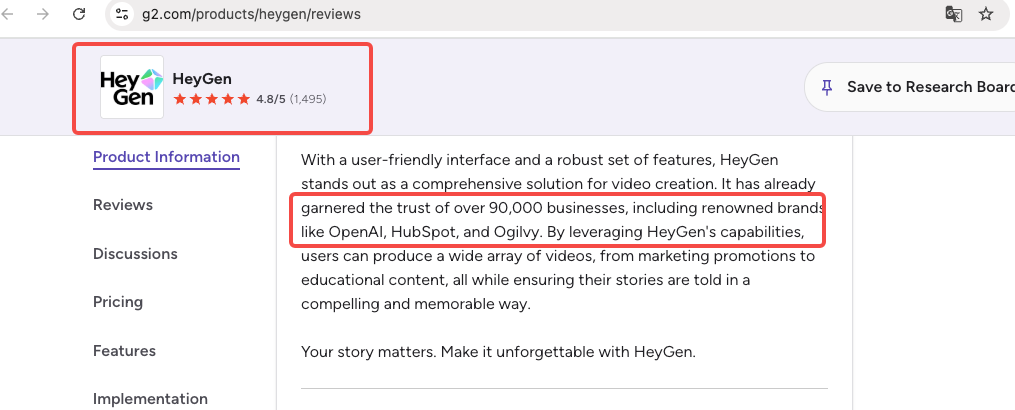
Plan | Price | What You Actually Get |
Free | $0 | 3 videos/month, watermarked, 720p |
Creator | $29/mo ($24 annual) | Unlimited videos, 1080p, no watermark, 200 premium credits |
Pro | $99/mo | Same + 4K, priority processing, 10× premium credits |
Business | $149/mo + $20/seat | Team workspace, 4K, up to 60-min videos |
Enterprise | Custom | No duration cap, dedicated support |
The part most people miss: "unlimited" on Creator refers to standard avatar videos. Features like Avatar IV and lip-synced translation eat into a separate premium credit pool — 200 per month on Creator, which translates to roughly 10 minutes of Avatar IV footage. For a deep breakdown of plan limits and add-on costs, the HeyGen Help Center pricing guide is the clearest source I found.
What We Tested
AI Avatars
Stock avatars are genuinely impressive. I ran three different ones across multiple scripts — lighting consistent, framing professional, nothing that reads as fake at normal viewing distance. At 1080p, the result holds up for product explainers, training content, and marketing clips.
Custom avatar setup is harder than it looks. You need to record a consent video, meet specific technical requirements (lighting angle, camera distance, background), then wait up to 24 hours for processing. The output quality is significantly better than stock, but the setup friction is real. Don't expect to have a working custom avatar in an afternoon.
Avatar IV — the motion system that animates realistic body movement — is the current standout feature. Independent reviewers consistently rank it above Synthesia and DeepBrain for natural motion. That said, a trained eye can still catch it in longer clips, especially when the script requires emotional range the avatar simply doesn't have.
Voice Cloning and Dubbing
Worth knowing: HeyGen's voice cloning runs on ElevenLabs under the hood. The quality is good for natural speech. It gets noticeably worse when you increase speaking pace — one of my test clips failed entirely at speed.
The video translation feature is where HeyGen genuinely pulls ahead. Lip-synced translation across 175+ languages, not just subtitle overlay. For creators localizing content across markets, this is a real differentiator. Dubbing (audio-only, no lip sync) is unlimited on all paid plans. Lip-synced translation pulls from your premium credit pool, so high-volume localization will cost you.
Per the HeyGen AI voice cloning documentation, best results come from clean, multi-minute recordings in a quiet environment. If your recording setup isn't solid, the clone will reflect that.
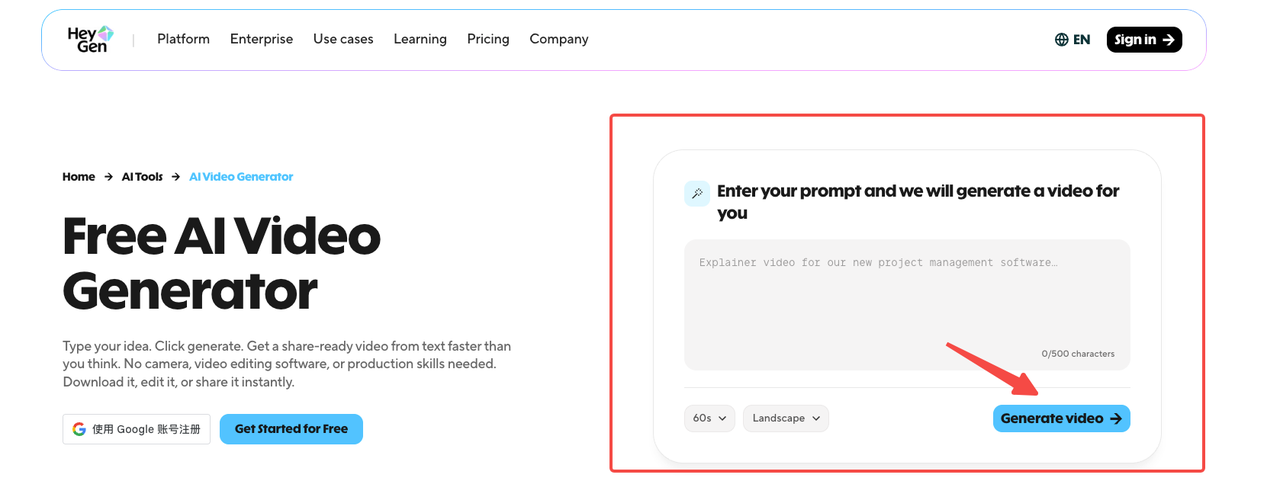
Video Templates
300+ templates across social formats. The vertical 9:16 templates for TikTok and Reels work fine technically — exports are clean HD, platform-ready. But the rhythm is fixed. You can't adjust cuts, control pacing, or drop in footage mid-sequence. For highly templated content where structure matters more than energy, it's fine. For trends-driven short-form where you need to hit specific beat drops or mirror a viral structure, you'll feel constrained fast.
Export Quality and Platform Fit
Creator plan: 1080p, no watermark, MP4. That's enough for TikTok, Reels, and YouTube Shorts. The short-form video platform specs for 2026 confirm these exports meet current platform requirements without re-encoding issues.
4K is locked behind Pro ($99/mo) and above. Rendering a 3-minute video consistently took 6–8 minutes in my tests. Not a dealbreaker, but it adds up when you're iterating.
Where HeyGen Works Well
Corporate training and onboarding. This is HeyGen's clearest home turf. Consistent framing, scalable production, no quality drift across contributors. A traditional presenter-led training video can run $10,000–$50,000 and take weeks. HeyGen delivers comparable structured content in under 30 minutes.
Multilingual content at scale. If you're publishing in multiple markets, the lip-synced translation feature has no real competitor at this price point. Synthesia locks equivalent translation to enterprise pricing. HeyGen includes it starting at Creator.
Product explainers and marketing ads. Clean, consistent spokesperson-style content. Fast iteration for A/B testing ad copy. Works well for awareness campaigns and product pages — less effective for anything requiring physical product demonstration.
Where HeyGen Falls Short
The credit logic is genuinely confusing. "Unlimited videos" is technically true but practically misleading. The advanced features that actually justify the subscription — Avatar IV, lip-synced translation — have hard monthly caps that are easy to blow through. 200 premium credits on Creator gives you about 10 minutes of Avatar IV content per month. If you're producing daily short-form, that's gone in two weeks.
Templates have fixed rhythm. You can't customize cuts or control pacing mid-video. For creators whose content relies on matching specific energy or trend formats, this is a real limitation.
Resolution is gated. 1080p is Creator's ceiling. If your channel or client work requires 4K, you're looking at $99/month minimum — a significant jump.
Short-form platform fit isn't perfect. HeyGen does output 9:16 vertical video, but it doesn't replicate the organic feel of creator-shot content. Trends-driven TikTok content, where authenticity and timing matter more than polish, is not where this tool shines.
Who Should Use HeyGen?
✅ Good Fit | ❌ Not a Good Fit |
Marketing teams with structured video pipelines | Solo creators posting 20+ short-form videos/week |
L&D teams producing training content at scale | Creators who need emotional range or storytelling pacing |
Businesses needing multilingual content | Anyone on a tight budget who needs high Avatar IV volume |
Faceless channel creators (explainers, how-tos) | UGC-style creators where authenticity is the product |
If you're running a high-volume short-form account — say 5–10 daily uploads on TikTok — HeyGen's credit system creates compounding friction. A creator-focused alternative comparison is worth reading before committing: the HeyGen alternatives breakdown covers where other tools pick up the gaps.
HeyGen vs. Alternatives — Quick Take
Synthesia is the enterprise choice: more locked-down, more reliable for corporate infrastructure, pricier for translation features.
D-ID is cheapest to enter, strong for API-driven workflows, weaker on avatar quality.
InVideo and CapCut are better for high-volume short-form where you don't need avatar-led presentation.
HeyGen wins on the combination: avatar quality + multilingual lip-sync + AI-generated video structure in one platform. It's not the cheapest per video at scale, but nothing else puts all three together at Creator pricing.
For a detailed feature-by-feature breakdown, I'll cover this in a dedicated HeyGen alternatives post.
FAQ
Is HeyGen free?
Yes, there's a permanent free tier — 3 videos per month, watermarked, 720p. It's enough to test avatar quality and basic workflow, but not enough for real content production. Think of it as a demo environment.
How many credits do I get per month?
On Creator ($29/month), you get 200 premium credits, which translates to roughly 10 minutes of Avatar IV video or about 40 minutes of lip-synced translation. Credits don't roll over. Standard avatar videos (non-Avatar IV) don't consume premium credits on paid plans.
Can I use HeyGen for TikTok or Reels?
Technically yes — HeyGen exports in 9:16 vertical format at 1080p, which meets current TikTok and Reels specifications. Practically, the fixed template rhythm and lack of pacing control make it a better fit for structured product content than for trend-driven short-form.
What happens when credits run out?
You can purchase additional premium credit packs at $15 per 300 credits. If you don't, Avatar IV generation and lip-synced translation are paused until your next billing cycle. Standard avatar videos continue without interruption.
Is HeyGen good for small creators?
Depends on what you're making. If your content is structured — explainers, tutorials, faceless product reviews — the Creator plan at $29/month is reasonable. If you're chasing daily TikTok trends or need high output volume with Avatar IV, the credit math doesn't work in your favor. Start with the free tier and run your actual workflow through it before committing.
Conclusion
HeyGen is a serious production tool — not a shortcut. The avatar quality is real, the multilingual translation has no equivalent at this price, and for structured content pipelines, it genuinely delivers. But it's not built for the creator who posts 10 videos a day and needs each one to feel spontaneous.
My current take: worth trying if your content is presenter-led, structured, and benefits from multilingual reach. Worth skipping — or at least stress-testing first — if your output volume is high and your workflow depends on Avatar IV or lip-synced translation. The credit system will surprise you faster than the marketing suggests.
Previous posts: