

Seedance 2.0 Generation Failed: Every Cause and How to Fix It
Quick Fix: Seedance 2.0 "generation failed" errors are caused by one of five things: a prompt that violates content policy, server-side timeout during peak hours, GPU memory overflow for complex scenes, API instability, or a video duration too long for your tier. Simplify your prompt, reduce duration to 5 seconds, and retry during off-peak hours to resolve most cases.
You wrote the prompt. You hit generate. And instead of a video, you got a failure.
"Generation failed" is one of the most frustrating Seedance 2.0 errors because it tells you almost nothing. No error code. No specific cause. Just a red state and a retry button that may or may not work.
The good news: generation failures are almost always caused by one of five specific, fixable things. This guide walks through each cause, how to identify which one is hitting you, and the exact fix for each.
If your video is stuck on processing instead of failing outright, that's a different issue — see what to do if Seedance 2.0 is stuck processing. For the full troubleshooting hub, check the Seedance 2.0 not working fix guide.
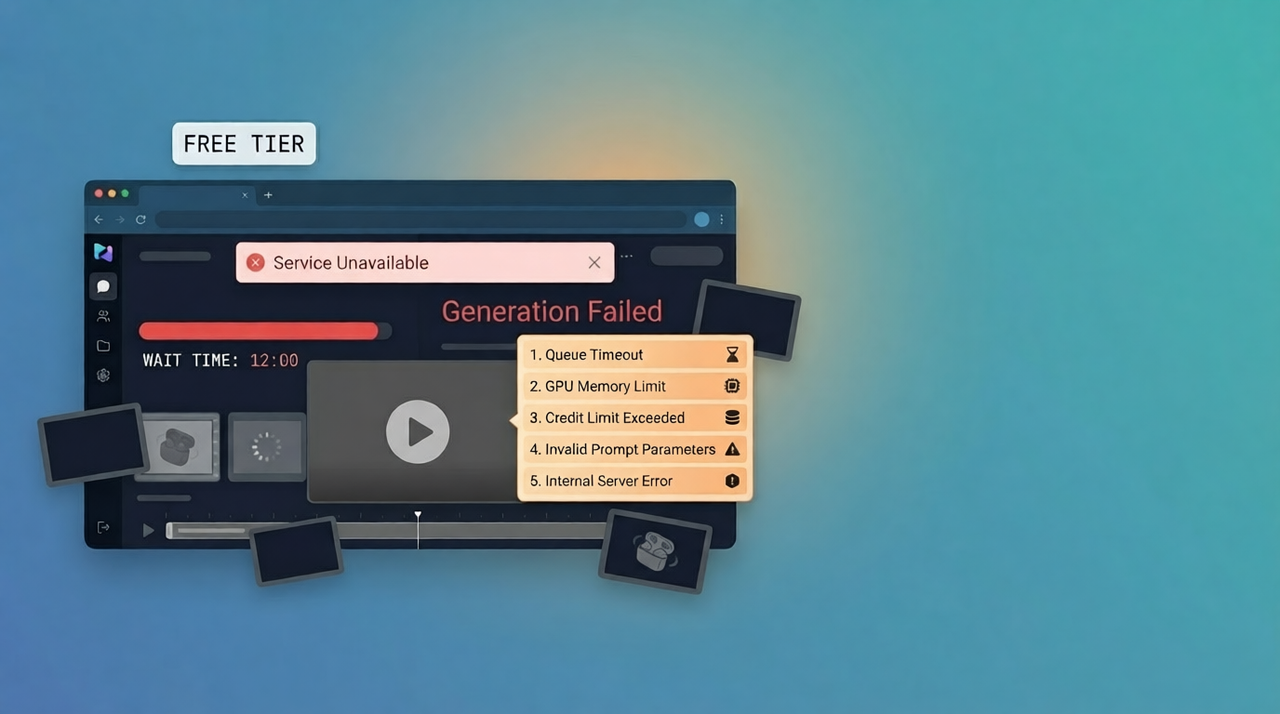
What "Generation Failed" Actually Means in Seedance 2.0
A generation failure means the server accepted your request, began processing it, and then stopped before producing output. The job entered the pipeline — it just didn't exit with a video.
This is different from a queue error (where the request never enters processing) or a timeout on your local connection. By the time you see "generation failed," Seedance 2.0's servers have already attempted to render your clip.
The Difference Between Generation Failed and Stuck Processing
State | What it means | What to do |
Generation failed | Server attempted, stopped with error | Diagnose cause, modify inputs, retry |
Stuck processing | Server is running but not completing | Wait, then force-refresh |
Too many users | Queue full, request not accepted | Retry later or switch platform |
Black/blank output | Generated but rendered nothing visible | Prompt or seed issue |
If your generation is spinning without completing, that's a stuck processing issue — not a generation failure. Fix paths are different.
What Happens on the Server Side When This Error Fires
When Seedance 2.0 receives a generation request, it runs through multiple stages: prompt parsing, safety filter evaluation, GPU allocation, diffusion rendering, and output packaging. A "generation failed" error can fire at any of these stages — which is why the error is generic. The platform doesn't expose which stage failed.
Your job is to systematically rule out each failure point.
Cause 1 — Prompt Violated Content Policy (Most Common)
This is the most frequent cause of generation failures. Seedance 2.0 runs prompt evaluation through a content safety layer before committing GPU resources to generation. If the prompt trips a filter, the job fails — often silently.
What Seedance's Safety Filters Flag
Seedance 2.0's filters are more aggressive than many users expect. Common triggers include:
Celebrity and public figure names — even in clearly non-harmful contexts
Brand names and trademarked characters — "a person dressed as Spider-Man" will fail; "a person in a red and blue superhero suit" typically won't
Violence descriptors — "fight," "attack," "explosion" in certain contexts
Explicit or suggestive language — even mild phrasing in some platform tiers
Political figures or sensitive events — especially on Doubao, which applies stricter Chinese regulatory filters
Medical or self-harm adjacent language — even clinical descriptions
How to Identify If This Is Your Cause
If the failure happens instantly — within 5–10 seconds of submitting — it's almost certainly a content filter rejection. Actual render failures from GPU or timeout issues take longer because the server has to attempt rendering before failing.
Instant fail = content policy. Delayed fail = infrastructure or complexity.
Fix: Prompt Rewriting Guide
Remove Brand Names and Celebrity References
Replace specific names with generic descriptions:
❌ Fails | ✅ Works |
"Elon Musk walking into a boardroom" | "A tall tech executive in a dark suit walking into a modern boardroom" |
"Spider-Man swinging through New York" | "A figure in a red suit swinging between skyscrapers" |
"Nike shoes on a running track" | "White athletic shoes on a red rubber running track" |
Avoid Violence and Explicit Language
Rephrase action language to be cinematically descriptive rather than event-descriptive:
"Two people fighting" → "Two people in a tense physical confrontation, dramatic lighting"
"An explosion in a city" → "A burst of orange light and smoke rising behind a skyline"
Rephrase Copyrighted Characters Generically
Any character with a recognizable design tied to IP should be described by visual attributes only — colors, costume elements, setting — never by name or franchise.
For prompts that pass filters reliably, studying Seedance 2.0 reference video motion techniques gives you a framework for describing motion and visual elements that generate consistently.
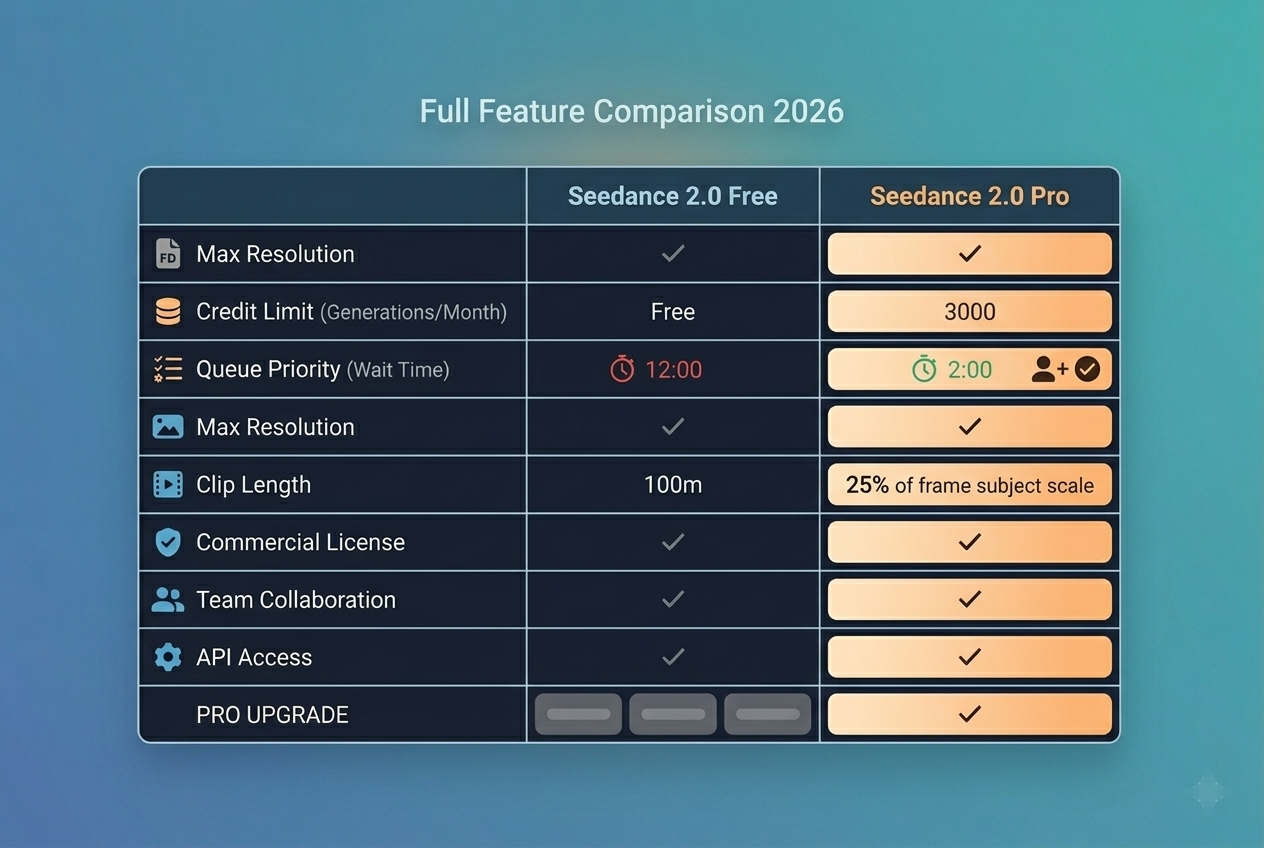
Cause 2 — Server-Side Timeout (Peak Hour Overload)
When Seedance 2.0 servers are under heavy load, generation jobs that enter the queue may time out before completing — returning a failure rather than a video. This is a server-side issue, not a problem with your prompt.
How to Tell It's a Server Timeout
The failure happens after 30–90 seconds (not instantly)
The same prompt worked previously without changes
Multiple users are reporting issues simultaneously
You're generating during known peak windows
Before assuming a prompt issue, check if Seedance 2.0 is down or experiencing elevated error rates. During demand spikes, generation failures can be entirely platform-side with no fix on your end.
Fix: Timing Strategy
Best Off-Peak Hours by Timezone
Region | Peak (avoid) | Off-peak (best) |
US East | 9am–12pm, 7pm–11pm ET | 2am–7am ET |
US West | 6am–9am, 4pm–8pm PT | 11pm–4am PT |
Europe | 9am–1pm CET | 2am–7am CET |
Asia | 8pm–11pm CST | 4am–9am CST |
Off-peak generation success rates are significantly higher. If your workflow is time-flexible, scheduling generation runs during these windows eliminates most timeout failures.
How Long to Wait Before Retry
After a timeout failure: wait 3–5 minutes before retrying
If second attempt fails: wait 15–20 minutes
If third attempt fails: switch platforms or try the next day
Three consecutive failures on the same prompt = stop debugging and switch tools.
When to Switch Platforms
Server-side timeouts during peak hours are a known limitation of Seedance 2.0's shared consumer infrastructure. The too many users and server overload issue is structural — it won't be fixed by retrying indefinitely.
Cause 3 — Prompt Too Long or Too Complex
Seedance 2.0 processes prompts through a text encoder with token limits. Prompts that are excessively long, grammatically fragmented, or contain conflicting instructions can cause the generation pipeline to fail mid-render.
Seedance 2.0 Token Limits
Seedance 2.0 performs best with prompts under 200 words. Beyond that threshold, the text encoder may truncate or misweight elements — leading to generation failures or badly degraded output.
Complex multi-scene descriptions are particularly problematic. Seedance 2.0 generates single continuous clips, not multi-shot sequences. Describing multiple scenes in one prompt creates irreconcilable instructions. For structured multi-scene work, see Seedance 2.0 multi-scene storyboard workflows.
Fix: Prompt Simplification Method
Cut Prompt by 30–50%
Take your failed prompt. Remove:
Redundant adjectives ("beautiful, stunning, gorgeous, cinematic")
Conflicting style directions ("photorealistic noir anime illustration")
Scene-transition language ("then cuts to," "meanwhile")
Overly specific technical camera specs
Keep: one subject, one action, one environment, one mood.
One Subject, One Action, One Scene
❌ Overloaded (fails): "A young woman in a red dress dancing in the rain on a rooftop in Tokyo while cherry blossoms fall around her and city lights reflect off wet pavement as the camera slowly zooms in and then pulls back dramatically"
✅ Clean (generates): "A young woman in a red dress dancing on a rain-soaked Tokyo rooftop at night, cherry blossoms falling, slow cinematic zoom"
Use a Reference Image Instead of a Long Description
If your scene is visually complex, upload a reference image and use a shorter prompt to direct the motion — rather than trying to describe every visual element in text. The Seedance 2.0 image-to-video workflow covers this approach in detail.
Cause 4 — Video Duration Too Long for Your Tier
Seedance 2.0 has duration limits that vary by platform and subscription tier. Requesting a clip length that exceeds your tier's limit causes a generation failure — sometimes without a clear error message about why.
Duration Limits by Platform and Tier
Platform | Free Tier | Pro Tier |
Dreamina | Up to 5 sec | Up to 10 sec |
Doubao | Up to 5 sec | Up to 10 sec |
Up to 5 sec | Up to 15 sec | |
NemoVideo | Managed | Managed |
Fix: Reduce to 5-Second Clips
If you're on a free tier and requesting anything over 5 seconds, reduce to 5 seconds as your first diagnostic step. This single change resolves a significant percentage of generation failures for new users who don't realize the duration ceiling exists.
For short video workflows where you need longer clips, the standard approach is to generate multiple 5-second segments and assemble them in post — rather than trying to generate longer clips in a single pass.
Cause 5 — GPU Memory Overflow (Complex Scenes)
Certain scene types require significantly more GPU memory to render than others. When a generation job exceeds available GPU allocation, it fails with a generic error rather than a memory-specific message.
What Scene Types Trigger This
High GPU load scenes include:
Highly detailed crowds — many distinct human faces simultaneously
Complex particle effects — heavy rain, fire, snow across the full frame
4K resolution on free tier — some platforms attempt this and fail
Rapid motion across the full frame — camera movement combined with busy environments
Very dark or very bright scenes — extreme contrast processing is compute-intensive
Fix: Scene Simplification
Reduce visual complexity before retrying:
Switch from wide establishing shots to tighter medium shots
Replace crowd scenes with 1–3 subjects
Reduce or remove particle effect language from the prompt
Request 1080p instead of 4K if you have a resolution option
Simplify background from "busy city street" to "an empty street" or "a minimal environment"
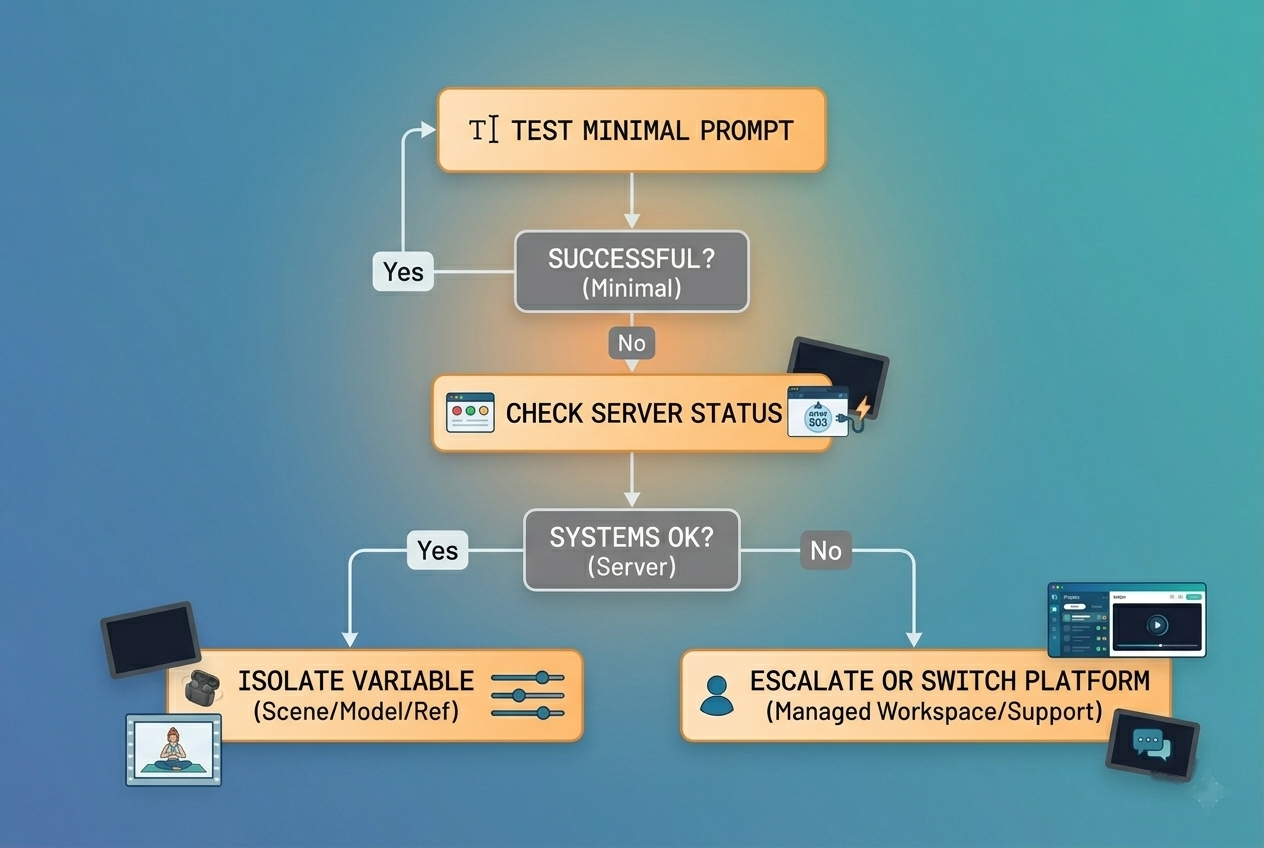
Systematic Debugging Workflow
Don't guess. Work through this process in order.
Step 1 — Test With a Minimal Prompt
Strip your prompt down to the absolute minimum: one subject, one action, five words if possible. Example: "A person walking through a forest."
If this generates successfully, your original prompt is the problem. Reintroduce elements one at a time to identify the specific trigger.
If even the minimal prompt fails, the issue is server-side or account-related — not your prompt.
Step 2 — Check Server Status
Before investing time in prompt debugging, confirm the platform isn't experiencing downtime or elevated error rates. Check if Seedance 2.0 is down via third-party status monitors or community reports.
If the platform is having issues, no amount of prompt editing will fix it. Wait it out or switch tools.
Step 3 — Isolate the Variable Causing Failure
Once you've confirmed it's not a server issue, test systematically:
Shorten the prompt to under 100 words
Remove any proper nouns, brand names, or celebrity references
Reduce requested duration to 5 seconds
Simplify scene complexity (fewer subjects, cleaner background)
Regenerate after each change — don't change multiple variables at once
Step 4 — Escalate or Switch Tools
If you've gone through Steps 1–3 and still hitting failures, you've exhausted most self-service fixes. Options:
Submit a support ticket with your failed prompt and session details
Try a different Seedance 2.0 access point (Dreamina vs Doubao vs Rita.ai behave differently)
Switch to a managed platform where generation infrastructure is abstracted from you
When to Stop Debugging and Switch Tools
The three-failure rule: If the same prompt fails three times after applying fixes from this guide, stop debugging that prompt on that platform.
Some failures are platform-specific — a prompt that fails on Dreamina may generate cleanly on Rita.ai, or vice versa. Infrastructure, regional content filter configurations, and GPU allocation all vary.
Platform Alternatives When Seedance 2.0 Is Failing
The most reliable alternative for production video generation right now is NemoVideo — an AI video agent that provides managed Seedance 2.0 access alongside autonomous scripting, hook optimization, and multi-platform adaptation.
The core difference: NemoVideo doesn't expose you to the raw generation failure states that make consumer Seedance access frustrating. You work at the project level — describe what you need, let the platform handle the generation pipeline.
Features that matter when you're coming off a generation-failure debugging session:
Inspiration Center — eliminates the blank-prompt problem by generating data-backed hooks and scripts before you generate a single frame
Smart Pick — intelligently assembles rough cuts from your footage without manual frame-by-frame decisions
Viral+ Studio — reverse-engineers high-performing content patterns so your generated clips are structured for retention from the start
Smart Caption — applies platform-native subtitle styles automatically after generation
→ Start free on NemoVideo — skip the generation failures
FAQ
Q: Why does Seedance 2.0 fail silently without a real error message?
A: ByteDance's consumer platforms don't expose internal error codes to end users. The "generation failed" message is a catch-all for multiple distinct failure modes — content filter rejection, GPU memory overflow, server timeout, and rendering errors all surface the same way. This is a deliberate UX decision to keep the interface simple, but it makes debugging harder. Using the systematic isolation method above is the only reliable way to identify the actual cause.
Q: If my prompt worked before, why is it failing now?
A: Three likely causes: (1) ByteDance updated their content safety filters and something in your prompt now triggers a flag that it didn't previously, (2) server infrastructure is under higher load than when you last used it, or (3) your account tier has changed. Content filters are updated regularly — a prompt that worked in April may fail in July due to filter changes, not anything you did wrong. Rewrite the prompt using the generic description approach and test again.
Q: Does regenerating the same prompt ever work?
A: Yes — if the failure is server-side. Timeout failures caused by peak-hour overload will sometimes resolve on retry when server capacity frees up. However, if the failure is prompt-related (content filter or complexity), retrying the exact same prompt will produce the exact same failure every time. Test with a minimal prompt first to determine whether you're dealing with a server issue or a prompt issue before retrying.
Q: What prompts always cause generation failed?
A: High-certainty failure triggers include: celebrity names, trademarked character names, explicit content descriptors, detailed violence language, political figure references, and prompts over ~300 words. On Doubao specifically, content filtered by Chinese regulatory requirements is stricter than on global platforms — some topics that generate on Dreamina will fail on Doubao. The safest approach is using purely visual, descriptive language with no proper nouns. For reference, the Seedance 2.0 complete guide covers prompt best practices in depth.
Conclusion: Seedance 2.0 Generation Failed — Fixed
Seedance 2.0 generation failures are fixable in the majority of cases — once you know which of the five causes you're dealing with.
To recap:
Content filter violation → rewrite prompt with generic descriptions, remove proper nouns
Server-side timeout → check status, retry off-peak, or switch platforms
Prompt too long or complex → cut to under 100 words, one subject/action/scene
Duration too long for your tier → reduce to 5 seconds
GPU memory overflow → simplify scene, fewer subjects, less particle complexity
If you've worked through all five and still hitting failures, the platform's consumer infrastructure is the limiting factor — not your content.
NemoVideo gives you managed Seedance 2.0 access without the generation failure debugging loop. Start free, bring your project, and generate without babysitting queue states and error messages.
→ Access Seedance 2.0 on NemoVideo — Free to Start