

HeyGen vs Synthesia: Which One Is Better?
Hi, I’m Dora!
Last month I produced the same video twice — once in HeyGen, once in Synthesia. Same script, same avatar style brief, same target language set. I wanted to stop guessing and just see what happened side by side.
The results weren't what I expected. One felt faster and more expressive. The other felt tighter, more controlled — like it was built by someone who'd sat through a lot of enterprise compliance meetings. Neither was wrong. They just weren't built for the same person.
That's the comparison nobody's actually making clearly. So here it is.
HeyGen vs Synthesia at a Glance
Both platforms use AI avatars to turn scripts into talking-head videos. No camera. No actor. No studio. That's where the obvious overlap ends.
Core Positioning Differences
HeyGen launched in 2020 with a focus on individual creators, social media, and marketing teams. Its pitch is speed, flexibility, and avatar realism. Synthesia has been in the space since 2017 and has consistently built toward enterprise: compliance, collaboration, and structured content at scale.
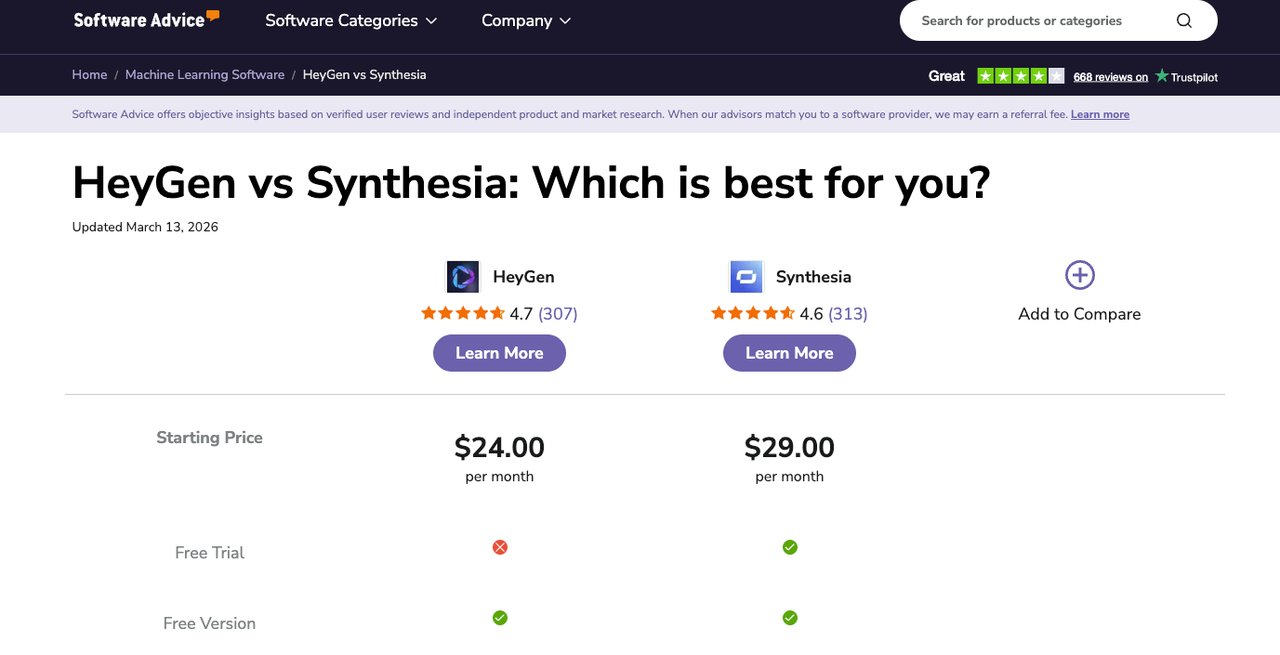
According to a side-by-side comparison published on Software Advice, HeyGen scores 4.7/5 from 307 reviews while Synthesia comes in at 4.6/5 from 313 reviews — almost identical on paper, but the user comments tell a very different story depending on what you're actually building.
The short version: HeyGen is built for breadth and creative range. Synthesia is built for enterprise trust and structured output.
Avatar Quality and Output Style
This is where most people make their decision — and where the two tools diverge most clearly.
Realism, Motion, Lip Sync
HeyGen's Avatar IV technology is the current showpiece. It brings motion capture-based animations, natural eye movement, and fluid hand gestures into stock avatar videos. The result feels closer to real footage than anything from a year ago. For UGC-style content, sales prospecting videos, or anything where authenticity matters, HeyGen has an edge.
Synthesia's avatars are polished and professional — but they're calibrated differently. They're designed to feel authoritative and consistent across dozens of videos, not necessarily to feel spontaneous. For corporate training or HR communications, that's actually what you want. You don't need your compliance training avatar to look like it's having a conversation. You need it to be clear, trustworthy, and on-brand.
Lip sync is genuinely better on HeyGen for most major languages. Synthesia supports 140+ languages; HeyGen supports 175+ with automatic lip sync across all of them. If you're running multilingual campaigns, that gap is worth paying attention to.
Workflow and Ease of Use
Templates, Editing, Localization
HeyGen's interface is optimized for getting from script to video quickly. The drag-and-drop editor works, the template library is decent, and the localization feature — where you generate in one language and automatically produce 30+ translated versions with lip sync — is genuinely impressive for global marketing teams.
Synthesia leans into a timeline-based editing experience. It's more structured, which means more control over pacing, scenes, and presentation. For anyone building a multi-slide training module or a product walkthrough, that structure is valuable. It integrates with tools like Microsoft PowerPoint and Articulate 360, which tells you a lot about who it's built for.
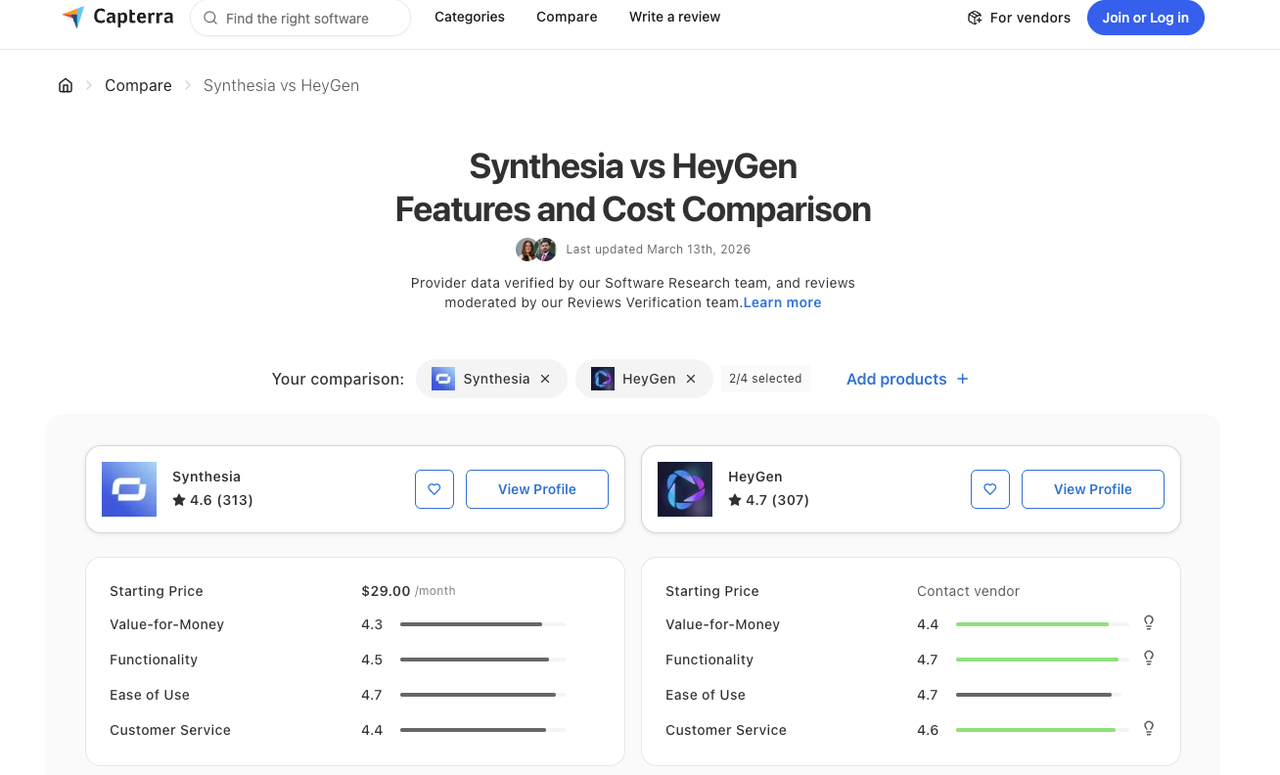
Capterra's verified review database shows Synthesia scoring higher on Ease of Use (4.7) while HeyGen edges ahead on Functionality (4.7 vs 4.5). Both have real user gripes — HeyGen users mention lip sync errors on unusual vocabulary; Synthesia users flag the video generation caps on lower-tier plans.
Pricing and Buying Decision
Plan Structure and Likely Fit
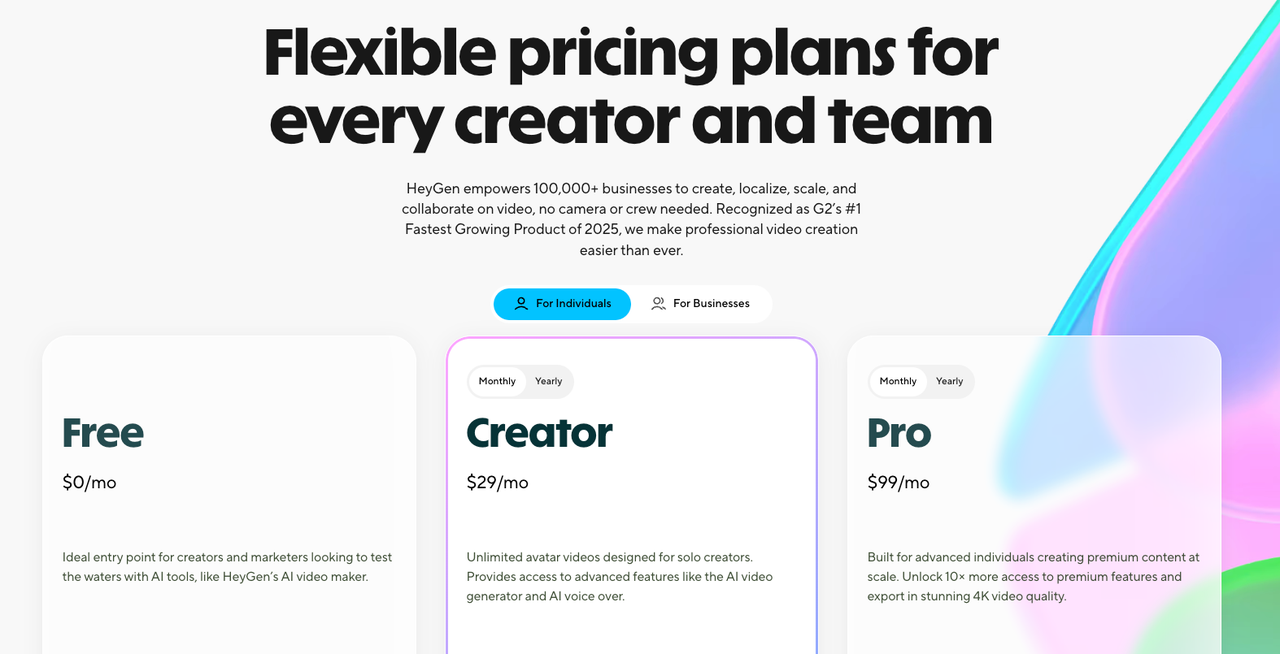
According to HeyGen's official pricing page, paid plans start at $29/month (or $24/month on annual billing) for the Creator tier, which includes unlimited video creation at 1080p with no watermark. The Business plan runs $149/month minimum (2 seats at $39/seat on monthly billing).
Synthesia starts at $29/month on its Starter plan but caps video generation at 10 minutes per month — a significant limitation if you're producing regularly. Enterprise pricing is custom and requires a sales conversation.
The key pricing trade-off: HeyGen gives you unlimited video creation on its entry plan. Synthesia's lower tiers are more restrictive but bundle enterprise features earlier.
Which Tool Fits Which Team
Use Case | Better Fit |
Solo creators, YouTubers, social content | HeyGen |
Corporate training, L&D, HR communications | Synthesia |
Multilingual marketing campaigns | HeyGen (175+ languages with lip sync) |
Enterprise compliance (SOC 2, GDPR, ISO 42001) | Synthesia |
Sales prospecting, personalized outreach | HeyGen |
Large team collaboration and approval workflows | Synthesia |
Trade-Offs That Matter After the Trial
Speed vs Control
HeyGen is faster than first output. You can go from script to shareable video in under 10 minutes on a straightforward project. The tradeoff is less control over fine timing and scene transitions.
Synthesia takes longer to set up properly — but the output is more controllable. If you're building a 15-slide training module that needs to match brand standards across six markets, that extra setup time pays for itself.
Polish vs Workflow Flexibility
Here's the thing that catches people off guard: Synthesia's polish is baked into its constraints. The structured editor produces consistent, professional outputs — but you can't stray too far from its template logic. HeyGen gives you more creative rope, which means more decisions to make (and more ways to make a messy video if you're not careful).
For a detailed breakdown of how both platforms handle enterprise-grade workflows, the verdict is the same: HeyGen wins on flexibility; Synthesia wins on institutional trust.
Final Verdict Based on Use Case
I've watched people pick the wrong tool here — usually because they optimized for avatar realism on a platform that will be used primarily for onboarding videos, or chose the enterprise plan when they're actually a team of two.
Pick HeyGen if:
You're a solo creator or small marketing team
You need multilingual output at scale without paying enterprise prices
Avatar realism and voice cloning quality are priorities
You want unlimited video creation from the entry plan
Pick Synthesia if:
You're in L&D, HR, or corporate communications
You need SOC 2 Type II compliance and advanced security
Your team needs collaborative review and approval workflows
Template consistency across a large video library matters more than expressive realism
Neither tool is the obvious winner. But one of them is the right tool for your specific situation — and that's probably clear to you now.
FAQ
Q1: Is HeyGen or Synthesia better for beginners?
HeyGen has a slightly shorter learning curve for solo creators. You can get from signup to a finished video faster, and the interface is more forgiving for non-technical users. Synthesia's workflow is more structured, which can feel rigid at first but becomes an advantage once you're building multi-scene content consistently.
Q2: Can I create a custom avatar on both platforms?
Yes, but the cost model differs. HeyGen charges a one-time fee for custom avatar creation on paid plans. Synthesia includes custom avatar creation only on its Enterprise tier, which requires a sales conversation. If custom avatars are important to you early, HeyGen is more accessible.
Q3: Which platform is better for multilingual video production?
HeyGen supports 175+ languages with automatic lip sync, compared to Synthesia's 140+. HeyGen also includes translation minutes in its entry-level paid plan, whereas Synthesia's 1-click translation is locked behind Enterprise pricing. For global marketing teams, that's a meaningful difference.
Q4: Does Synthesia have better security and compliance than HeyGen?
For regulated industries, yes. Synthesia is SOC 2 Type II, GDPR, and ISO 42001 certified, and it's described as trusted by over 90% of Fortune 100 companies. HeyGen has content moderation and consent requirements for custom avatars, but its enterprise compliance stack is less developed.
Q5: Can I use these videos commercially on paid plans?
Yes. Both HeyGen and Synthesia allow commercial use on their paid plans, as long as your inputs comply with their content guidelines — no copyright violations, no prohibited content categories. Always check the current terms of service for the specific plan you're on, as policies can update. For the latest details, HeyGen's official help center is the most reliable source.
Conclusion
Here's the bottom line after testing both: this isn't a "which tool is better" question. It's a "which tool is built for you" question.
HeyGen and Synthesia have been quietly diverging for years — one leaning harder into creative flexibility and realistic avatars, the other doubling down on enterprise infrastructure. In 2026, that gap is wide enough that picking the wrong one will genuinely slow you down.
If you're still on the fence, ask yourself one thing: are you making videos to move fast, or to scale safely? Your answer is probably your tool.
Previous posts: