

How to Access Vidu Q3 in 2026 (Web App + Credits + Common Login Fixes)
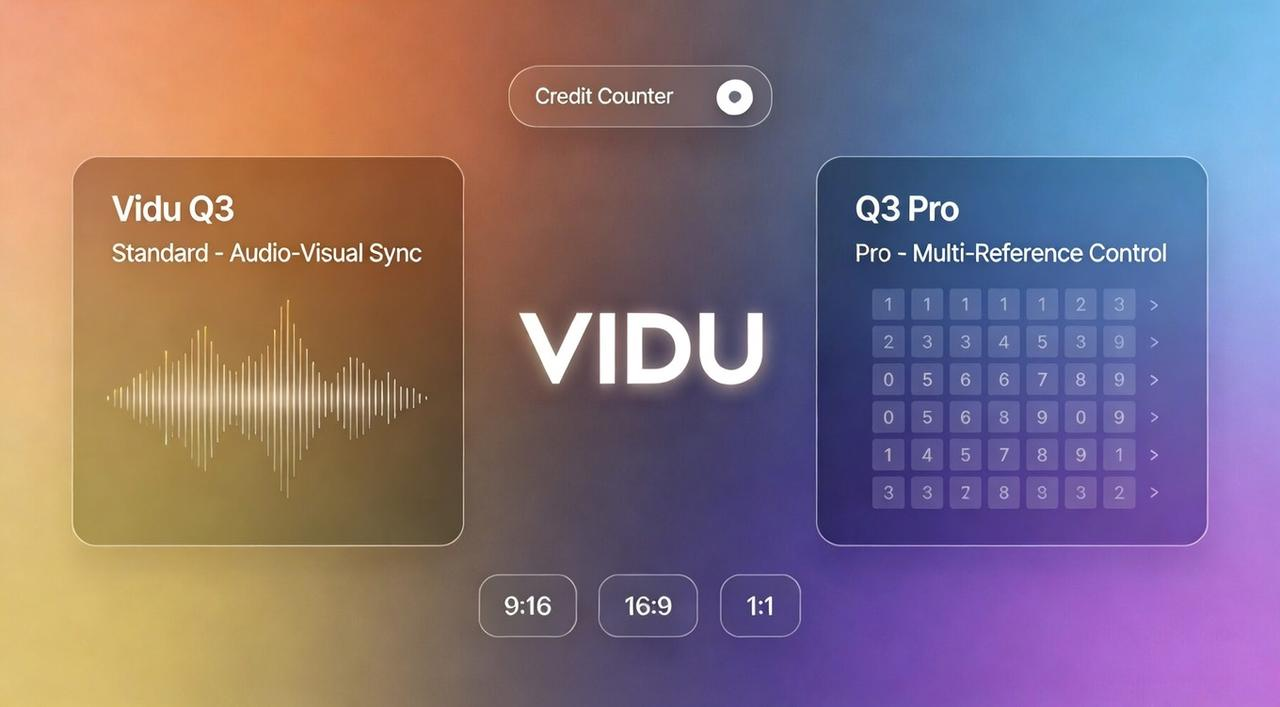
You've heard the buzz about Vidu Q3's revolutionary 16-second AI video generation with native audio sync, but when you try to sign up, you hit a wall: unclear credit systems, confusing platform options, or worse—a cryptic "not available in your region" message.
This comprehensive guide eliminates that confusion. You'll learn exactly how to access Vidu Q3 and Q3 Pro in 2026, whether through the web app at vidu.com or third-party platforms. We'll decode the credit system, show you a bulletproof first prompt, and solve the most common login and payment problems. By the end, you'll be generating production-ready videos in minutes—not hours.
What You Need to Access Vidu Q3 (Account, Plan, Region Basics)
Account Signup and Login Requirements
Access Vidu Q3 through two main paths:
Direct Access: Sign up at vidu.com using email, Google, or other OAuth options. No credit card required—you'll get free credits immediately after registration.
Third-Party Platforms: Vidu Q3 is also available on platforms like Media.io, Pollo AI, and Dzine AI. These offer faster onboarding and sometimes better trial deals (like Dzine's 7-day unlimited access), but vidu.com gives you direct API access for long-term use.
How Plans and Credits Work
Vidu's credit system is straightforward: longer videos and advanced features cost more credits.
Here's what your credits buy:
A 4-second video costs ~4-10 credits
A 16-second Q3 Pro video with audio costs ~40+ credits
Free vs. Paid:
Free users start with 80 credits/month—enough to experiment, but not enough for production scale
Paid plans ($10-$40+/month) unlock 300-800+ credits, giving you room to test and refine
Use Off-Peak Mode for unlimited free generation when you're not in a rush. It's slower, but perfect for building your prompt library without spending credits.
For full details, visit the official Vidu Pricing Page.
Region, Network, and Availability Basics
Vidu Q3 serves in 200+ countries, but regional friction can still occur:
Payment Restrictions: Vidu uses Stripe, which isn't available everywhere. If you hit payment blocks, try third-party platforms that may support local payment methods.
Network Stability:A stable internet connection (5+ Mbps) is recommended. If you encounter a "not available" error, ensure your IP aligns with Stripe’s globally supported regions. If using a VPN, select a major market like the US, UK, or Singapore.
Get Your First Vidu Q3 Generation (Fast Path)
Setting up your account is just the pre-game; the real magic happens when you hit that "Generate" button. Vidu Q3 is a multimodal powerhouse, meaning it doesn't just make pictures move—it generates synchronized audio (dialogue, sound effects, and background music) and handles camera movements directly from your text.
Where to Select Q3 / Q3 Pro
Once you're logged into the Vidu web app (or your chosen third-party platform), you'll find the model selection menu near the prompt box.
Vidu Q3 (Standard)
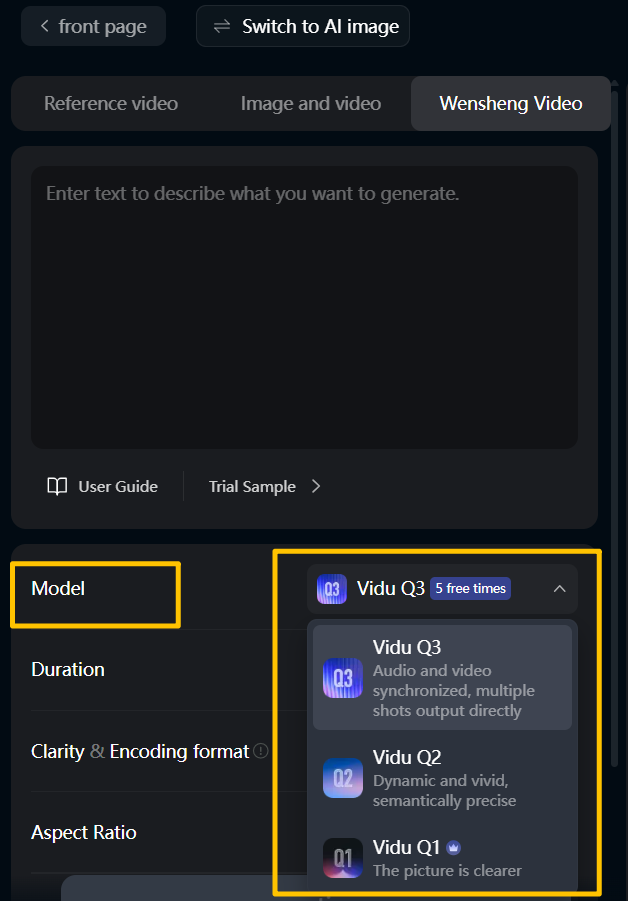
This is your versatile all-rounder. It's optimized for anime styles, high-energy action, and native audio support. If you want a complete scene with sound and stable visuals in one generation, start here.
Vidu Q3 Pro
Built for professional storytelling, Q3 Pro supports multi-reference control—essential when you need to maintain character consistency across different shots. It handles complex physics, lighting, and camera movements better than the standard version, making it the choice for "hero" clips or client-facing work.
The Credit Cost Reality
Generations aren't equal. A standard Q3 clip typically costs 15-20 credits, while a high-definition Q3 Pro generation can run 40-50 credits. If you're on a free plan with 80 credits per month, use standard Q3 for testing and exploration. Save your Pro credits for final renders or when consistency really matters.
Want to save credits? Generate once in Vidu, refine everything later in NemoVideo→
A First Prompt That Rarely Fails
AI video models can be finicky. Vague prompts produce "AI soup"—distorted faces, random movements, and incoherent camera work. To nail it on your first try, use the Subject + Action + Environment + Audio + Camera formula.
Try this "Golden Prompt" for a 2026 Cinematic Vibe:
"A young woman in a cozy coffee shop, warm morning sunlight streaming through large windows. She takes a sip of coffee and smiles gently at the camera. Soft jazz piano music plays in the background. Camera: smooth push-in from medium shot to close-up on her face."
Why This Works:
Camera Control: "Smooth push-in from medium shot to close-up" tells Q3 exactly how to frame and move
Audio Cue: "Soft jazz piano music" triggers Q3's native audio generation, creating atmosphere without post-production
Lighting Specifics: "Warm morning sunlight streaming through windows" gives the AI clear rendering instructions
Simple Action: One subject, one recognizable gesture—keeps complexity low and success rate high
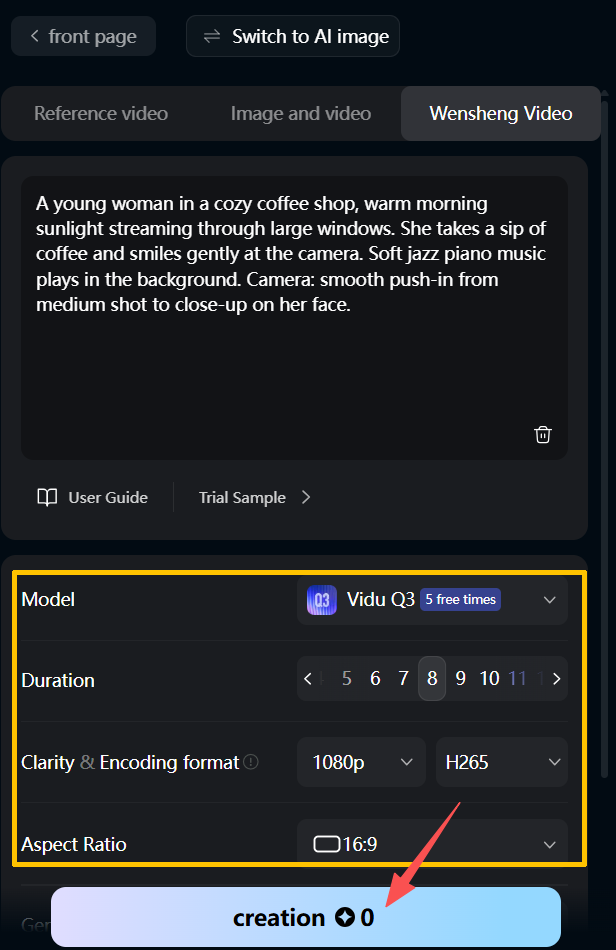
Generation Settings to Confirm:
Model: Vidu Q3 selected (you'll see "5 free times" if you're on a trial)
Duration: Q3 recommends 8 seconds
Clarity & Encoding: 1080p resolution, H265 format (Q3's native output quality)
Aspect Ratio: Select your desired video ratio
Once all settings are confirmed, click "creation" at the bottom. Processing takes 30-90 seconds depending on server load.
I tested this exact coffee shop prompt on Vidu Q3, and you can see the result below—the camera push-in feels intentional, the lighting captures that morning warmth, and the background jazz syncs naturally with the visual mood.
👉 One clean Vidu render + all iterations in NemoVideo = fewer wasted credits.
Common Access Issues & Fixes
Region, Network, and Verification Problems
"Service Not Available in Your Region"
Vidu uses Stripe for payment processing, which isn't available everywhere. If you hit this block, try third-party platforms like Media.io or Pollo AI—they use different payment gateways with broader regional coverage.
VPN and Payment Blocks
Payment processors often flag VPN traffic as suspicious. If your payment fails, temporarily disable your VPN during checkout, then re-enable it after. Also verify your card supports international transactions by contacting your bank.
Quick Fix Checklist:
✅ Ensure billing address matches card details exactly
✅ Clear browser cache and retry
✅ Try a different browser or payment method
✅ Maintain stable internet (5+ Mbps recommended)
“Out of Credits” or Plan Mismatch Issues
Quick Vidu Troubleshooting
Check Your Balance: Verify your exact credit count at vidu.com/my-subscription.
Mind the Model Cost: A 16-second Q3 Pro generation consumes significantly more (~40-50 credits) than a standard 4-second test (~4-10 credits).
The "Plan Required" Error: Features like extended durations or character-consistent Pro modes often require an active paid subscription.
Stretch Your Credits with Post-Production
Every Vidu generation costs credits, so many teams use NemoVideo as their post-production layer to avoid unnecessary regenerations.
Instead of burning credits on trial-and-error renders, import your Vidu clips into NemoVideo's editing pipeline:
Refine without regenerating – Use Talk-to-Edit to trim awkward pacing or adjust timing on clips that are "90% perfect"
Extract the best moments – SmartPick automatically identifies the strongest frames from your raw Vidu generations
Handle the finishing work – Add captions, resize for different platforms, and optimize hooks without touching your Vidu credit balance
🎯 Small timing tweaks? Captions? Hooks? Do it post-gen in NemoVideo.
When to Switch to the API (Batch Generation & Automation)
When API Access Makes More Sense
The Vidu web app works well for individual videos, but once you need to generate 10+ videos per day or integrate video creation into existing workflows, the API becomes essential.
Clear API Triggers:
E-commerce at scale: Generating product videos for 50+ SKUs weekly
Ad testing campaigns: Creating 20+ creative variants per product launch
Automated social content: Publishing daily video series with templated formats
Custom integrations: Embedding video generation into your CMS or marketing automation platform
Why Teams Choose NemoVideo for Batch Generation:
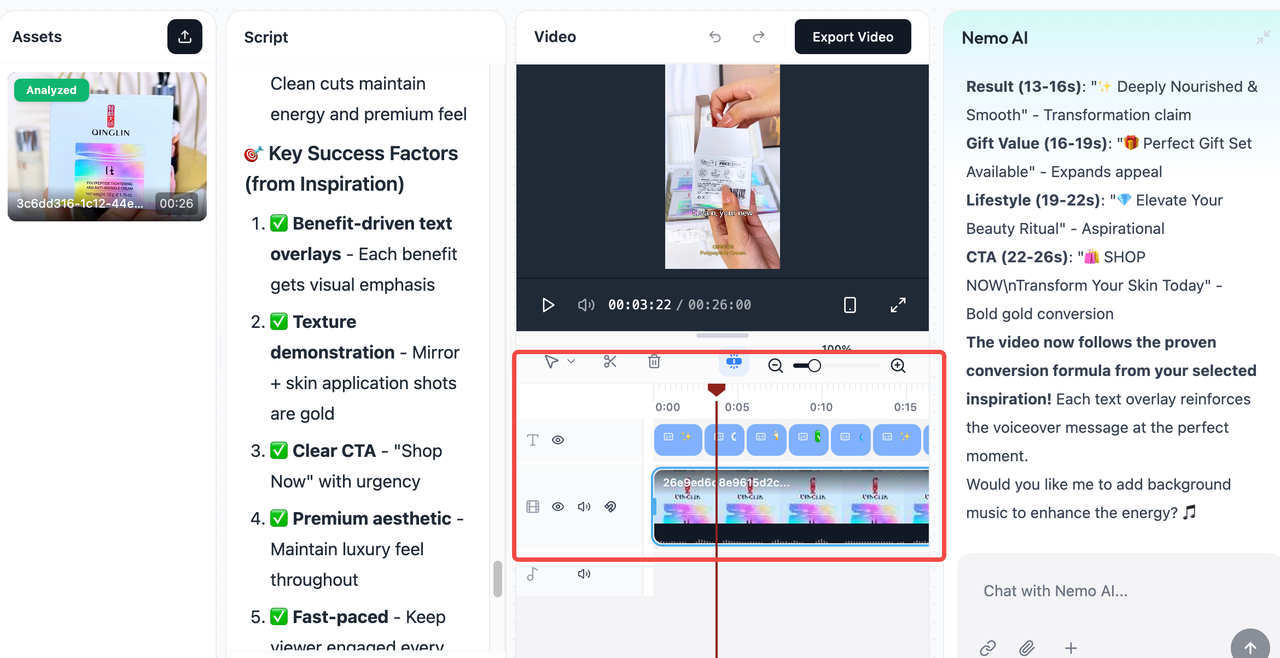
For teams facing these high-volume scenarios, building custom API integrations can be time-consuming and require developer resources. NemoVideo offers a faster alternative designed specifically for marketers and operations teams:
No coding required – Conversational interface replaces technical API calls
Spreadsheet-driven workflow – Import your SKU data, map fields to video templates
Instant batch variants – Swap hooks, features, and CTAs directly from your data sheets
Built-in creative intelligence – Nemo's Inspiration Center suggests viral hooks based on trending content; Smart Rough Cuts auto-generate first drafts for immediate A/B testing
Minimal learning curve – Marketing teams can operate independently without waiting on dev cycles
Key Differences Between Web and API Workflows
The Web and API worlds offer two very different experiences for the professional editor:
Manual vs. Machine: The Web App is visual and built for "Talk-to-Edit" exploration, where you can manually tweak every frame. The API is "headless," meaning it runs in the background to churn out content based on code.
Subscription vs. Pay-As-You-Go: While the Web App usually relies on a monthly subscription, many API platforms (like Fal.ai) offer a pay-per-generation model, which is often more cost-effective for massive, one-time bursts of content.
📈 Scale your story, not your stress. Let NemoVideo automate the resizing and captioning while you focus on the viral ideas.
Your Next Step: Production at Scale
Vidu Q3 creates stunning individual videos. But when you need dozens of variants for testing, catalog-scale SKU videos, or daily content series, you need a system—not just a tool.
NemoVideo turns your winning concepts into production pipelines. Spreadsheet-driven batching, built-in A/B testing, and conversational editing mean your team can scale independently without developer complexity, no API expertise, no extended timelines.
Ready to turn one concept into 50 platform-ready videos?
👉 Try NemoVideo free and see how fast your team can scale.