

Stop Switching Tabs: Seedance 2.0, Grok & Gemini Are Now in NemoVideo
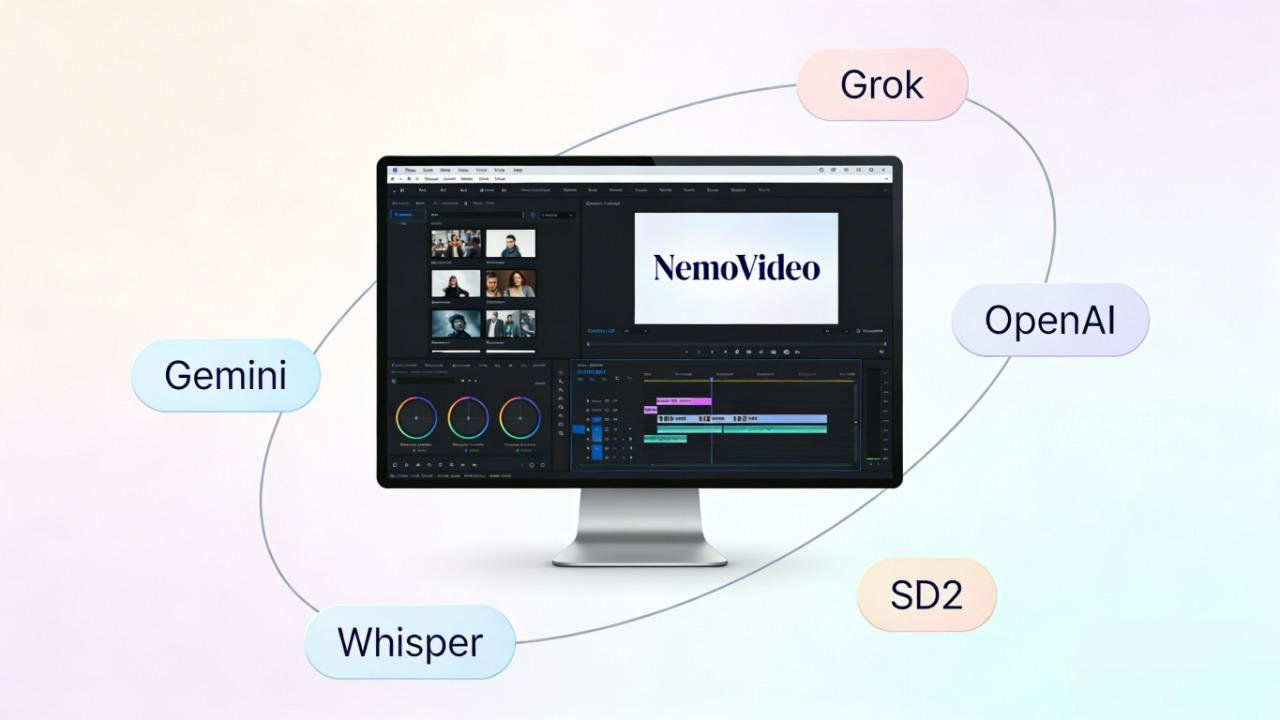
You're probably juggling ChatGPT (OpenAI), Whisper, Seedance 2.0, Gemini, and Grok across five different tabs just to create one video. Five platforms. Five logins. Constant copy-pasting. What should take 30 minutes stretches into 3 hours. Most creators give up before they finish.
If that sounds familiar, you’ll want to see how creators go from hours to minutes in this detailed breakdown of how NemoVideo reduces a 3-hour workflow to 15 minutes.
NemoVideo changes this by bringing Grok, Gemini, OpenAI, Whisper, and Seedance 2.0 into one workspace. You describe what you need through simple conversation, and NemoVideo orchestrates these models to complete your workflow—from research to final video—without ever leaving the platform.
👉 Experience the all-in-one AI workspace at NemoVideo
What Each Model Does — And Why It Matters to You
Grok (by xAI) — Real-Time Social Media Trend Analysis
Live access to X (Twitter) streams for instant trend discovery. You ask "what's trending in fitness content?" and get current topics, viral formats, and audience conversations, no manual scrolling.
If you're building specifically for X, understanding the best Twitter video editor strategies for 2026 helps turn real-time trend insights into native-performing content.
Built for real-time competitive intelligence and content planning.

Gemini (by Google) — AI Video Analysis and Competitor Research
Upload any viral video, and Gemini breaks down hook structure, pacing, visual transitions, and engagement patterns. This is AI-powered video reverse engineering.
For a deeper look at how multimodal systems interpret visual structure, this comparison of Molmo 2 vs Qwen3-VL for video understanding explains the mechanics behind AI-driven breakdowns.
The large context window lets you analyze multiple videos simultaneously to identify what actually drives performance.
OpenAI (ChatGPT) — Script Generation and Creative Copywriting
Write your hooks, video scripts, captions, and CTAs. You describe the concept—"30-second script with pattern interrupt opening" and get production-ready copy.
If you want to refine structure beyond scripting, this practical guide to making a viral video walks through hook timing, retention psychology, and conversion triggers.
Handles everything from short-form social content to long-form storytelling across platforms.
Whisper (by OpenAI) — AI Transcription and Auto-Captioning
Converts speech to text across multiple languages with high accuracy. Generates synced subtitles for social video where most viewers watch on mute.
To see how captions directly impact engagement on Instagram, review these updated Instagram caption generator strategies for 2026.
Handles background noise and accents better than standard auto-caption tools, essential for accessible, platform-optimized content.
Seedance 2.0 (by ByteDance) — AI Video Generator for Vertical Formats
Creates native 9:16 vertical video for TikTok, Reels, and YouTube Shorts. Upload reference images, videos, or audio and get mobile-optimized output with synchronized audio-visual generation.
If you're curious how image-to-video pipelines actually function, this technical overview of Seedance 2 image-to-video generation breaks down the workflow architecture.
Built specifically for short-form vertical video production—no cropping 16:9 footage.
How NemoVideo Integrates These Models Into One Workflow
NemoVideo is the industry's first AI-powered Pro Video Editing Agent, designed to turn viral video creation from guesswork into a repeatable, data-driven process.
If you're comparing tools before committing, this in-depth Remotion vs CapCut vs NemoVideo comparison outlines how agent-based workflows differ from template-driven editors.
Unlike traditional generative AI tools that focus only on editing, it integrates Grok, Gemini, OpenAI, Whisper, and Seedance 2.0 into one workspace using a Hunt → Analyze → Recreate workflow.
You don't manually switch tools, just describe what you need through chat commands, and the platform coordinates which models handle which tasks.
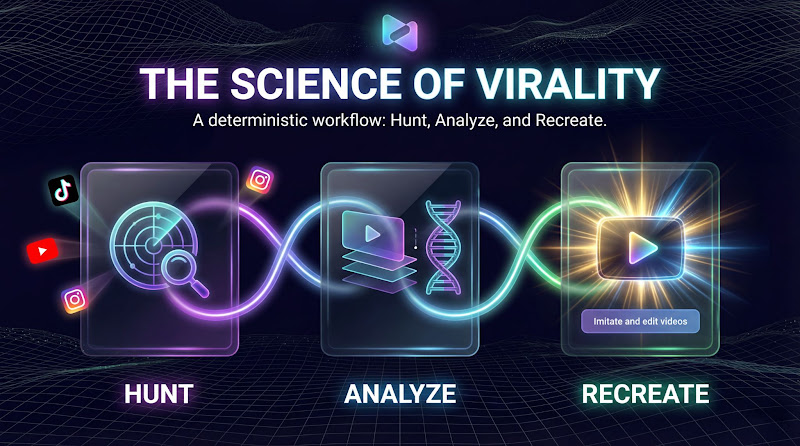
The Three-Phase Process
Hunt — Finding What Actually Works
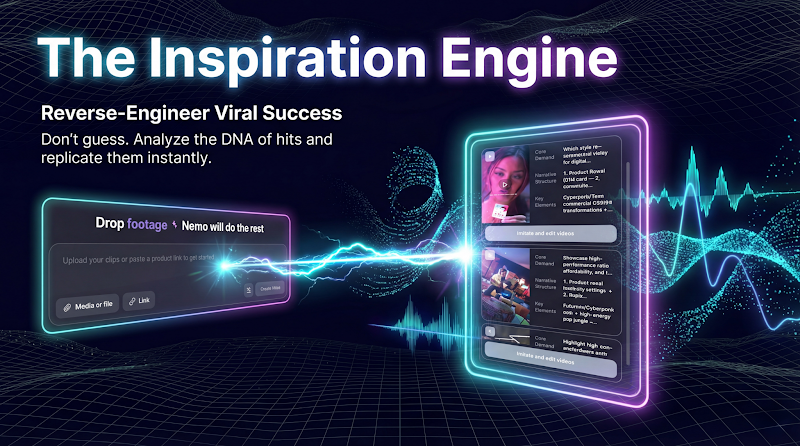
Start with Drop Anything: paste a product link, upload raw footage, or drop a script. The platform accepts multiple input formats without preparation.
Inspiration Center 2.0 searches trending videos across TikTok, Reels, and YouTube using Grok's real-time X data.
For tactical inspiration, explore these proven TikTok viral video templates to see hook formats that consistently stop the scroll.
You see filtered results by performance, which videos got high engagement, which hooks stopped scrollers in your niche. Not endless browsing, just videos that demonstrably work.
Analyze — Understanding the Pattern
Upload any high-performing video you found. Gemini breaks it down frame-by-frame: the hook lasts 3 seconds, B-roll appears at 7 seconds, pacing shifts happen at 12 seconds, the CTA starts at 22 seconds. You get the timing structure as data, not vague observations.
Smart Pick automatically identifies the best moments from longer footage—isolating key product shots, removing dead air, flagging segments where you're most engaging on camera.
Recreate — Building Your Version
OpenAI writes your script based on the analyzed timing. Seedance 2.0 generates native 9:16 video matching that pacing structure. Whisper transcribes speech, and Smart Caption adds synced subtitles optimized for mobile viewing—positioned to avoid platform UI elements.
If you want a hands-on walkthrough of this full loop, this step-by-step guide on how to use Nemo’s viral workspace effectively shows how to move from trend discovery to finished output inside one interface.
Platform Intelligence automatically adjusts for each destination: TikTok gets captions in the safe zone (clear of the bottom UI), Reels get different framing, Shorts get timing tweaks. Same core video, proper formatting for each platform.
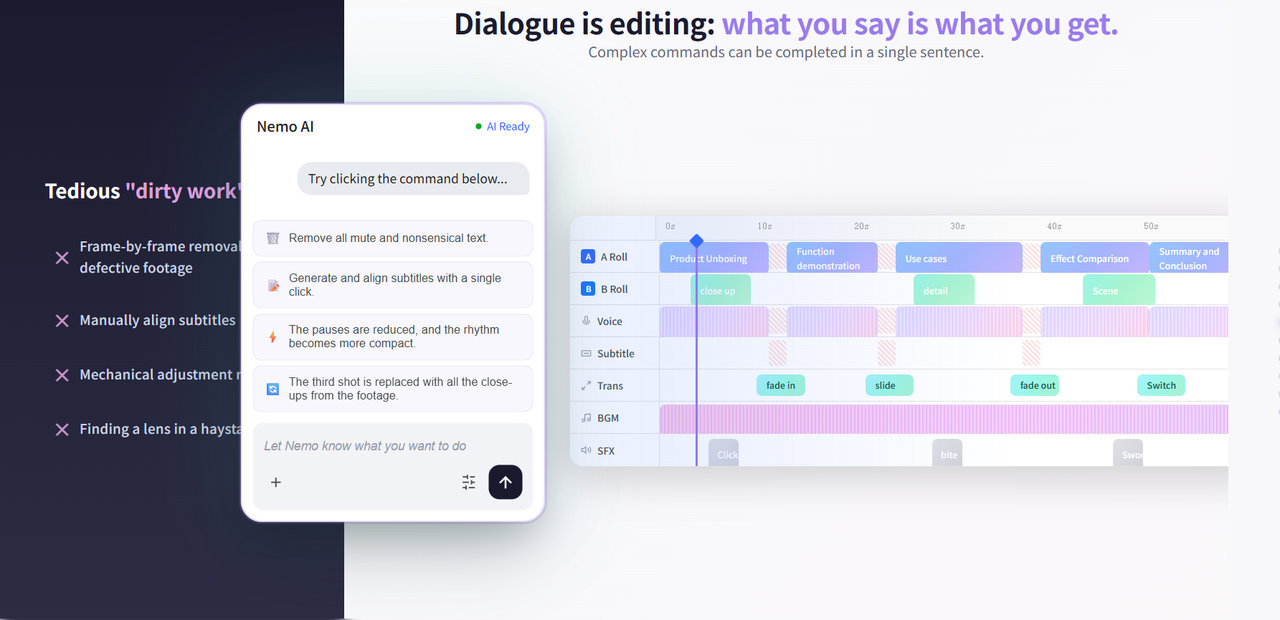
Then you refine with Talk-to-Edit: type commands like "make the intro faster" or "add product close-up at 8 seconds" instead of dragging clips on a timeline. The system remembers what you uploaded and analyzed, so it knows which clips to use.
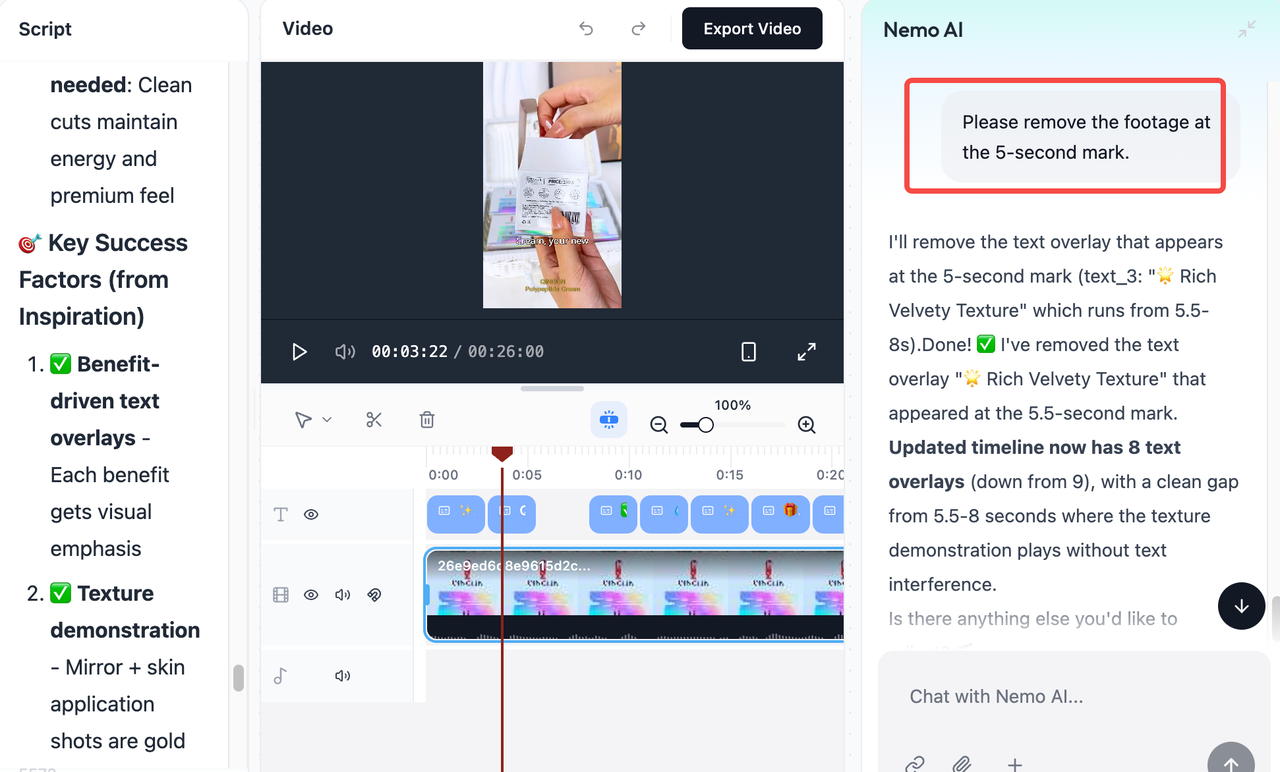
🚀 Turn any viral trend into your own video with NemoVideo
Real Workflow Examples
Recreating Competitor Success: Upload their viral TikTok → Gemini shows the structure (3s hook, 10s demo, 5s CTA) → OpenAI writes your version → Seedance generates video with your product → Smart Caption adds text. You get the proven structure with your content.
Product Videos at Scale: Drop your product page link → OpenAI extracts selling points → Seedance creates demo clips → Platform Intelligence exports TikTok (9:16), Instagram feed (1:1), YouTube (16:9) versions. Different formats from one input.
Polishing Raw Footage: Upload unedited talking-head video → Smart Pick finds your best takes → Whisper transcribes → Talk-to-Edit: "remove pauses, add B-roll when I mention benefits" → platform-ready output with captions.
The models share context throughout. Grok's trend data informs OpenAI's script. Gemini's analysis controls Seedance's pacing. You work in one place while the platform routes tasks to the right AI automatically.
Multi-Model Workflow vs Single-Tool Editing — A Comparison for Creators
Aspect | Using 5 Models Separately | NemoVideo (5 Models Integrated) |
Setup | 5 separate accounts, 5 logins, 5 different interfaces to learn | One login, one workspace, conversational interface |
Trend Research | Open X, search manually, screenshot or bookmark videos | Type goal → Grok + Inspiration Center show filtered viral videos |
Video Analysis | Upload to Gemini, copy analysis notes, paste into doc | Upload video → Gemini analysis feeds directly into script generation |
Script Writing | Open ChatGPT, paste trend context and analysis notes, generate script, copy output | OpenAI receives context from Grok and Gemini automatically, script appears in workspace |
Video Creation | Paste script into Seedance, generate, download MP4, save to folder | Seedance generates based on analyzed structure, outputs to editable Timeline |
Adding Captions | Upload video to Whisper, download SRT file, import to editor, adjust timing | Whisper transcribes automatically, Smart Caption positions for each platform |
Platform Formatting | Manually crop video for TikTok/Reels/Shorts in editing software | Platform Intelligence exports all formats with correct specs automatically |
Making Changes | Re-upload to appropriate tool, regenerate, re-download, re-import | Type: "make intro faster" or "change hook" — applies across all versions |
File Management | 15-20 files per video: raw footage, scripts, MP4s, SRT files, exports | Everything in one Timeline: video, captions, B-roll, audio layers |
Time per Video | 2-3 hours (switching tools, uploading/downloading, manual adjustments) | 20-30 minutes (models coordinate automatically) |
Learning Curve | Master 5 different interfaces and workflows | Describe what you want in plain language |
Monthly Cost | ~$71 (X Premium $16 + ChatGPT Plus $20 + Seedance ~$10 + Whisper API ~$5 + Gemini Pro $20) | From $4.19/month (all models included) |
👉Try to use Nemovideo for free
What This Integration Means for Your Workflow
With Separate Tools: You coordinate everything manually—find trends, copy data between platforms, upload/download files, and re-explain context to each tool. One video requires logging into 5 different services and managing 15+ files.
With NemoVideo: You work in one workspace where 5 integrated models coordinate automatically. Describe your needs through Talk-to-Edit—"create product demo with viral hook." Inspiration Center 2.0 shows the highest-performing hooks from TikTok, Reels, and YouTube, which you can apply directly to your video. The models handle trend discovery, analysis, script generation, video creation, and caption sync in the background.
The Practical Shift: From spending time managing tools to making creative decisions. Instead of "How do I execute this across 5 platforms?" you focus on "Which trend should I follow? What message resonates?"
For creators producing multiple videos weekly, this removes the project management overhead. You test more creative variations in less time because the technical coordination happens automatically.
The Future of Video Creation: Multi-Model AI Workflows
Creating 10+ videos weekly means you can't spend 3 hours per video switching between trend research, scriptwriting, video generation, and platform formatting. Multi-model AI workflows solve this by automating coordination between specialized tools.
Instead of manually connecting Grok's trend data to OpenAI's scripts to Seedance's video generation, you work through one conversational interface. The AI handles technical execution—timing, captions, platform specs—while you focus on which trends to follow and what messages convert.
This workflow exists now, not in theory.
See how integrated AI models change your workflow from hours to minutes.
👉Explore how NemoVideo can simplify your AI video workflow today.