

Best AI Video Generators for TikTok in 2026

Hey, it's Dora. I tested seven tools with the exact same brief — same script, same concept, same goal: a 23-second TikTok that doesn't lose viewers in the first two seconds. After three hours and 47 generations, the pattern was obvious: some tools understand TikTok, others just make vertical video.
Most comparisons miss the point. It's not "which AI makes the best-looking video?" It's "which one gets you to a postable TikTok fastest?" Big difference. A video can look great and still flop — weak hook, bad caption placement, slow pacing.
So this breakdown is based on real use cases, not features or pricing. Just pick what fits your workflow.
What Makes an AI Video Generator Good for TikTok
Aspect Ratio and Mobile-First Output
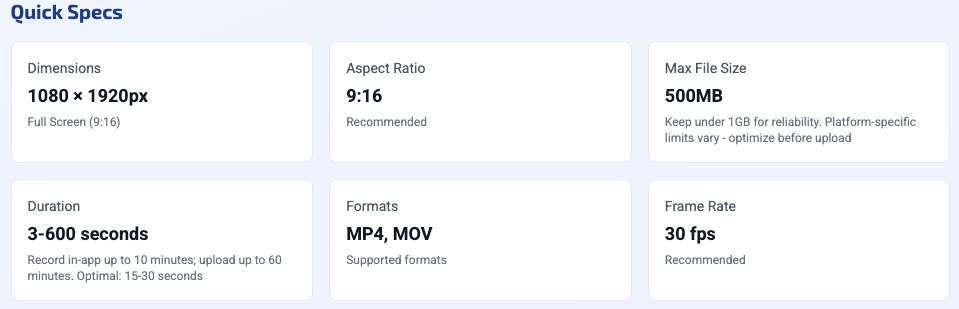
This feels obvious until you watch a tool export 16:9 and call it "TikTok-ready." The standard is 1080×1920 at 9:16, H.264, under 500MB. What's less obvious is the safe zone — TikTok overlays its UI (comments, share button, description) on roughly the bottom 30% and right 15% of the frame. If a tool doesn't account for this, your product, your face, or your text overlay gets partially buried under the interface. I've had this happen with output from three tools that otherwise performed well.
The sweet spot for organic reach is still in the 21–34 second range. Most tools handle duration settings correctly, but a few are stuck defaulting to 60-second outputs optimized for YouTube Shorts. Check before you commit to a workflow.
Hook Density and Pacing
TikTok's algorithm evaluates early retention hard. You need something happening in the first two seconds — text, motion, a face reacting, a question landing — not a slow reveal. Tools that generate content from scripts handle this better than pure text-to-video generators, because you can specify the hook. Tools that generate from images or product photos alone almost never nail the opening unless you heavily prompt for it.
Pacing is harder to fix in post than most people expect. If the AI builds a clip with 4-second static shots, cutting it down to TikTok rhythm takes real editing time. This matters when you're doing volume — five videos a day means you can't spend 40 minutes restructuring every output.
Caption and Text Overlay Support
About 85% of social videos are watched on mute, so captions are essential. The difference between tools is huge: some offer accurate, well-timed captions, while others are so off that it's faster to redo them. And some tools don't generate captions at all, adding an extra step before posting.
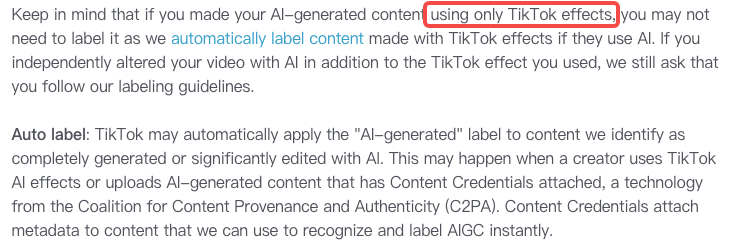
One thing worth noting: according to TikTok's AI content labeling policy, AI-assisted text workflows like script writing and caption generation are exempt from the disclosure requirement. The requirement only applies to AI-generated or significantly altered visuals and audio. That distinction matters for how you build your workflow.
Tool-by-Tool Comparison
Best for Talking-Head Shorts
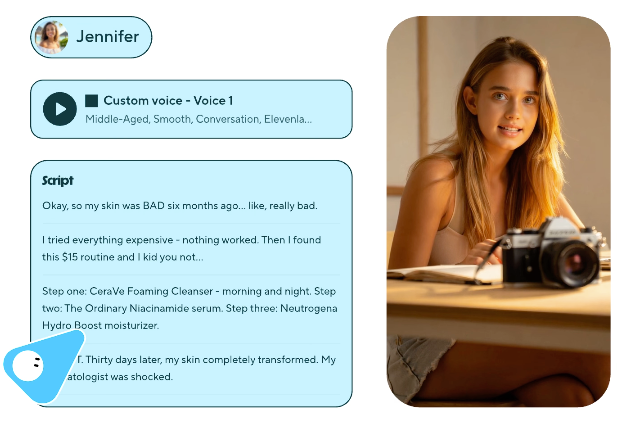
Kling AI 3.0 is the best choice when your content centers on a human face. Face consistency is much stronger than before, the uncanny look is mostly gone, and lip sync works well. Skin and hair motion also stays stable throughout the clip.
The downside is speed. Each clip takes about 3–5 minutes, so it's not ideal for producing lots of videos quickly. It works great for a few high-quality pieces, but not for daily TikTok volume.
HeyGen is built for speed and consistency. If you're using your own avatar or one from its library, videos generate fast and stay consistent across batches. The downside is a lower visual ceiling — it can look like a typical "AI presenter." That's fine for TikTok, but can feel repetitive if you post daily.
For creators making 5+ talking-head videos a week, HeyGen is better for workflow. For occasional, higher-quality content, Kling delivers stronger visuals.
Best for B-roll/Stock Shorts
Runway remains the quality benchmark for cinematic B-roll. The motion coherence over 10–15 seconds is still ahead of most competitors, and the control features — camera direction, motion intensity — actually work. I used it for background footage on a product explainer and the result was legitimately indistinguishable from stock footage in the final cut.
The honest caveat: Runway's quality on TikTok is sometimes too good. High-production B-roll can look out of place next to native short-form content — it signals "ad" rather than "creator," which matters for organic performance. Worth testing with your specific audience before committing.
Luma Dream Machine is faster and cheaper, with a slightly lower quality ceiling but better throughput for volume work. For lifestyle B-roll where you need 8 clips in an afternoon, it's the more practical choice.
Best for Image-to-Video TikToks
This category is useful for creators who have product photos, stills, or existing visual assets they want to bring to motion. Pika Labs is the most intuitive for this workflow — you drop an image, describe the motion, and get a usable clip within a couple of minutes. The physics aren't always realistic (objects move in ways that look slightly off), but for short clips where the motion is more about energy than accuracy, it works.
For e-commerce specifically — product photos animating into a short demo — Adobe Firefly Video has gotten significantly more reliable. The advantage is commercial licensing: everything generated is trained on licensed content, which matters if you're running paid TikTok ads and need to avoid IP issues.
Best for Product/E-commerce TikToks
This is where the right tool really matters — and generic comparisons don't help much. You need something that can turn a product link, images, or a short description into a real ad draft, not just a basic vertical video with product shots.
CapCut AI is the practical default for most e-commerce creators. It's TikTok-native, the script-to-video flow is reliable for product demos, captions are top-tier, and safe zones are handled automatically.
The downside is a lower visual ceiling—you won't get Runway-level visuals. But for high-volume daily content at zero cost, it's hard to beat.
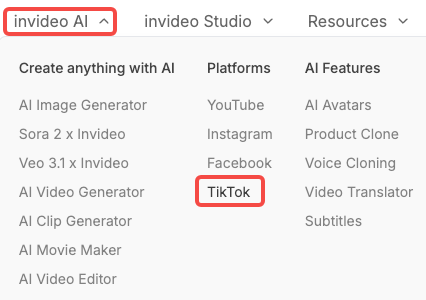
InVideo AI competes here with stronger template variety for TikTok-specific ad formats. If you need UGC-style content at scale and want something that looks more "creator" than "brand," InVideo's library is better suited than CapCut's.
Comparison Table
Tool | Best For | Aspect Ratio | Caption Quality | Avg. Time to Usable Output | Price Range |
Kling AI 3.0 | Talking-head, high quality | ✅ 9:16 native | Manual | 3–5 min | ~$10–30/mo |
HeyGen | Avatar/talking-head at volume | ✅ 9:16 native | Good | 1–2 min | ~$29+/mo |
Runway | Cinematic B-roll | ✅ 9:16 option | None | 2–4 min | ~$15+/mo |
Luma Dream Machine | Fast B-roll/motion | ✅ 9:16 option | None | 1–2 min | ~$10+/mo |
Pika Labs | Image-to-video | ✅ 9:16 native | None | 1–2 min | Free tier + paid |
CapCut AI | E-comm/product, daily volume | ✅ 9:16 native | Best-in-class | Under 1 min | Free |
InVideo AI | UGC-style ads | ✅ 9:16 native | Good | 2–3 min | ~$20+/mo |
AI Generation vs. Post-Generation Editing for TikTok
Why Raw AI Output Can't Go Straight to TikTok
I tested every tool on the list, and fewer outputs were truly post-ready than advertised — strong hook in the first 2 seconds, accurate captions, clean safe zones, and native pacing. On average, I had to re-edit about 65–70% of videos. Even the best tools (like CapCut AI, around 30%) still needed caption timing tweaks or hook adjustments.
That's not a flaw — it's the reality. The value isn't "zero editing," it's starting at 70% instead of 0%. And at scale, that still saves a lot of time.
What actually needs post-generation attention on almost every output:
First 2 seconds — does something happen, or is it a slow build?
Caption position — are they below the safe zone?
Caption accuracy — especially for product names, brand terminology, and numbers
Pacing — does it feel native or does it feel like a YouTube video in a vertical container?
Audio — most tools produce either no audio or generic background music; you'll likely replace this
Captions, Pacing, Platform Adaptation Layer
Treat generation and editing as two separate steps. Tools like Kling, Runway, and Pika handle creation. Captions, timing, safe zones, and audio need a second pass.
CapCut is best for that second step since it's built for TikTok. The fastest workflow: use Kling or HeyGen to generate, then CapCut to finalize.
Use-Case Matching
Solo Creator Daily Posting
If you're posting 5+ times per week and editing is the bottleneck, your priority is cycle time — not quality ceiling. CapCut AI as your primary tool, Pika Labs if you want motion from existing photos, and a fixed caption/audio pass before every upload. Total time per video targeting 20–30 minutes. Anything slower than that is unsustainable at daily volume.
Brand/UGC Teams
For teams producing ad creative variations, the combination of HeyGen (for avatar-based explainers) and InVideo AI (for UGC-style formats) covers most use cases. The important thing is building a shared asset library — brand fonts, product footage, audio clips — that gets dropped into every generation to maintain consistency across a batch.
One thing I'd flag specifically for brand accounts: TikTok requires disclosure for significantly AI-modified ads through either the built-in AIGC label in TikTok Ads Manager or a visible disclaimer within the video. Using the toggle doesn't automatically suppress your reach — and TikTok's automated detection will often label it regardless. Label it and move on.
E-commerce/Affiliate Creators
This is where tool choice matters most — and depends on your format.
For product link videos, CapCut AI is the fastest, most reliable option.
For UGC-style reviews at scale, InVideo AI gives you more template variety to test hooks.
If you have product photos and need motion, Pika Labs is the quickest solution.
What most guides miss: conversions don't come from the tool. They come from your script (hook, offer clarity) and your edit (first 3 seconds, CTA timing). The tool just fills in the middle.

Limitations and Platform Risks
A few things worth knowing before you commit to any of these workflows:
Generation quality vs. TikTok-native quality is still a gap. Highly polished AI visuals can signal "ad" to audiences that are trained to skip branded content. Sometimes a rougher, more native-looking output outperforms the cinematic one. Test before you standardize.
TikTok's AI detection is real. The platform uses C2PA Content Credentials to automatically detect and label AI-generated content, and has applied labels to over 1.3 billion videos. If your tool embeds this metadata — and most major generation tools do — TikTok will label it regardless of whether you toggle it manually. Plan for this upfront rather than treating it as optional compliance.
Credit/cost structures vary wildly. A generation that fails still often consumes credits on most platforms. I tracked redo rates across my 47 test generations — waste rates ranged from about 20% (CapCut, Pika) to 38% (some Runway sessions on complex prompts). Factor this into actual cost-per-usable-video, not just the sticker price.
Captions are not the same as accessibility captions. Auto-generated captions from AI tools are optimized for style, not accuracy. For product names, technical terms, and proper nouns — the things that matter most for conversion — the error rate is higher than general speech. A manual review pass on captions is not optional if accuracy matters for your content.
FAQ
Can I post AI-generated videos on TikTok without being flagged?
Yes — just disclose it. TikTok requires labeling if content is fully or heavily AI-generated. There's a built-in toggle, and using it won't kill your reach. In many cases, TikTok may label it automatically anyway. Safest move: always label.
Cheapest tool that works well for TikTok volume?
CapCut AI at zero cost handles the most TikTok-specific needs (safe zones, native captions, script-to-video) better than most paid alternatives. Pika Labs has a free tier that works for image-to-video use cases. If you need avatars, the gap between free and paid gets wider — there's no free tier for HeyGen that's usable at real volume.
Do I need to edit AI videos before uploading?
In my testing — yes, almost always. The minimum pass is: check the first two seconds for a working hook, verify caption position and accuracy, confirm audio isn't going to get flagged for copyright, and make sure your key content is inside the safe zone. This takes 5–10 minutes per video once you have a checklist. The generation step saves you from building from scratch; the edit step makes the output actually work.
Final Picks by Use Case
Daily posting solo creator → CapCut AI. Free, TikTok-native, best caption quality, lowest re-edit rate. The ceiling is real but it's a real ceiling, not a fake one.
Talking-head content, quality matters → Kling AI 3.0 for individual pieces, HeyGen for volume and consistency.
Cinematic B-roll → Runway when quality is the priority, Luma Dream Machine when speed is.
Product/image-to-video → Pika Labs for quick motion from stills, Adobe Firefly Video if commercial licensing for paid ads matters.
UGC-style ad creative at scale → InVideo AI. Template variety and TikTok-format library are stronger than CapCut for this specific use case.
No single tool covers everything. The practical stack for most creators running TikTok at volume is a generation tool (matched to your format) plus CapCut as the adaptation layer. That combination keeps total time-per-video under 30 minutes and keeps you inside TikTok's compliance requirements without extra overhead.
Worth trying if you're producing at this volume. If you're not, most of this is overkill — start with CapCut.
Previous Posts: