

Compare UGC Video Tools for Low-Budget Campaigns
Last week I was staring at a $500 campaign budget and a client asking for 20 UGC videos. My first instinct was to DM creators. My second instinct, after checking rates, was to quietly close that tab.
I’m Dora – glad to be here! Here's the thing nobody tells you when you start comparing ugc video tools for low-budget campaigns: the pricing pages lie by omission. The real cost — watermarks, export limits, per-video credits, usage rights — only surfaces after you've already signed up. I've been through this loop enough times that I started documenting it. This article is that documentation: six tools, real numbers, and where each one actually breaks down when your budget is under $500.
Quick Answer
If you need volume fast and you're working solo: NemoVideo (free tier → $12.99/mo) for AI-powered editing and CapCut (free) for raw cuts. If you need real human creators under $100/video: Billo starting at $84/video is currently the lowest vetted-creator floor I've found. For repurposing existing footage: Pictory at $19/mo does the job without making you learn a new editing workflow.
Budget Constraints in UGC Video Production
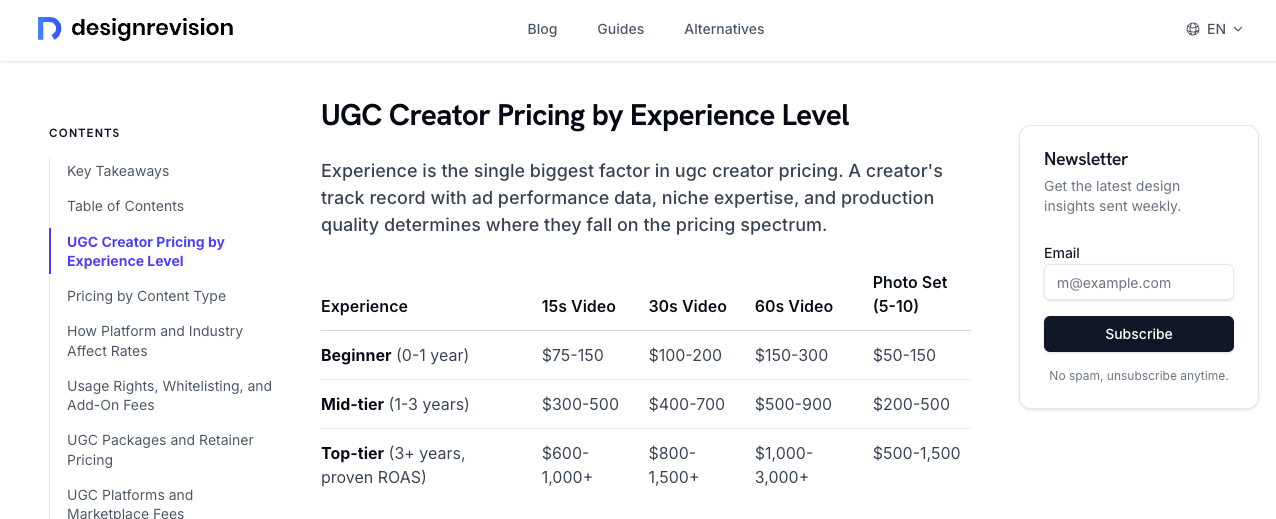
The uncomfortable math: the average cost per UGC deliverable dropped 44% year over year to $198, driven by an influx of new creators and growing competition from AI UGC tools. That sounds cheap. It's not — not when you need 20 videos for a test campaign.
Where the money actually goes:
Creator fee (base rate): $75–$300 for beginners
Usage rights for paid ads: add 50–100% on top
Platform commission: 20–30% markup on marketplace platforms
Revision rounds: 1–2 included, more costs extra
A realistic 20-video campaign with beginner creators, paid ad usage rights, and one revision round lands around $3,000–$4,000. That's not a low-budget campaign anymore.
This is why AI tools entered the conversation. Not because they replace authentic creators — they don't, not fully — but because they let you test 20 hook variations before spending real money on humans.
6 Budget-Friendly UGC Tools Compared
Tool | Free Tier | Paid Entry | Best For | Watermark-Free? |
NemoVideo | ✅ Credits-based | $12.99/mo | AI editing + hook recuts | ✅ Paid |
CapCut | ✅ Full features | Free (with limits) | Fast mobile edits | ✅ Free |
InVideo AI | ✅ 2 min/week | $25/mo | Prompt-to-video | ❌ Free tier |
Pictory | ✅ Limited | $19/mo | Repurposing footage | ❌ Free tier |
Billo | ❌ None | ~$84/video | Real human creators | ✅ Always |
✅ Limited | $18/mo | Captions + team edits | ❌ Free tier |
NemoVideo
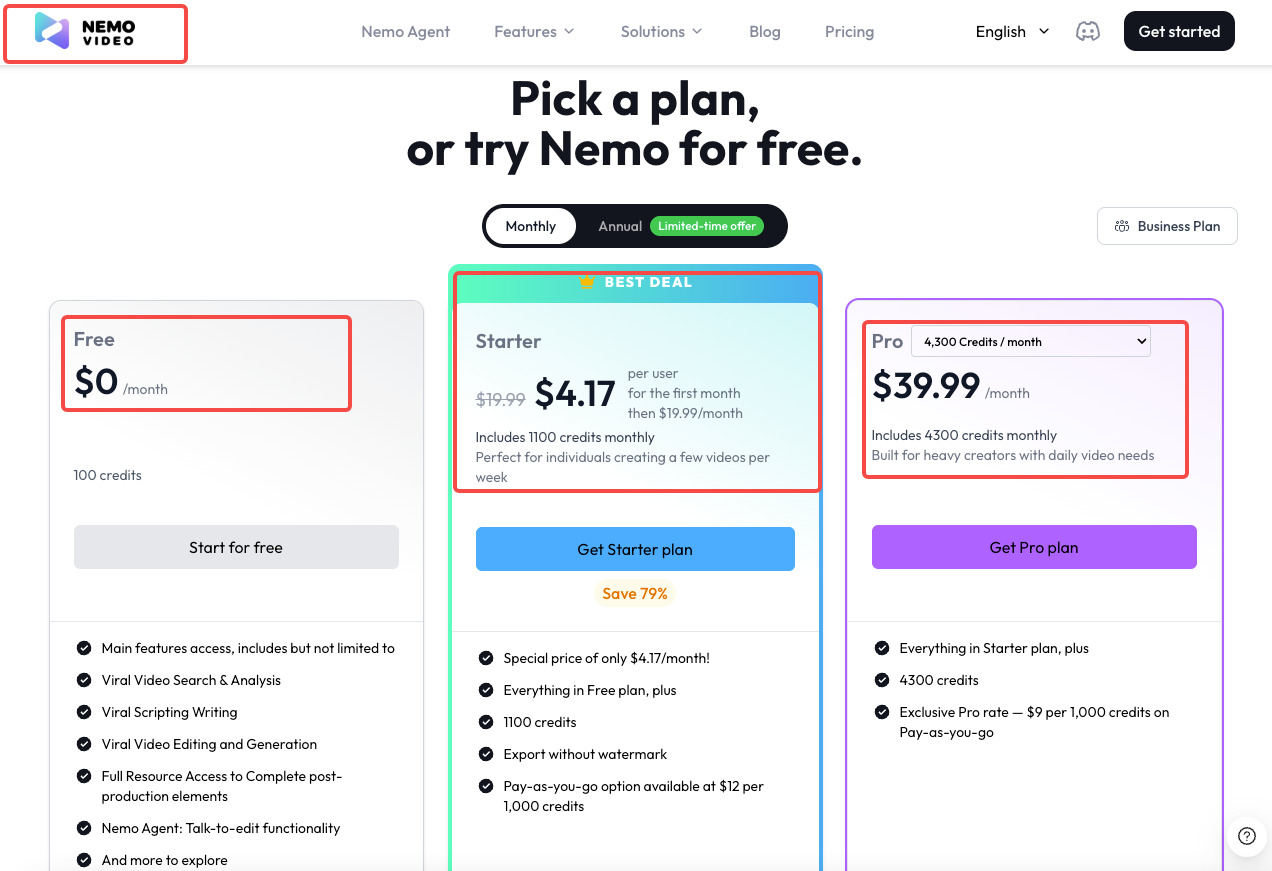
NemoVideo offers a free plan with credit-based usage. Paid plans start around $12.99/month (Starter) and $39.99/month (Pro) depending on usage and features.
What I actually use it for: the hook recut feature. You mark a section as a hook candidate, and it generates three alternate intros from different moments in your footage. For a low-budget campaign where you're trying to A/B test without paying a creator three times, that's genuinely useful. The auto-caption accuracy on my test clips ran around 92% — I fixed six words on a 47-second video. Usable.
Limitation worth knowing: The AI voiceover starts sounding slightly synthetic past 30 seconds. Fine for punchy 15-second hooks, noticeably off for anything story-driven.
CapCut
CapCut's free tier is notably generous, offering high-resolution exports without a watermark — a significant advantage for serious creators. It handles AI auto-captions, background removal, and text-to-speech at zero cost.
The catch: YouTube copyright claims. CapCut's built-in music library has ongoing licensing issues on YouTube. If your campaign lives on TikTok or Instagram Reels only, you're fine. If YouTube is in the mix, you need to bring your own audio or budget for a different tool.
InVideo AI
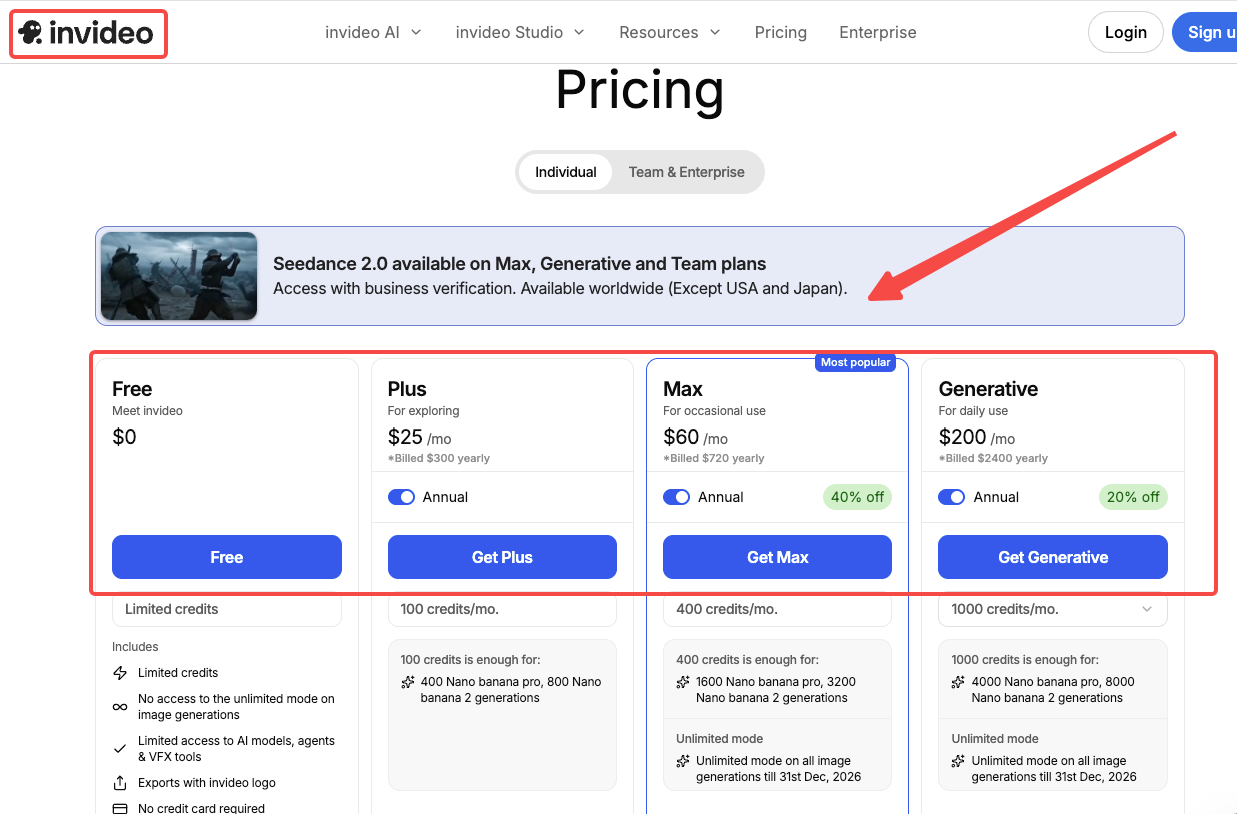
Prompt-to-video. Describe what you want, get a full draft with script, voiceover, stock footage, and transitions. InVideo AI at $25–60/month converts scripts into fully assembled videos with stock footage, automatically syncing voiceover timing with visual elements.
The free tier is genuinely limited — 2 video minutes per week. That's not a trial, that's a teaser. Budget $25/month if you're serious about testing it.
Pictory
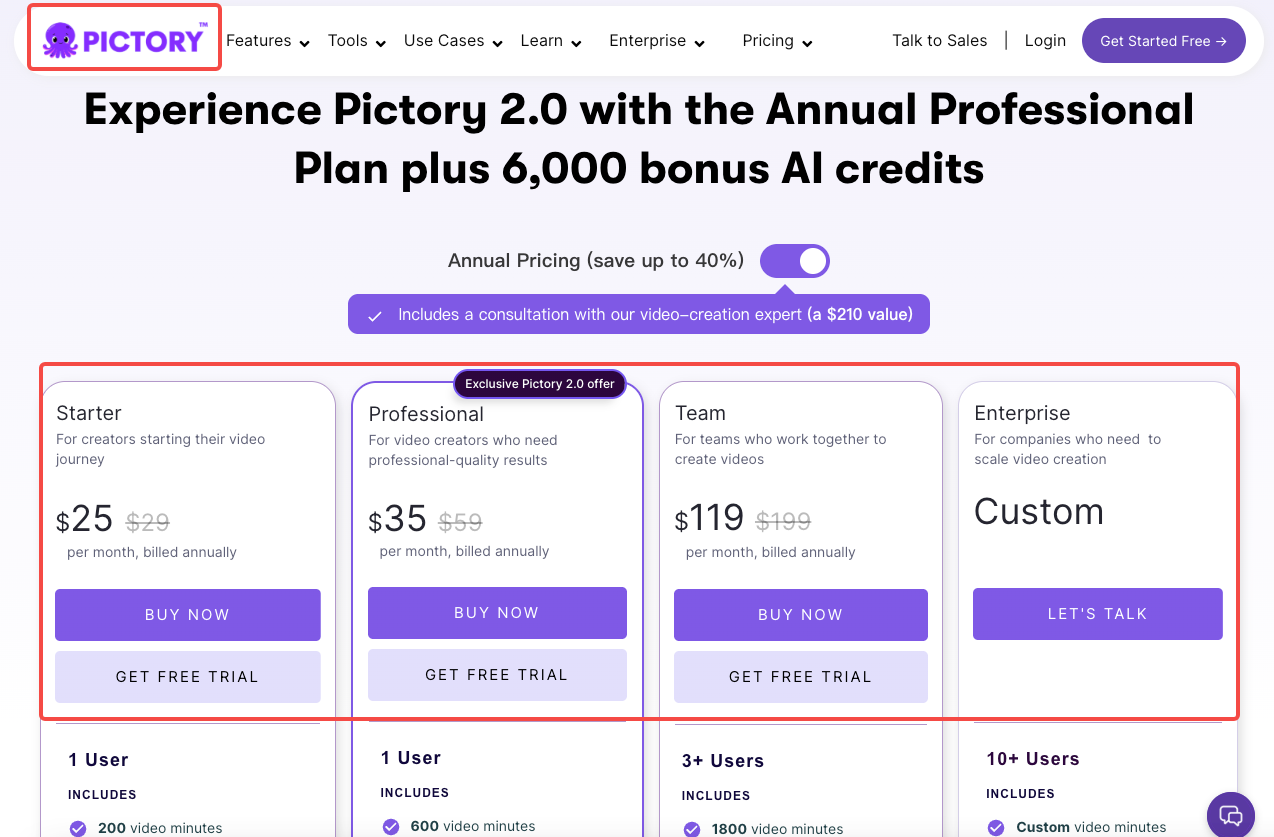
Best for one specific scenario: you have a long webinar, a recorded testimonial, or a blog post, and you need to turn it into short clips without re-filming anything. Pictory excels at content repurposing — paste a blog post, article, or long script, and the AI identifies key points, matches them with relevant stock footage, adds voiceover, and creates finished clips.
If you're starting from scratch with no existing footage, Pictory is the wrong tool. It's a repurposing engine, not a creation engine.
Billo
The only human-creator option in this list. Billo offers pricing plans with options ranging from $500 to $15,000, with prices starting from $84 per video — currently the lowest vetted-creator floor I've confirmed for 2026. You get real people, real facial expressions, real product interaction. Nothing AI currently replicates that authenticity reliably.
The downside: minimum spend matters. Most brands report spending $1,500–$3,000 monthly for consistent output. If you only need 5 videos a quarter, Billo's overhead is disproportionate.
Free vs Freemium vs Paid
What you can achieve with $0:
CapCut's free tier is genuinely complete for TikTok and Reels editing. You won't hit a wall for basic UGC cuts, captions, and 1080p exports. NemoVideo's free credits let you test the hook recut feature before committing. VEED.io's free plan handles caption generation, though you'll export with a watermark.
The $0 ceiling: No bulk exports. No removing platform watermarks across multiple videos. No voice cloning. You're limited to one video at a time with most free tiers.
When to invest ($19–$40/month range):
Once you're producing more than 8 videos per month, the per-video math flips. At NemoVideo's $12.99 Starter or Pictory's $19 plan, the credit math works out to roughly $1.50–$2.50 per video at moderate volume — which is a fraction of creator rates.
The real question: Are you testing concepts, or producing proven winners? AI tools for testing. Human creators for scaling what already converts.
Cost Optimization Strategies
Batch creation saves more than people think. Most AI tools charge by credits or export minutes, not by session time. Produce 10 videos in one sitting and your effective cost per video drops by 40–60% compared to one-at-a-time production.
Template reuse: Build two or three proven structures — hook format, product demo format, testimonial format — and reuse them across campaigns. You're not being lazy, you're being systematic. The format is the skeleton; swap the product, the claim, the CTA.
DIY filming tips that actually reduce editing time:
Shoot in natural light, near a window. Eliminates 80% of color correction work.
Record three takes of every hook. Pick the best one; don't ask AI to fix a bad one.
Speak slower than feels natural. You'll cut pauses in editing; you can't add pace.
A UGC video is generally 3 to 10 times cheaper than traditional production, whether handled by an agency or an in-house team. The gap between DIY-with-AI and agency-produced content has closed enough that a $200/month tool stack now outputs what agencies were charging $3,000–$8,000 for two years ago.
ROI Calculation for Budget Campaigns
Here's a realistic scenario I've run through more than once:
$500 budget → 20 videos → campaign results:
Tool cost: NemoVideo Pro at $39.99/mo + CapCut free = ~$40
Creator cost (5 human videos for winners, Billo): 5 × $84 = $420
Total production: $460
Remaining ad spend: $40 (this is thin — but the point is the math)
Where this actually works: use the $460 to produce 20 variations (15 AI + 5 human), run them for two weeks, identify the top 3 performers, then redirect next month's budget toward scaling those three with proper ad spend.
Testing 10 different hooks with human creators costs $1,750+. Testing 10 hooks with AI costs the time it takes to write them. The budget campaign isn't about producing the final ad — it's about finding the winning concept cheaply enough that you can afford to scale it.
FAQ
Q1: What's the cheapest way to make 20 UGC videos for a campaign?
Honestly, the most cost-effective stack right now is NemoVideo (free credits or $12.99/mo) for AI-edited content combined with CapCut (free) for quick manual trims. You can produce 20 short-form videos for under $15 in tool costs — the real investment is your time. If you need even one or two with a human face, Billo's per-video floor sits around $84. Mix accordingly.
Q2: Can I remove watermarks for free?
CapCut is the only major tool that exports at 1080p watermark-free on the free tier. Most others — InVideo, VEED, Pictory — add watermarks until you hit a paid plan. Check before you build your workflow around a free tier, or you'll end up re-exporting everything anyway.
Q3: Are there annual discounts worth considering?
Yes, most tools offer 30–40% off on annual billing. Fliki's Standard plan drops to $21/month on annual billing for 1,000 voices and 1080p exports. For tools you're actively using every month, annual billing is almost always worth it. For tools you're testing, stay monthly until you're sure.
Q4: What if I only need 5 videos per year?
Skip subscriptions entirely. Use CapCut's free tier for editing, and if you need real creators, go direct — DM creators on TikTok or Instagram with a specific brief and a set rate. You'll pay $100–$150 per video without platform fees, and you own the content outright. Platforms like Billo are optimized for volume; at 5 videos/year, the overhead isn't worth it.
Q5: Are AI UGC videos detectable by TikTok and Meta?
According to current platform guidelines, yes — and disclosure is required. Meta, TikTok, and YouTube all require disclosure of AI-generated content. In practice, detection is improving but inconsistent. The more important point: for direct response ads where you're optimizing clicks and conversions, AI UGC currently performs comparably to human UGC. For brand awareness campaigns where emotional connection is the goal, human creators still outperform.
Conclusion
The comparison I keep coming back to: what are you actually trying to figure out?
If it's "which hook converts," use AI tools to test 10 variants for under $20. If it's "does this product resonate with real people," spend $84–$150 on one human creator and watch the comments. They're different questions that need different tools.
The budget isn't a constraint. The real constraint is knowing which question you're trying to answer before you spend anything.
Worth trying if you're in the same position I was: start with NemoVideo's free tier for one week. See what the hook recut feature does to your existing footage. If it saves you two hours, the $12.99 math is obvious.
Previous posts: