

How to Create Affiliate Videos with AI (Step-by-Step Guide)
I made $2,400 in affiliate commissions during my first month using AI-generated videos — and I didn't film a single second of footage myself. No camera, no ring light, no awkward intros. Just me, a laptop, and a handful of AI tools that turned product reviews into short videos people actually watched.
I've been running affiliate campaigns for four years. But the moment I started pairing AI video with my affiliate strategy, everything changed. This guide is exactly how I do it — step by step, with real tool names, real pricing, and honest takes on what works.
What Is AI Affiliate Video?
AI affiliate video is exactly what it sounds like: using AI tools to create product review or recommendation videos — without filming anything yourself. Instead of recording your face or screen, you feed a script into an AI video generator and it produces a complete video with stock footage, voiceover, captions, and music.
The reason it works for affiliate marketing comes down to one thing: trust. According to Wyzowl's 2026 Video Marketing Report, 93% of marketers consider video important to their strategy, and video consistently converts better than text because viewers can see the product in action. AI removes the production barrier that used to make video inaccessible for most affiliate marketers.
You don't need Premiere Pro or a film crew. You can go from product idea to published video in under an hour.
Why AI Video Works for Affiliate Marketing
Most affiliate marketers live and die by blog posts. The problem is that text-based content is getting harder to rank, slower to build trust, and easier to ignore.
Video changes the equation. A 60-second product demo shows the value immediately — no scrolling required. Viewers who watch your video are already warmer leads by the time they hit your affiliate link. And with AI handling production, you can publish five videos in an afternoon instead of spending a full day on one.
I used to batch one affiliate review video per day if I was lucky. Now I batch five. More products covered, more links in circulation, more commissions.
How to Create Affiliate Videos with AI (Step by Step)
Step 1 — Pick the Right Affiliate Offer for Video
Not every product translates well to video. Here's what works and what doesn't:
Works well:
SaaS tools with a visual interface — screen recordings of dashboards, before-and-after workflows
Online courses — walk through module previews, share your results
Subscription boxes and physical products — unboxing-style content performs well even with AI b-roll
Before-and-after products — fitness, skincare, photo editing — anything where transformation is visual
Avoid: anything where the value proposition takes five minutes to explain. If you can't show a clear result in 60 seconds, save it for a longer YouTube format.
Step 2 — Script for Conversions (AIDA Framework)
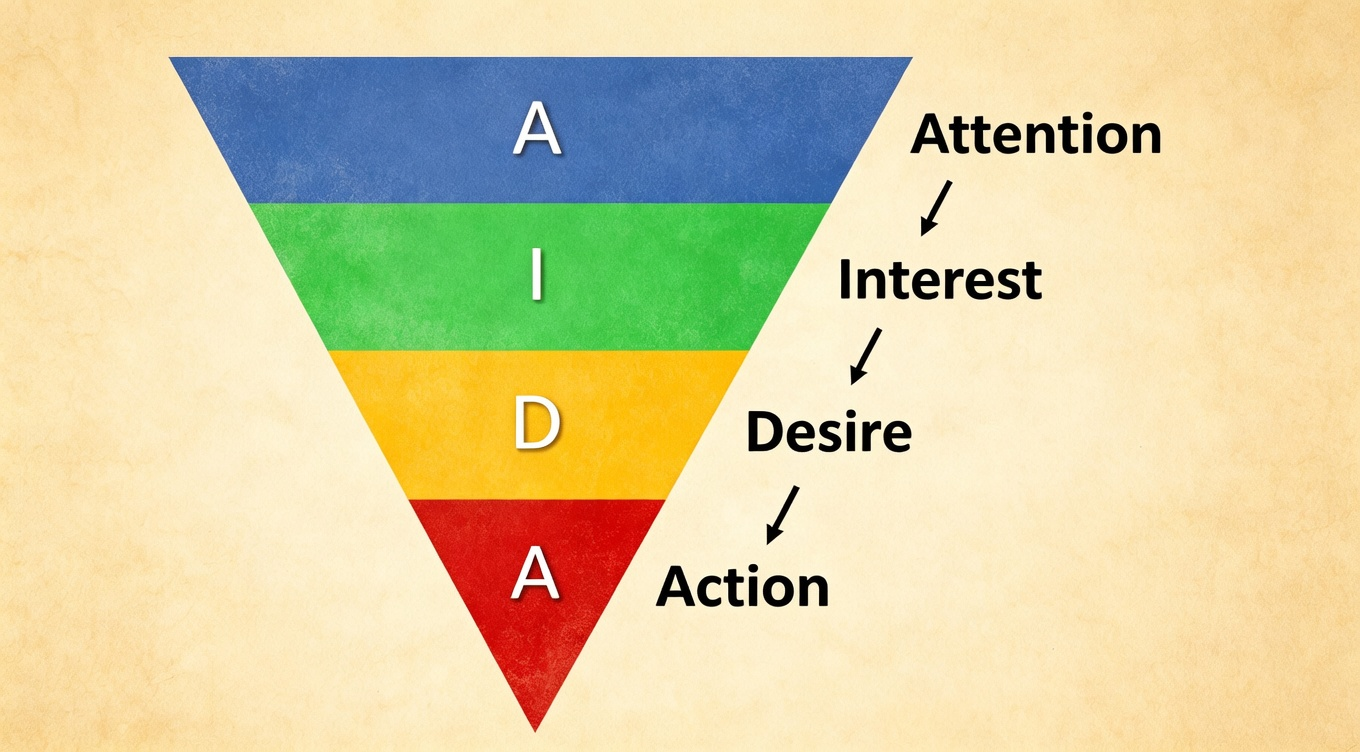
Every affiliate video I make follows the same structure:
Attention (first 3 seconds): Bold claim or relatable pain point. "I cut my email marketing costs by 60% with this one tool."
Interest (10–15 seconds): What the product is and why it matters. Keep it conversational.
Desire (20–30 seconds): Show proof — screen captures, results, your numbers. "After two weeks, my open rates jumped from 18% to 34%."
Action (final 5–10 seconds): Clear CTA. "Link in bio — you'll get 20% off your first month."
Keep scripts under 150 words for short-form (TikTok, Reels) and under 400 words for YouTube-style content.
Step 3 — Best AI Video Tools for Affiliate Marketing
This is the part most guides get wrong — they list tools without telling you which one to actually use. Here's a real comparison based on my own testing:
Tool | Price | Best For | My Take |
Free / $28/mo | Full video from a text prompt | My go-to for creating affiliate reviews from scratch | |
From $19/mo | Blog post → video automatically | Best if you're repurposing existing written content | |
Free / $19/mo | Brand-consistent social videos | Great templates, easiest learning curve | |
Free / $33/mo | UGC-style ad creatives with AI avatars | Best for performance marketing and paid ads | |
Free / $15/mo | Cutting long videos into short clips | Feed it a YouTube video, get 10 short clips automatically |
My personal workflow: InVideo AI for creating full affiliate review videos from scratch. OpusClip when I have longer content I want to repurpose into short-form clips.
Step 4 — Add Voiceover and Captions
A video without captions is leaving money on the table. Research shows that approximately 85% of social media videos are watched without sound — if your message only lives in the voiceover, most viewers never hear it.
Best AI voiceover tools:
Tool | Price | Best For |
Free / $5/mo (Starter) | Most natural-sounding voices, voice cloning | |
Free / from $23/mo | Studio-style with built-in video sync | |
Free / from $31/mo | Strong multilingual support, developer API |
I use ElevenLabs for most of my affiliate videos. The Creator plan at $22/month gives roughly 2 hours of audio — plenty for a month of short-form content.
For captions: most AI video tools auto-generate them. For standalone captioning, NemoVideo works great and is free.
Step 5 — Optimize for Each Platform
The same video doesn't perform equally everywhere:
YouTube (3–10 min): Horizontal 16:9. Hook within 5 seconds. Affiliate link in the description, mentioned verbally. Use TubeBuddy or vidIQ for keyword research.
TikTok / Instagram Reels (15–90 sec): Vertical 9:16. Hook in 1–2 seconds. Text overlays and captions required. Link in bio.
Pinterest (15–60 sec): Vertical 2:3 or 9:16. Frame content around "how to" and "best of" searches — Pinterest users are planners and shoppers.
Blog embeds: Horizontal 16:9, embedded in review posts. Video increases time-on-page and captures readers who prefer watching over reading.
My workflow: create one master video in horizontal format, then use OpusClip or CapCut to reformat for vertical platforms. One piece of content, four channels.
Step 6 — Build a Content Funnel (Not Just Drop Links)
Here's where most affiliate marketers go wrong: they create one video, slap a link on it, and wonder why nobody clicks.
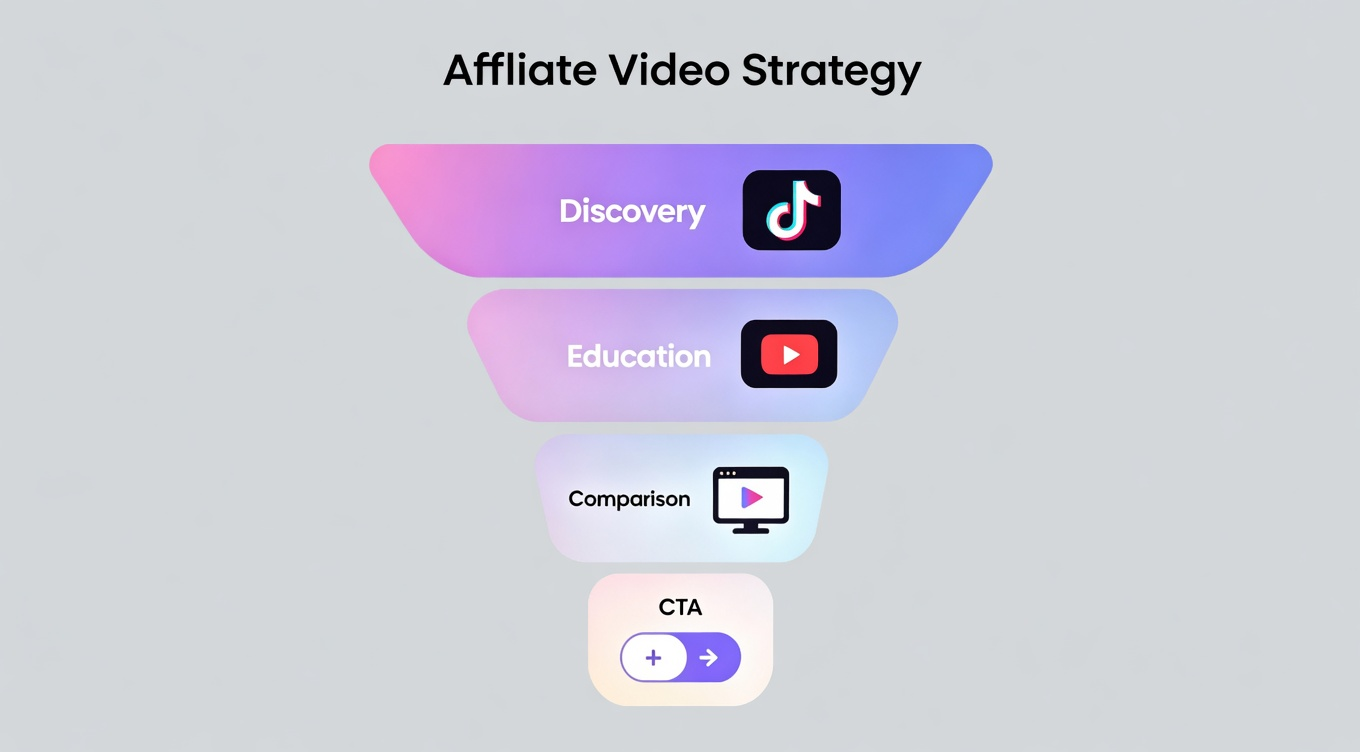
Affiliate video works best as a funnel:
Discovery (top): Short videos on TikTok, Reels, or Shorts that create curiosity — not sell. "3 tools that replaced my entire marketing stack."
Education (middle): Longer YouTube videos or blog embeds. Tutorials, walkthroughs, "how I use this" content that builds credibility.
Comparison (bottom): "Tool A vs. Tool B" videos targeting people ready to buy. High intent = high conversion.
CTA (conversion point): Every video points somewhere — a link-in-bio page, a blog post with affiliate links, or a landing page.
How to Track Affiliate Video Performance
Most affiliate marketers publish and hope. Tracking closes the loop — you find out what's actually driving commissions, so you can do more of it.
Use UTM Parameters on Every Link
Add UTM parameters to your affiliate links so you can see exactly which video, which platform, and which CTA drove the click. A link might look like:
yoursite.com?utm_source=tiktok&utm_medium=video&utm_campaign=invideo-review
Tools like Google Analytics 4 or Pretty Links make this easy to manage without coding.
Track These Metrics — Not Just Views
Views tell you nothing about commission potential. Watch these instead:
Metric | What It Tells You |
Click-through rate on affiliate link | Is the video creating enough desire to act? |
Conversion rate (clicks → purchases) | Is the offer right for this audience? |
Watch time / retention rate | Are people staying long enough to hear the CTA? |
Revenue per video | Which videos earn the most — and why? |
A/B Test Your Hooks
The first 3 seconds determine whether someone watches or scrolls. Create 2–3 different opening hooks for the same video and track which version drives more clicks. With AI, making a second version takes ten minutes.
Review Every 30 Days
Once a month, look at which videos drove actual commissions. Double down on what worked — same product category, same format, similar CTA. Kill the format that didn't.
Common Mistakes to Avoid
Dropping links without context. Every affiliate link needs a reason — what the product does, why you recommend it, who it's for.
Ignoring affiliate disclosure rules. The FTC requires clear disclosure when you're paid or incentivized to recommend a product. Add a visible disclosure — "This video contains affiliate links" — at the start of every video and in the description.
Using robotic voiceovers. Cheap AI voices kill trust instantly. Spend $5–22/month on ElevenLabs or Murf.
Trying to be everywhere at once. Pick one or two platforms, master them, then expand.
Not testing your hooks. The first 3 seconds are your only real variable in the first round. Test them.
FAQ
Do I need to show my face in affiliate videos?
No. Faceless videos — using screen recordings, stock footage, AI avatars, and voiceover — work extremely well for affiliate content. Many of the highest-performing affiliate channels never show a face.
How long does it take to make one AI affiliate video?
With a script ready: about 15–30 minutes for short-form (under 90 seconds). Longer YouTube reviews take 45–60 minutes including QC.
Can I use AI videos on Amazon Associates?
Most programs allow video content as long as you follow their guidelines and include proper affiliate disclosures. Check each program's terms before publishing at scale.
What's the minimum budget to start?
Technically $0 — free tiers on InVideo AI, Lumen5, ElevenLabs, and OpusClip are enough to test. For a serious setup, budget around $50–70/month.