

What Is Gemini 3.1 Flash TTS? A Guide for Video Creators
It's 11:47 PM and I'm on the 8th generation of the same 30-second voiceover. The first seven sounded like a GPS telling me to turn left. This one finally has a pause in the right place, a small laugh where the script says "laughs", and an actual change in pace when the product comes on screen. That shift—from "AI voice" to something I'd actually put on a short—is the whole story of Gemini 3.1 Flash TTS.
If you've seen the name floating around since April 15 and you're trying to figure out whether it changes anything for your workflow, here's the short version: yes, but not in the way the announcement posts make it sound. This isn't a magic "one-click voiceover" button. It's a better-behaved narrator with 200+ inline commands, 70+ languages, and a free tier generous enough to actually test before you commit to anything. What matters is whether those upgrades survive contact with a real posting schedule.
It's Dora here. I'll walk you through what's actually new, where it fits in a short-form workflow, and — more importantly — what it still can't do. I've been running it since launch week on real client scripts, not demo copy, so the limits I'll flag are the ones you'll actually hit.
What Is Gemini 3.1 Flash TTS?
Gemini 3.1 Flash TTS is Google DeepMind’s latest text-to-speech model, released in preview on April 15, 2026. It’s available via the Gemini API, Google AI Studio, Vertex AI, and Google Vids.
In simple terms: you give it a script, it generates a voiceover—with far more control than before, no DAW needed.
How It Relates to Gemini 2.5 Pro TTS and 2.5 Flash TTS
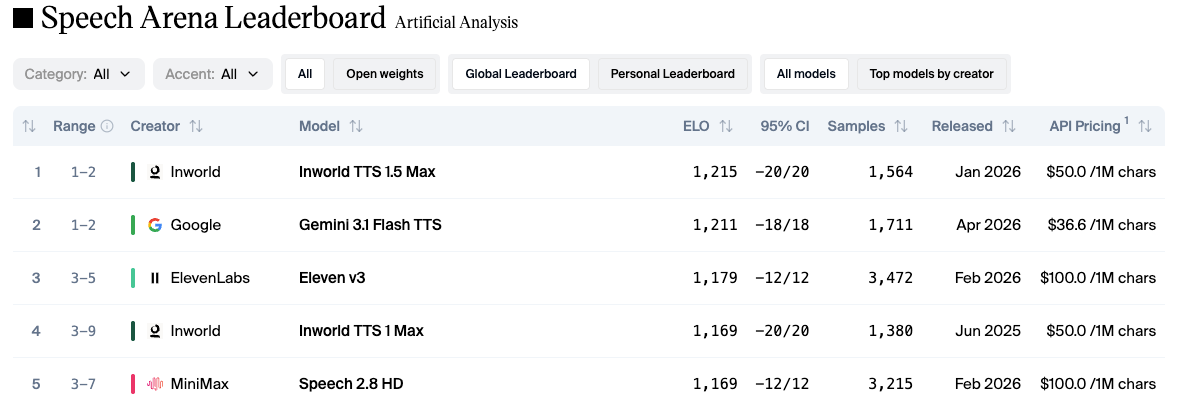
If you used the 2.5 family, the jump is bigger than the version number suggests. The Gemini 2.5 TTS update from December 2025 supported 24 languages and handled multi-speaker dialogue, but style control was basically "choose a voice and hope." 3.1 Flash TTS adds 200+ audio tags, expands to 70+ languages with regional accents, and on the independent Artificial Analysis TTS leaderboard, it scored an Elo of 1,211 — second overall, ahead of ElevenLabs v3.
I'll be honest — benchmark Elos don't matter until you hear the output. But the gap between 24 languages and 70+ is the kind of thing that actually changes which projects you can take.
What's Actually New — 3 Upgrades That Matter for Creators
Audio Tags (200+) — whispers, laughs, Pace and Tone Control
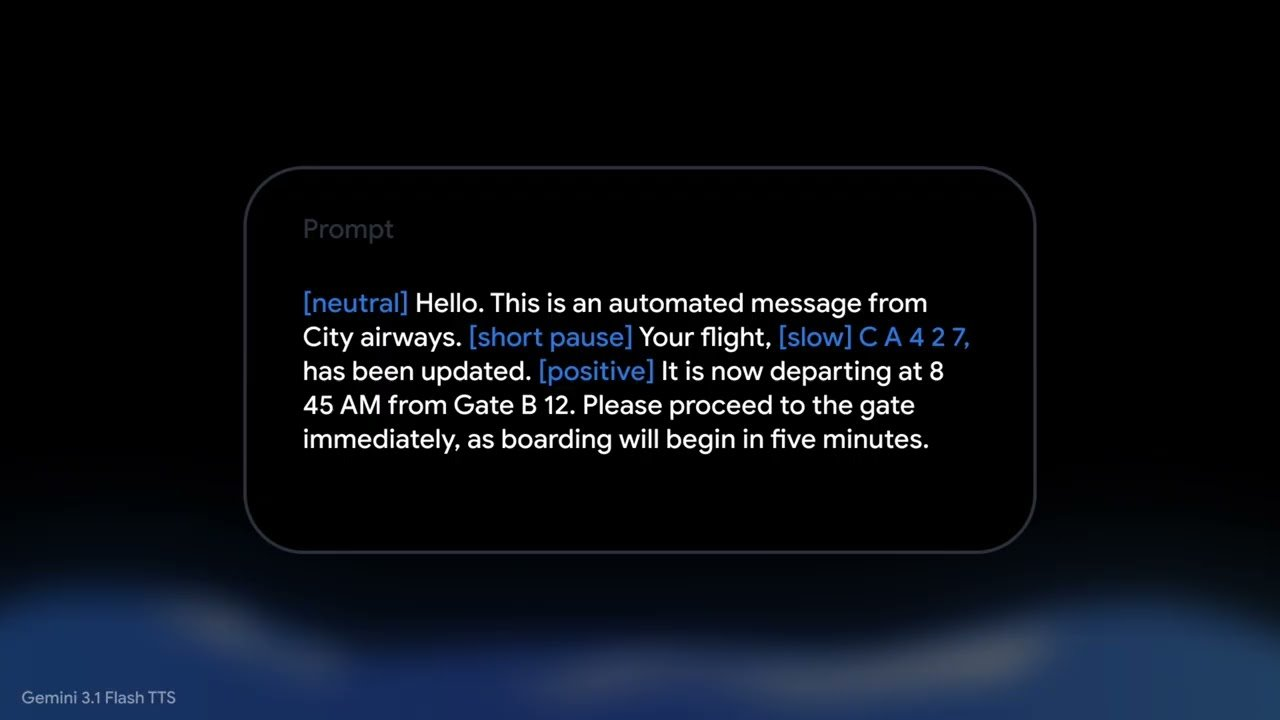
This is the upgrade that earns its place in a real workflow. You embed commands in square brackets directly in your script:
[excited] Okay, this is the part I've been waiting to show you.
[pause] [slower pace] Look at the difference. [whispers] Nobody is talking about this.
The output actually follows the tags. Not perfectly — sarcastic on my first three tests landed closer to "mildly judgmental" than sarcastic — but well enough that I stopped manually splitting my script into emotional sections.
For short-form, the ones I use almost every day:
pause before a hook reveal
faster pace for list-style content (saves 3–5 seconds on a 30-second clip, which matters for TikTok)
whispers for the "secret/tip" framing that performs well in affiliate content
laughs — sparingly, because fake laughs are worse than no laughs
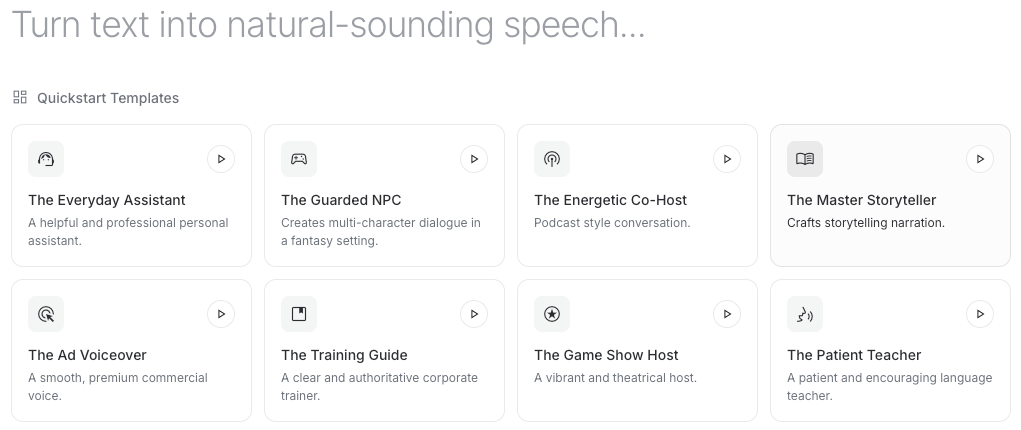
There are also format templates — podcast narrator, news broadcaster, support agent, language tutor, wellness guide — that work as a starting baseline before you fine-tune with tags. On Google AI Studio I timed it: configuring a voice and exporting the settings as API code takes about 4 minutes. After that, every future generation uses the same parameters.
Multi-Speaker Dialogue in a Single Generation
Before 3.1, two-person dialogue meant generating each voice separately and stitching them together. Now you can write both speakers in one prompt and get a single, natural-sounding conversation.
I tested a 45-second back-and-forth (expert vs. skeptic), and it was usable on the first try—which is rare.
70+ Language Native Support (up from 24 in Gemini 2.5)
The jump from 24 to 70+ languages is the biggest quiet upgrade. Every language now gets the same style and accent controls as English.
For English, you can choose regional variants like Valley, Southern, RP, Brixton, and Transatlantic.
For multilingual creators and e-commerce teams, this removes the need to hire voice actors or use separate tools for each language.
How Gemini 3.1 Flash TTS Fits a Video Workflow
Here's where the reality check kicks in. Gemini 3.1 Flash TTS generates audio. It does not generate video, it does not cut footage, it does not handle captions, and it does not know what platform you're posting to.
Script → Voiceover → Import into Your Editor
My actual workflow looks like this:
Write the script with audio tags inline — this takes the same time as a normal script, maybe 30 seconds longer per minute of content
Generate in AI Studio or via API — for a 30-second short, generation takes under 10 seconds
Download the WAV file and drop it into your editor as the audio layer
Layer your footage, B-roll, and captions on top — this part is still the editor's job
The "saves time" number: for a faceless YouTube short that used to take me ~25 minutes to record, edit, and clean up audio, the voiceover stage now takes about 4 minutes. Captions, cuts, and B-roll still take the same time they always did.
Use Cases — Where This Actually Earns Its Place
Not every creator needs this. The ones I'd say benefit most:
Faceless YouTube / TikTok creators running talking-point videos, summaries, or explainers — no studio, no voice actor
E-commerce teams converting product descriptions into listing videos across multiple languages — the 70+ language support does the heavy lifting here
Affiliate creators testing multiple hook styles — generate 5 variants of the same script with different tone tags, see which one holds watch time
Talking-head creators who need a fallback narrator for B-roll-heavy segments when their own voiceover gets interrupted or needs a retake
If you're doing cinematic work, narrative film, or anything where the voice is the product (podcast hosting, brand voice as an identity asset), this is a supporting tool, not a replacement.
What Gemini 3.1 Flash TTS Can't Do Yet
I'll say this part clearly because the launch coverage glossed over it: this is a voice generation model. That's it.
Not a Video Generator, Not a Dubbing/Lip-Sync Tool
A few things it does not do:
Generate video. There's no visual output. You still need footage, stock clips, or image-based content.
Lip-sync to existing footage. If you have a talking-head clip and want to replace the audio, 3.1 Flash TTS will give you new audio, but you'll need a separate tool to sync lips (or just keep the original visual and not re-sync).
Clone your voice from a sample. Despite what some third-party coverage claimed on launch week, Google's official documentation lists 30 prebuilt voices and does not currently offer public voice cloning for this preview. I'm flagging this because I saw the "voice cloning" claim in a few articles and it did not match what I found in the docs.
Do dubbing. If you have a Spanish video and want an English version, 3.1 Flash TTS generates the English audio, but doesn't translate or align it to the original timing.
What You Still Need to Finish a Publishable Short
A realistic stack for one short-form video:
Script — your brain, or an LLM
Voiceover — Gemini 3.1 Flash TTS, the part this article is about
Footage / B-roll — your own, stock, or generative video
Captions — every platform wants them burned in
Cuts, pacing, platform adaptation — 9:16 crops, hook placements, CTA framing
The voiceover step used to be one of the slowest. It's now one of the fastest. Which means the bottleneck has moved — to editing, captioning, and testing variants. That part is still on you.
All outputs are embedded with SynthID watermarking, an inaudible signal that identifies the audio as AI-generated. For most creator use cases this doesn't affect anything — listeners can't hear it and it survives normal compression — but if you're in a regulated space (news, political content, certain ad platforms) it's worth knowing.
FAQ
Q: Is Gemini 3.1 Flash TTS free? There's a free tier that's actually usable for testing — not 30 seconds of demo and then a paywall. The paid tier, per the Gemini API pricing documentation, is $1 per million input text tokens and $20 per million audio output tokens. A batch mode offers a 50% discount. For context, generating a 30-second voiceover costs fractions of a cent on the paid tier. Free-tier usage data may be used for product improvement — worth noting if you're working with sensitive client scripts.
Q: What happened to Gemini 2.5 Pro TTS? Still available, still in the API. Google didn't retire it. If you already have pipelines built on 2.5, they keep working. For new projects, 3.1 Flash TTS is the default recommendation — better expressivity, more languages, more control, lower per-token cost.
Q: Does it support voice cloning? Not in the public preview. 30 prebuilt voices, regional accent variants, style parameters — but no "clone from a 30-second sample" feature in Google's official documentation at the time of this writing. This part I'm keeping an eye on because tool behavior changes with updates.
Conclusion
Gemini 3.1 Flash TTS is the first TTS tool I'd actually use for my own content, not just client work. The audio tags are the reason—being able to write pauses and whispers directly into the script turns what used to be multiple steps into one.
But it's still just a voiceover tool. No video, no captions, no platform optimization. You still need to edit, format, and test everything else.
If you're producing high-volume short-form content, it's worth trying. If you make one polished video a month and your voice is part of your brand, your own voice still wins.
Previous Posts: