

Gemini 3.1 Flash TTS Pricing: Free Tier and Real Cost (2026)
Hey everyone, Dora here. I've been testing TTS tools for about eighteen months now, and every launch post follows the same script: "$X per million tokens, up to Y% cheaper than before." Cool. Now tell me what a 60-second voiceover actually costs.
That's the question nobody answers cleanly when a new model drops. So when Gemini 3.1 Flash TTS Preview went live on April 15, I opened a spreadsheet, ran a batch of short-form scripts through it, and translated Google's token math into something a person with a content calendar can actually use.
Here's what the pricing looks like once you stop counting tokens and start counting videos.
Gemini 3.1 Flash TTS Pricing at a Glance
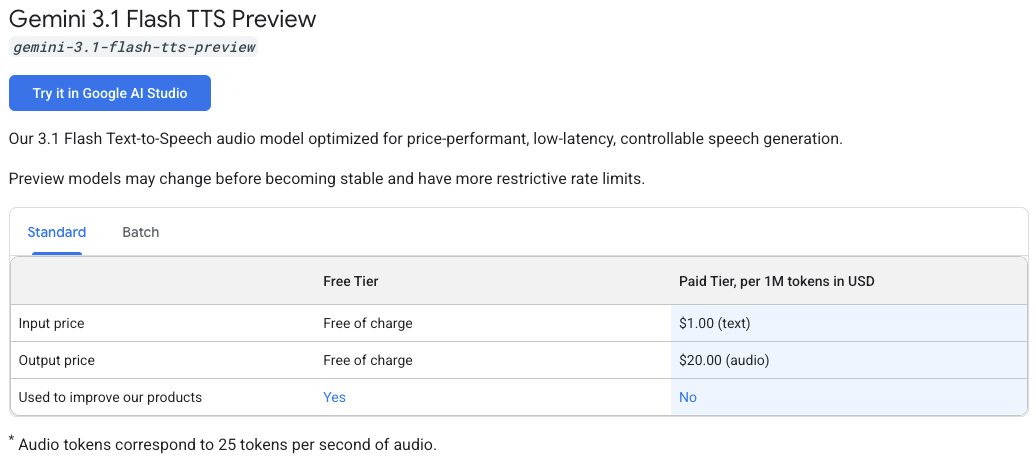
The model has two lanes: free and paid. Straight from Google's Gemini API pricing page:
Tier | Input (text) | Output (audio) | Data used to improve Google’s products | Notes |
Free | Free of charge | Free of charge | Yes | Rate limits project-specific in AI Studio |
Paid Standard | $1.00 per 1M tokens | $20.00 per 1M tokens | No | Pay-as-you-go |
Paid Batch | $0.50 per 1M tokens | $10.00 per 1M tokens | No | 50% discount, asynchronous processing |
Three things worth catching before you go further:
Audio tokens are measured at 25 tokens per second of generated audio. This is the conversion rate that makes the pricing real. Everything below is built on it.
Output dominates the bill. Not by a little. By 20x.
The free tier exists, but its rate limits now live inside your AI Studio project, not in a public table. Google's rate-limits page explicitly sends developers to AI Studio for live quota — so don't build a workflow around free-tier numbers you found on a third-party blog.
Where pricing lives
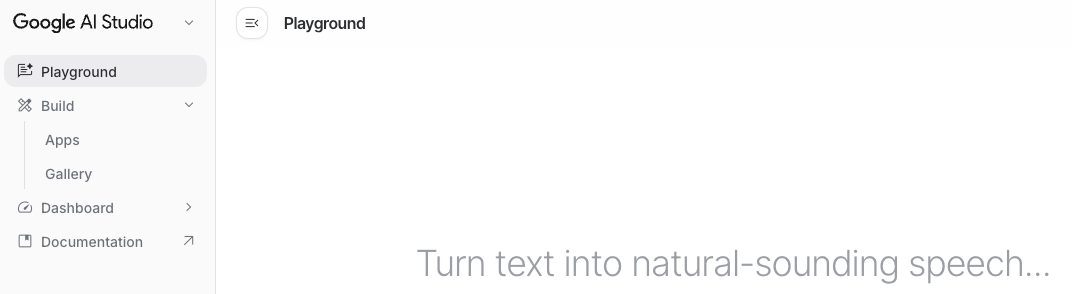
The model runs in three places: AI Studio for free experimentation, the Gemini API for pay-as-you-go production, and Vertex AI for enterprise. AI Studio itself is free to use in supported regions. Token-based billing applies when you call the model through the API with billing enabled. Vertex pricing is generally the same for Gemini models — but Google notes it can differ, so check Vertex's page if that's where you'll deploy.
How Token-Based Billing Actually Works
Two counters run on every request: input tokens (your script) and output tokens (the audio).
Input tokens ($1/M) — your script
A 60-second voiceover script is usually 140–180 words. Call it roughly 200 text tokens to be safe. At $1 per million:
(200 / 1,000,000) × $1 = $0.0002 per script
Two hundredths of a cent. For normal voiceover work, input cost is a rounding error. Don't even build it into your spreadsheet.
Output tokens ($20/M) — the audio you generate
This is where the real money lives. Audio output tokens are billed at 25 tokens per second. A 60-second clip = 1,500 output tokens:
(1,500 / 1,000,000) × $20 = $0.03 per 60-second voiceover
Three cents. That's the number I actually write on the budget sheet.
Why output tokens dominate your bill
The ratio is $20 output vs $1 input. That's 20x. Most text models sit around 8–10x (2.5 Flash is $0.30/$2.50). TTS is wildly skewed toward output because you're not paying the model to read 200 tokens of script — you're paying it to synthesize a minute of broadcast-grade audio with expressive control.
Practical consequence: every regeneration is a full output charge. Re-running the same script ten times because the first nine sounded wrong costs you ten times $0.03, not one. I'll come back to that.
Real Cost Scenarios for Creators
Assuming 60-second clips on the paid Standard tier. Scripts at ~200 input tokens each.
Monthly volume | Output cost | Input cost | Total |
10 videos | $0.30 | $0.00 | ~$0.30 |
50 videos | $1.50 | $0.01 | ~$1.50 |
100 videos | $3.00 | $0.02 | ~$3.00 |
100 videos (Batch API) | $1.50 | $0.01 | ~$1.50 |
Let that sit for a second. One hundred voiceovers per month for roughly three dollars. Not a typo. And if your workflow tolerates async processing, the Batch API cuts it in half again.
Longer clips shift the math fast
Swap 60-second clips for 3-minute narration and output scales linearly:
3-min video = 180 sec × 25 tokens/sec = 4,500 tokens → $0.09 per video
100 such videos/month = ~$9.00
Still absurdly cheap compared to per-character TTS pricing elsewhere. The growth is real, though — if you're doing 10-minute narration at high volume, actually run the numbers instead of eyeballing.
What the Free Tier Actually Covers
This is the part most creators care about, and it's also where I have to be careful not to hand you numbers Google no longer publishes.
Confirmed facts:
The free tier covers both input and output tokens. No per-token cost.
Free-tier usage counts as "unpaid services." Google's terms state content submitted through unpaid services may be used to improve their products. If that's a dealbreaker — client work, confidential scripts, anything sensitive — you want the paid tier.
Rate limits are project-specific and live in AI Studio. The old Gemini docs used to publish one master table with RPM/RPD per model. That's gone. The current rate-limits page explicitly warns that "specified rate limits are not guaranteed."
Is Preview access still free?
As of this writing, yes. The pricing page lists Gemini 3.1 Flash TTS Preview with "Free of charge" in both input and output rows of the free tier. Preview status means this can change — Google can introduce restrictions or paid-only access at any point, and preview models typically come with tighter rate limits than stable models.
Commercial use on the free tier
Google's terms don't place a blanket "no commercial use" block on free-tier API output the way ElevenLabs does on its free plan. Two catches worth taking seriously:
Content flowing through unpaid services may be used for product improvement. Not a licensing issue, but a privacy one.
All Gemini 3.1 Flash TTS output is watermarked with SynthID, regardless of tier. The watermark is imperceptible, so it doesn't block use — but it does mean the audio is flagged as AI-generated if anyone runs detection on it.
Take this with a grain of salt and read the current terms yourself before shipping commercial voiceovers on free.
Hidden Costs to Watch For
The headline pricing is honest. The bill can still surprise you if you don't plan around these three things.
Regenerations. Every re-run is a full output charge. Generating one 60-second clip four times because you kept tweaking the audio tags costs $0.12, not $0.03. On short-form this is still tiny, but at 100 videos × 3 retries each, you're looking at closer to $9 than $3.
Long scripts vs chunking. Processing a single 10-minute narration vs. splitting it into ten 60-second chunks costs the same on output — same audio length either way. Chunking doesn't save money, but it saves you on regenerations: if second 8:42 is off, you re-render one chunk, not the full 10 minutes. Cheaper in practice.
Multi-speaker generations. Native multi-speaker dialogue is supported. The official docs on speech generation show multi-speaker output is billed by total audio duration — same 25 tokens/second rate. A 60-second two-speaker clip costs $0.03, just like single-speaker. You're not paying double. Genuinely useful for podcast-style scripted content.
Gemini 3.1 Flash TTS vs ElevenLabs — Quick Comparison
Cost angle only.
Tool | Entry model | Effective cost per minute | Best for |
Gemini 3.1 Flash TTS (Standard) | Pay-as-you-go | ~$0.03/min | Low-to-mid volume, no minimums |
Gemini 3.1 Flash TTS (Batch) | Async 50% discount | ~$0.015/min | Predictable async workflows |
ElevenLabs Starter | $5/mo subscription | ~$0.167/min | Voice cloning + high consistency |
ElevenLabs Creator | $22/mo subscription | ~$0.22/min | Professional long-form production |
Pay-as-you-go wins hard at low-to-mid volume. Subscription pricing wins when usage is predictable and high. If you're producing 10–100 short videos a month, token-based pricing is cheaper by an order of magnitude. If you're doing 500+ minutes of long-form narration on a voice clone you already trained, ElevenLabs Pro math starts winning on features, not just cost.
The sales page says one thing about every tool. Reality usually says something else once you run a month of real volume through it.
FAQ
Is Gemini 3.1 Flash TTS free to use? Yes, through the free tier in AI Studio and the Gemini API. Free-tier input and output both show as "Free of charge." Content submitted on the free tier may be used by Google to improve their products.
Does the free tier allow commercial use? There is no explicit prohibition, but free-tier content may be used to improve Google’s products. All outputs carry SynthID watermarks. Review the current terms before shipping client deliverables.
Does Google Vids use the same pricing? Google Vids is a Workspace product with its own subscription terms. Token pricing doesn't directly apply inside the Vids UI the way it does for API users. Access there is governed by your Workspace plan, not the API pricing table.
Conclusion
At 100 short-form voiceovers per month, Gemini 3.1 Flash TTS on the paid tier runs you around three dollars. On Batch, half that. The free tier works for experimentation, but the live rate limits have moved out of public docs and into AI Studio per project — so don't plan a commercial workflow around a free-tier quota number you found on a third-party blog.
Run the math on your actual volume before picking a tier. Output tokens are the only line that matters.
Previous Posts: