

GPT Image 2 Pricing for Creators in 2026
I got this wrong the first time I tried it.
Hi everyone, it's Dora. I assumed GPT Image 2 pricing worked like a subscription feature — pay $20/month for Plus, generate images, done. Then I ran a batch of 40 product frames for a client, pulled up the API bill, and realized I'd been thinking about this completely backwards.
Here's what actually matters: ChatGPT and the API are not the same budget line. And the generation cost you see in docs isn't the number that matters most. The re-generation cost is.
If you're producing short-form video thumbnails, ad creative variants, or product visuals at any real volume, you need to understand both layers before you commit to a workflow. This is that breakdown.
What GPT Image 2 Access Looks Like Today
ChatGPT Plan Access
GPT Image 2 (the model behind ChatGPT Images 2.0, released April 21, 2026) is available across all ChatGPT plans, but the differences between tiers matter more than most people realize.
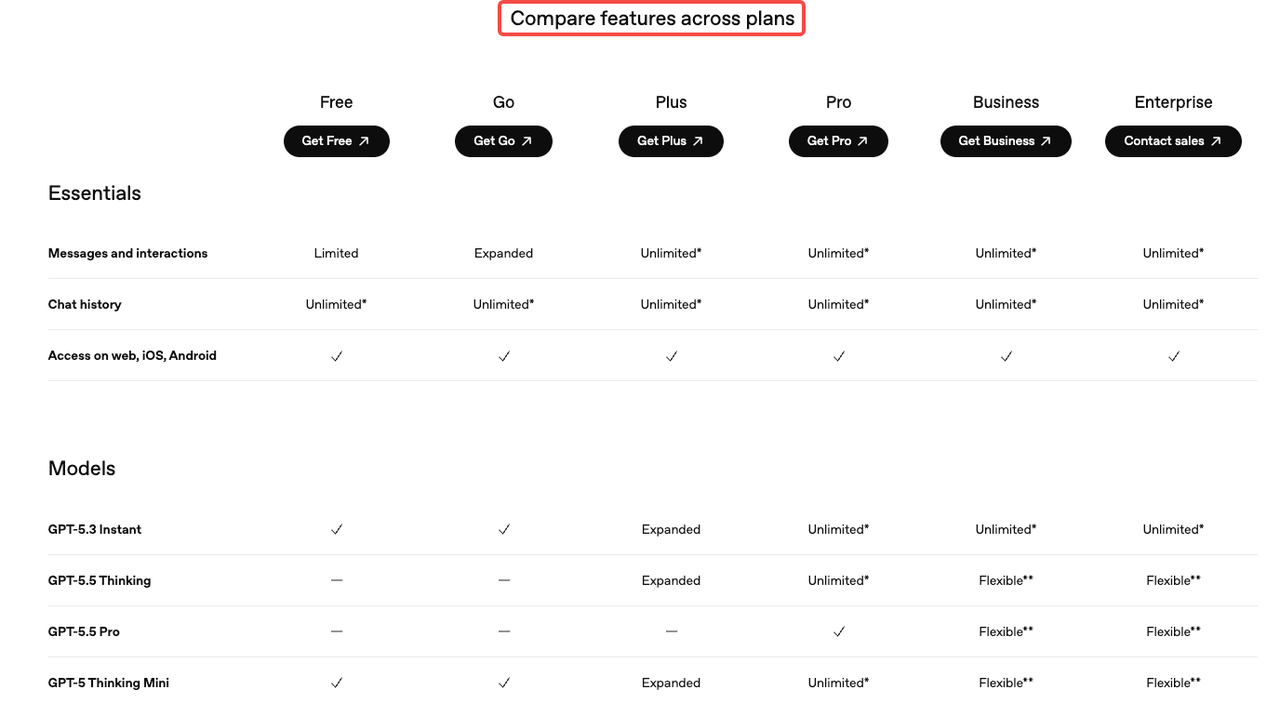
Free users get standard image generation with tight rolling limits — roughly 3 images every 24 hours. Enough to test, not enough to produce. Plus at $20/month opens up somewhere in the neighborhood of 40–50 generations per 3-hour window, with a soft daily ceiling around 200. That's the number community testing consistently lands on, even if OpenAI doesn't publish it as a fixed SLA.
The bigger access gap is Thinking mode. GPT Image 2's reasoning layer — the part that actually plans composition before rendering, runs web search during generation, and batches up to 8 coherent images from a single prompt — requires Plus, Pro, Business, or Enterprise. Free users get the standard model only.
Pro at $200/month is positioned as effectively unlimited for individuals who need that Thinking mode running all day. For most solo creators doing 5–10 pieces per session, Plus is fine. For teams batch-producing ad variants across multiple SKUs, that ceiling starts to bite.
API Model and Snapshot Access
The API is a different contract entirely. The model ID is
gpt-image-2gpt-image-2-2026-04-21API access is token-based and doesn't depend on your ChatGPT subscription tier. A developer without any paid ChatGPT plan can access
gpt-image-2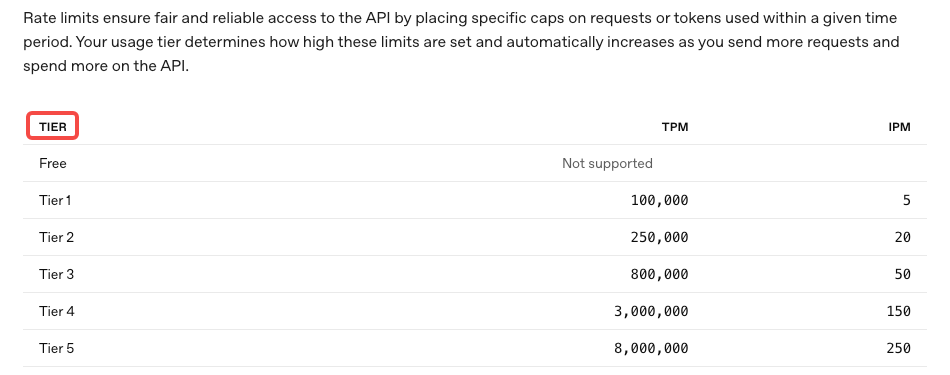
GPT Image 2 Pricing by Creator Workflow
This is where the math gets real. Per the OpenAI API pricing page and the image generation calculator referenced in their docs, here's what 1024×1024 outputs actually cost:
Low quality: ~$0.006 per image
Medium quality: ~$0.053 per image
High quality: ~$0.211 per image
For 1024×1536 (portrait, common for mobile-first content), high quality drops slightly to ~$0.165. The larger format is actually cheaper per image at high quality, which is counterintuitive but useful to know.
The token billing underneath those numbers runs $8.00 per million image input tokens and $32.00 per million image output tokens. Text prompt tokens are $5.00 in and $10.00 out. Cached inputs are significantly cheaper — $2.00 per million for image inputs.
Thumbnails and Cover Frames
Thumbnails and static cover frames are the cheapest use case because they're text-light, single-output, and you usually get a workable result in 1–2 generations.
At medium quality, you're spending about $0.05–$0.10 per final frame including one retry. Run 200 thumbnails a month and you're looking at $10–$20 in API costs. That's noise. The ChatGPT Plus plan handles this entirely within its rolling limits if you're doing it manually.
Where it gets expensive: if your thumbnails require precise text on-image (channel names, titles, captions), you may need 3–5 iterations to get clean rendering. That multiplies cost by 3–5x. Same budget, slower output.
Storyboards and Ad Variants
This is the sweet spot for the API's batch generation feature. With Thinking mode enabled, a single prompt can return up to 8 coherent images — same characters, consistent visual style across all outputs.
For a campaign storyboard with 4 scene variations at high quality: roughly $0.85 per batch. Generate 20 storyboard sets in a session, and you're at $17 in API costs. Compare that to the time cost of doing the same in a traditional tool — the math starts to favor API very quickly at this volume.
The gotcha: storyboard prompts are complex. Complex prompts = more reasoning tokens in Thinking mode = variable per-batch cost. Build in 20–30% budget buffer for reasoning overhead when planning.
Product Visuals for Short-Form Ads
E-commerce and product content is where I see the biggest cost surprises. Here's why: product shots usually need a reference image as input. You're uploading the actual product photo, then generating variations.
Edit requests that include reference images are billed at high-fidelity input rates — regardless of the quality parameter you set for output. That means your input tokens run higher than a pure text-to-image prompt. OpenAI processes every image input at maximum quality on the model side; the quality parameter only affects output resolution and compute.
Practical number: 1,000 high-quality product shots runs roughly $211 via the API calculator estimates. At medium quality for product thumbnails destined for social, closer to $53 per thousand. Both of these are genuinely competitive with stock photography licensing at scale — and every image is unique, which matters for ad creative where variation prevents ad fatigue.
Hidden Costs Creators Miss
Iteration Loops and Failed Generations
The single biggest budget error I see: people plan for the generation cost and forget the iteration cost.
A complex ad creative with specific layout requirements, branded typography, and a particular product angle? That's not a one-shot prompt. It's 4–6 generations before you have something shippable. At high quality, that one "final" image has already cost $0.84–$1.26, not $0.21.
Per OpenAI's image generation guide, generation time with Thinking mode can run up to 2 minutes for complex prompts. Most creators don't wait. They resubmit early, burning another generation slot on an output that was still processing. This matters on the ChatGPT side (it eats your rolling window) and on the API side (you're billed for the attempt either way).
The fix is boring but it works: write the prompt in full before hitting generate. Every detail you nail in the prompt is one fewer re-roll you pay for.
Editing After Generation vs Regenerating
This is the trade-off that separates efficient API workflows from expensive ones.
Inpainting — editing a specific region of an existing image — costs more per request than generating from scratch, because you're sending a reference image (high-fidelity input billing) plus a mask plus a text prompt. But if the base image is 90% right and you just need to fix the background or replace one element, inpainting is cheaper than a full regeneration at high quality.
The decision rule I use: if you'd change more than 40% of the image, regenerate. Under 40%, use the edit endpoint. It's not perfect math, but it's close enough to make a real difference across 50+ generations in a session.
When ChatGPT Is Enough vs When API Makes Sense
Solo Creators
If you're producing fewer than 100 images per week and doing it manually (prompt → review → refine in the UI), ChatGPT Plus covers you. The rolling limit doesn't bite, and you get Thinking mode included.
The moment you want to batch, automate, or integrate image generation into a larger content pipeline — that's when the API is the right route. Not because Plus runs out, but because manual generation doesn't scale, and the API unlocks programmatic control over quality parameters, size, format, batch count, and caching.
Marketing Teams and E-commerce Operators
If you're running ad creative tests across 10+ SKUs or producing consistent imagery for a product catalog, the API math works in your favor. You get precise cost control, the ability to cache repeated reference images (dramatically cheaper second use via cached input rates), and version-locked model snapshots so your output style doesn't drift between runs.
One thing worth knowing: the ChatGPT plan and the API bill to separate systems. Your $20/month Plus subscription doesn't offset API token charges. Budget for both if you're using both surfaces.
FAQ
Is GPT Image 2 free?
Standard image generation via ChatGPT is available on the free plan, but with strict limits — roughly 3 images per day. The Thinking mode features require a paid plan. API access is pay-per-token with no free tier.
Is API pricing separate from ChatGPT?
Yes, completely separate. ChatGPT is a subscription product with in-app generation limits. The OpenAI API is billed per token and charges independently of your subscription. Using Plus does not reduce your API bill.
Which workflow burns the most budget?
Edit-heavy workflows with reference image inputs. Because every image input is billed at high-fidelity rates on the API side, a cycle of generate → edit → edit again can cost 3–4x more than generating fresh from a well-written prompt.
Can teams control costs without losing output quality?
Yes — a few levers actually matter. First: medium quality hits 80–90% of high quality output for roughly 25% of the cost on most visual tasks. Second: cached input rates apply when the same reference image is used across multiple requests — $2.00/million vs $8.00/million. Third: batch generation (up to 8 images from one prompt in Thinking mode) dramatically reduces the per-image reasoning cost versus running the same prompt 8 times.
Bottom Line
The surface-level pricing is simple enough. The actual cost structure is not.
ChatGPT Plus at $20/month works for manual, moderate-volume workflows. The API is the right move the moment you need automation, batch control, or predictable billing per project. And in both cases, the iteration loop — not the base generation cost — is where most budgets leak.
Run your real monthly volume through the image generation calculator in OpenAI's docs before you commit to a pipeline. One test session with your actual prompt complexity will tell you more than any pricing table.
Previous Posts: