

How to Make Viral AI Videos with Kling, Pika, or Luma
I spent three weeks last month testing the same hook across Kling 3.0, Pika 2.5, and Luma Ray3. Same script. Same 9:16 frame. Same product. One version hit 340K views on TikTok. The other two flopped under 2K.
Here's what made me want to throw my laptop: the 340K video wasn't the "best" generation. It wasn't even the cleanest one. It was the one I bothered to re-cut, recaption, and re-test with three hook variants.
Which brings me to the thing nobody selling these tools wants to say out loud: the model you pick is maybe 20% of the work. The other 80% — hook, edit, captions, posting — is where viral happens or dies. If you're here because you think switching from Pika to Kling is going to unlock virality, I'll save you three weeks: it won't.
This is the workflow I actually run. Generate → Edit → Publish → Test. Four steps, and the second one is the one most creators skip.
The Real Viral Formula (It's Not the Model)
Why the same AI clip goes viral for one creator and flops for another
I ran a side-by-side last month. Took the exact same Kling 3.0 generation and gave it to two creator friends. Both posted to TikTok within 48 hours.
Creator A: 12K views. Creator B: 210K views. Same clip. The difference was everything Creator B did after the generation — cut the first 0.8 seconds, added a hook caption on frame 1, re-cut to 9 seconds ending on a question, dropped it at 8:40 PM with trending audio. Same source file. 17× the reach. The model gave both of them the same clay. One of them sculpted it.
The 3 viral levers you actually control
Stop obsessing over which tool renders the best water physics. Focus on these:
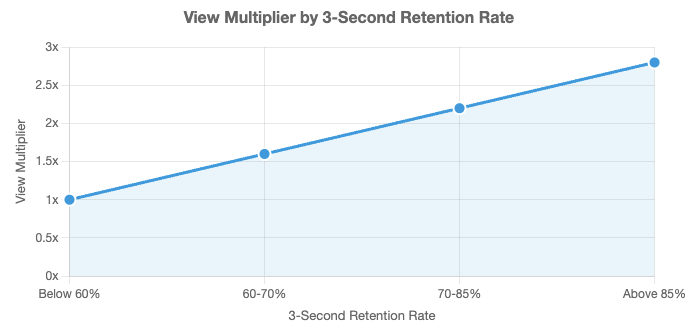
Lever 1 — The first 1.5 seconds. Research on short-form retention shows TikTok users decide whether to continue watching within 3 seconds in over 70% of cases, and videos holding 85%+ retention in that window get 2.8× more views than baseline. That's the difference between 2K and 200K.
Lever 2 — Platform-native editing. The TikTok safe zone in 2026 is 900×1492 pixels centered in a 1080×1920 frame, avoiding the profile UI (108px top), captions (320px bottom), and engagement buttons (120px right). If your AI-generated subject's face is in the bottom third, TikTok's comment button literally sits on top of it. Game over.
Lever 3 — Variants, not perfection. One perfect video doesn't go viral. Three decent videos with three different hooks — one of them probably does.
Step 1 — Plan the Hook Before You Generate
This is the step I skipped for my first six months. I'd write a prompt, get something "cool," export, post. Flat every time.
Then I started writing the hook before opening any generator. Once I had that locked, I'd reverse-engineer what visual the AI needed to produce.
First 1–2 seconds decide your reach
The first 1–2 seconds are make-or-break. TikTok data confirms the majority of scroll decisions happen here. If nothing grabs attention immediately, the algorithm stops pushing. That’s the difference between 2K and 200K. Every generation now starts with this constraint baked in — no slow fades, no warmup shots.
Hook templates that work for AI-generated content
Four hook templates I've tested at volume:
The contradiction open. "I didn't think this would work." Creates a gap the viewer has to resolve.
The mid-action drop. Start in the middle. No setup. Cut the AI's warmup second.
The direct question. "Why does nobody talk about this?" Works because when you hear a question, your brain automatically begins formulating an answer, even if you don't want to.
The list tease. "3 things I'd never do as a [X]." Implies structure, buys attention for the whole clip.
What doesn't work: "Hey guys welcome back." That's 3 seconds you don't have.
Why this step saves you credits
Every time you generate without a hook locked, you're burning credits. I used to go through 400 credits a week. Now I go through 150 and post more videos. Lock the hook first — you'll generate fewer clips and ship faster.
Step 2 — Generate Your Clip (Pick Your Tool by Content Type)
I've stopped pretending there's one "best" AI video tool. There isn't. Each of these is best at different things.
Pika 2.5 for effects-heavy reactions and memes
Pika shines on stylized content. The Pikaffects library (crush, melt, explode, dissolve) is genuinely unique. Fastest generation in its class, some renders under 45 seconds.
Reach for Pika: reaction clips, product "destruction" content, anything where the effect is the content. Hard limits: 5-second max, no native audio, Standard plan doesn't include commercial rights.
Kling 3.0 for multi-shot narrative (up to 2 min)
If the clip needs to tell a small story, Kling is what I use. Kling 3.0 is the capability-dense pick for cheaper testing and longer runs. It also has the best human faces of the three — anything with a person talking or reacting, default to Kling.
Luma Ray3 for smooth motion and cinematic realism
Luma is my pick when I need the clip to feel shot, not generated. Establishing shots, environmental scenes, product pans. Trade-off: higher credit cost, no native audio. I only use Luma when the shot genuinely needs it.
Generate 3–5 variants, not one "perfect" clip
Biggest mistake I see: creators generate one clip, tweak the prompt five times trying to perfect it, and run out of credits before shipping anything. Three generations per concept, max. Pick the best as-is. Fix the rest in the edit.
Step 3 — Edit for the Platform (Where Most AI Videos Die)
This is where raw AI generations either become viral or become landfill. I'll be honest with you — this is where 80% of creators bail out, and it's exactly why their AI content looks like AI content.
Trim ruthlessly to the hook.
Most AI generations waste the first 0.5–1 second on a fade or slow camera start. Kill it. My rule: if nothing interesting happens in the first 1.2 seconds, I'm cutting until it does. Even if my 6-second clip becomes 4.8 seconds.
Reformat for 9:16 with safe zones.
TikTok, Reels, and Shorts all use 9:16 at 1080×1920 — one file works on all three. The trap: AI often composes subjects dead-center vertically, which sounds safe but means captions eat the face. When reformatting, shift the subject up so the key visual sits 35–45% from the top.
Add captions. 85%+ of viewers watch muted.
Non-negotiable. Two rules for AI clips specifically: size large enough to read in thumbnail preview, position above the bottom 320px. Burn them into the file — don't rely on platform auto-captions, which render late and look sloppy.
Layer music and sound cues.
Neither Pika nor Luma outputs native audio. What works: music drop timed to the visual hook (first beat on frame 1), short SFX on any cut, voiceover only if the clip needs context.
Step 4 — Publish and Test Variants
Same clip, different hooks — 3-variant testing
One generation, three versions. Version A: question hook. Version B: contradiction hook. Version C: cold open, no caption, just visual. Post each to a separate platform, or stagger them 36–48 hours apart on the same platform.
Posting cadence and timing basics
Track 3-second retention. Drop during peak times (often 8–10 PM local for many audiences). One file, same day, cross-posted to TikTok, Reels, and Shorts works well.
What signals tell you to double down
Look at retention past 3 seconds, not just views. A video with 20K views but 65% retention is a winner — it's going to keep distributing. If retention past 3 seconds is above 50%, remake it. Same hook structure, different product, different angle. Milk the format until it stops working.
Common Mistakes That Kill Viral Reach
Publishing raw AI generations without editing. The algorithm can smell a 1-second fade-in. Raw AI gets buried.
Wrong aspect ratio and cropped subjects. Uploading 16:9 and letting TikTok crop is how you get your subject's head cut off.
No captions, generic music, weak hooks. The unholy trinity. If your AI video has all three, it's dead before you post.
FAQ
Q: Do viral AI videos need to hide that they're AI? Not anymore — hiding it can get you penalized. TikTok requires creators to disclose when content is entirely AI-generated or significantly edited using AI tools, while minor edits don't require disclosure. The good news: labeled AI content remains eligible for monetization, and the rule applies to visual and auditory media, not to AI-assisted captions or scripts. The risk isn't labeling — it's not labeling and getting auto-detected.
Q: How many AI video variants should I test? Three per concept. One is a guess. Five is overthinking. Three gives you enough data to spot a pattern without burning your weekly credits.
Q: What's the best free tool combo for viral content? Kling 3.0 has the most generous free tier — 66 credits daily, replenishing. Pair it with a free editor that handles 9:16 export and burn-in captions. You can post daily for free if you accept the resolution caps.
Q: Do captions really matter that much? Yes. I ran a 30-day test: same content, with and without burned-in captions. Captioned versions averaged 47% higher retention past 6 seconds. Not 5%. 47%.
Conclusion
If you take one thing from this: which AI model you use matters less than you think, and how you edit and publish matters more than anyone selling you a model wants to admit.
The Kling vs Pika vs Luma question gets you 20% of the way. The hook, the cut, the captions, the platform fit — that's the other 80%. Build the workflow around that, and you can swap in whatever model releases next month without rebuilding from scratch.
Honest advice: stop chasing the latest model. Start testing three hooks per concept. Start cutting the first second off every generation. Start captioning every clip. Do those three things for 30 days before you even think about changing tools.
The creators who post consistently viral AI content in 2026 aren't using better models. They're running better workflows. Pick one to build, then ship.
Previous Posts: