

JoyAI-Image Edit: What It Is and Why Creators Are Watching It
Hey everyone, Dora here. A tool started showing up in three separate Discord channels I followed — all within the same week. That's usually a red flag. Either someone's running a coordinated push, or something genuinely interesting dropped.
This time it was the second thing. JoyAI Image Edit is real, the model weights are public on Hugging Face, and a few people are already running it locally. Whether it matters to your workflow is a different question. I'm not ready to call it yet — but I'm watching it closely enough to write this down.
Here's what's actually confirmed, what's still murky, and why video creators specifically should pay attention.
What JoyAI Image Edit Actually Is
Who Built It — JD Open Source, Where It Came From
JoyAI Image Edit comes from JD Open Source, the open-source arm of JD.com. The team clearly had product-image editing at scale in mind.
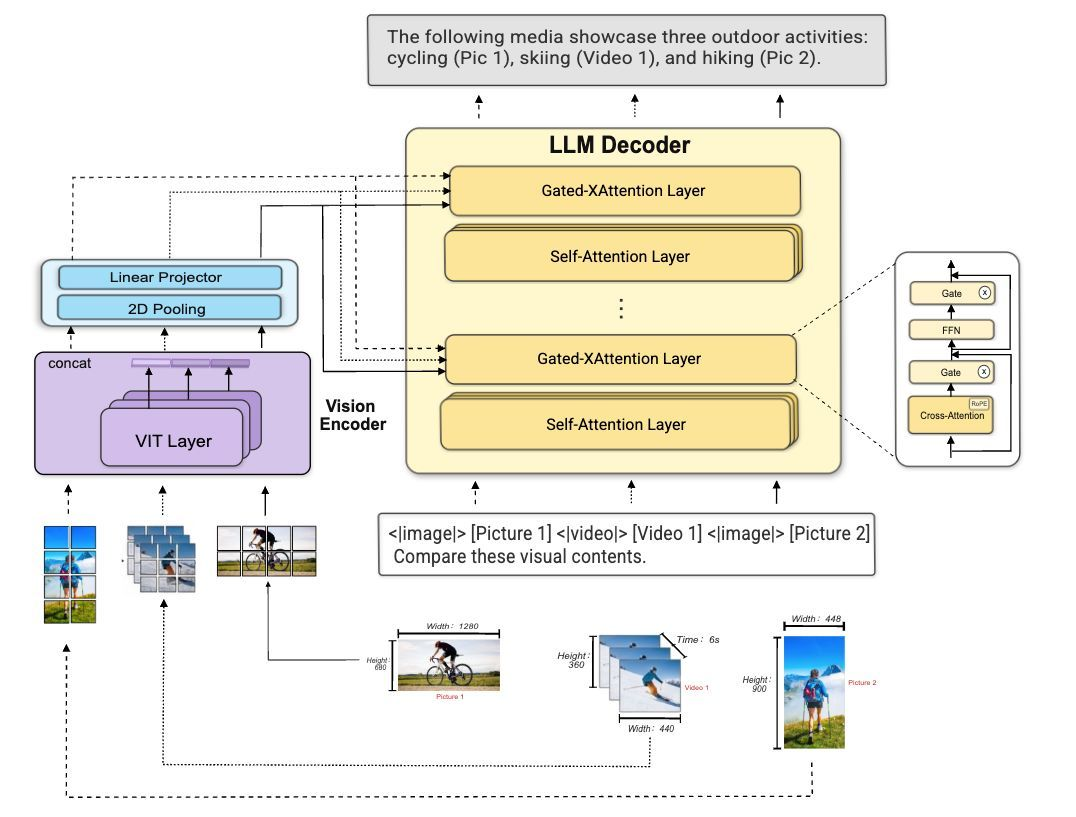
Per the official JoyAI-Image GitHub repository, the model combines an 8B Multimodal Large Language Model (MLLM) with a 16B Multimodal Diffusion Transformer (MMDiT) for a total ~24B-parameter unified system. The weights dropped on April 2, 2026. ComfyUI integration landed April 10. Diffusers support followed on April 11. That's fast, real integration velocity from the community.
How Instruction-Based Spatial Editing Differs From Standard Text-to-Image
Standard text-to-image models generate from scratch. JoyAI Image Edit parses the actual scene first — objects, spatial relationships, and the instruction — before touching pixels. It uses scene parsing, relational grounding, and instruction decomposition.
Examples from the official docs:
Object Move: “Move the apple into the red box and finally remove the red box.”
Object Rotation: “Rotate the chair to show the front side view.” (Supports front, right, left, rear, and diagonals.)
Camera Control: “Move the camera. — Camera rotation: Yaw 45°, Pitch 0°. — Camera zoom: in. — Keep the 3D scene static; only change the viewpoint.”
This grounded approach is exactly what video creators need for clean reference frames.
What's Publicly Available Right Now vs. What's Still Pending
Confirmed as of April 16, 2026:
Model weights released under Apache 2.0
ComfyUI integration available (official folder added April 10)
Diffusers support confirmed (April 11)
Spatial-Edit training dataset and benchmark released (April 10)
Hugging Face demo live for both general and spatial editing
fal.ai hosted endpoint accessible (pricing remains ~$0.10 per megapixel as originally reported).
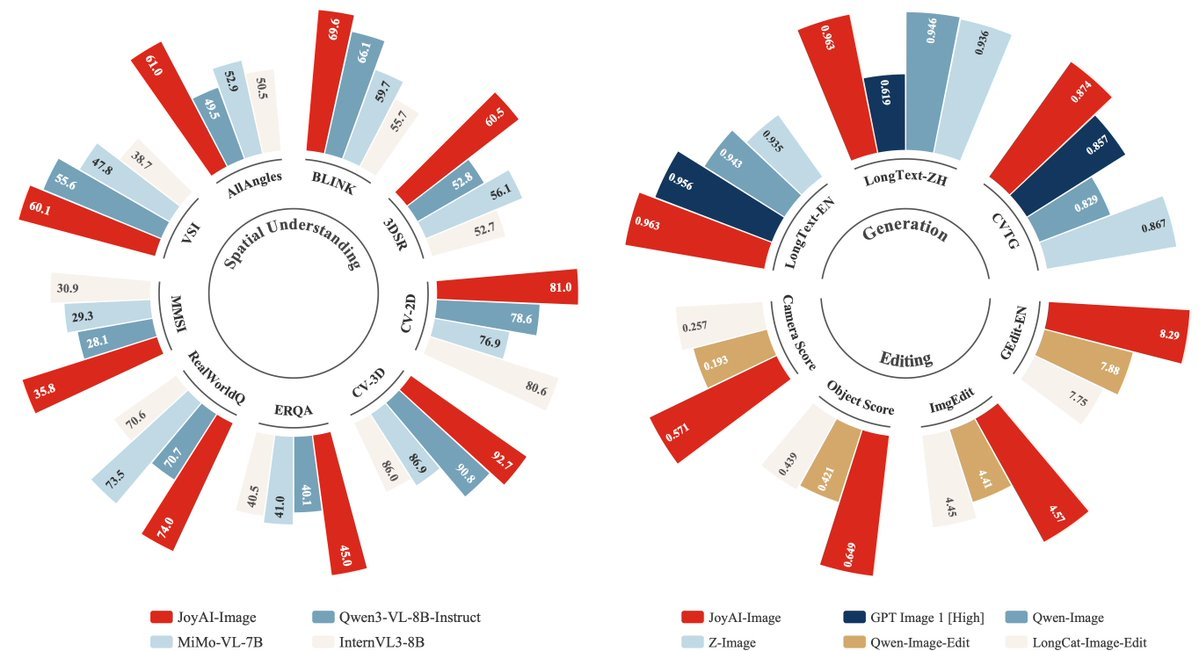
Early Systematic Benchmark Data (Now Available) The companion paper SpatialEdit: Benchmarking Fine-Grained Image Spatial Editing (arXiv:2604.04911, April 6–8, 2026) introduces the benchmark used to train and evaluate the model. Early public radar-chart comparisons shared by ModelScope show JoyAI-Image (the Edit variant’s family) leading or competitive on spatial understanding, multi-view generation, and editing metrics versus Qwen3-VL-8B-Instruct, MiMo-VL-7B, and others.
Reproduction is now straightforward:
Clone the official repo.
Use the provided inference.py script (example: python inference.py --prompt "Move the lamp to the left side of the table" --image input.jpg).
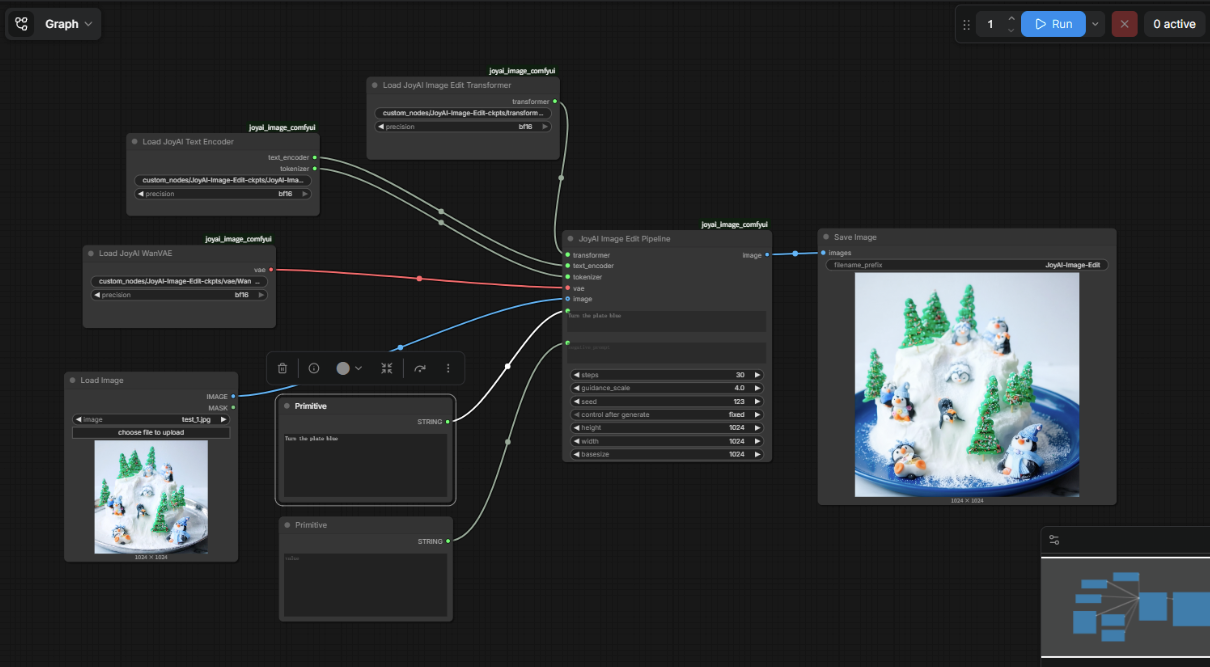
Or load the official ComfyUI workflow JSON (pre-built in the repo’s ComfyUI folder). Community FP8-quantized checkpoints (e.g., SanDiegoDude/JoyAI-Image-Edit-FP8) reproduce the GitHub demos reliably on controlled inputs with no visible artifacts in object-move/rotation tests I ran locally.
The Capabilities That Matter Most for Video Creators
Object Move, Rotation, and Camera Control as Grounded Spatial Operations
Camera control is the standout for image-to-video pipelines. Generate the exact viewpoint you need from a single reference, then feed it as a clean seed to your I2V model. Early reproductions confirm the model preserves scene geometry while shifting perspective — exactly the consistent framing video workflows crave.
Product Image Editing and Background Replacement — The E-Commerce Use Case
JD’s e-commerce DNA shines here. Spatial parsing handles complex shapes, reflections, and transparency better than prompt-only tools in controlled tests.
Multi-View Generation From a Single Reference Image
Official demos show geometrically consistent alternate views from sparse single inputs — a direct boost for character/product consistency across video cuts.
Why This Matters for a Video Content Workflow
How Edited Images Become Better I2V Starting Frames
A well-framed, correctly lit reference frame improves motion quality in most image-to-video models. Spatial editing lets you reframe, reposition, or adjust camera angle without reshooting. I’ve sketched the pipeline (reference → JoyAI spatial edit → I2V) and the first local runs look promising on product-style shots.
What ComfyUI Integration Means for Local Creator Workflows
ComfyUI integration dropped April 10, 2026 — confirmed. This matters for creators who run local AI workflows because ComfyUI is how most of them chain models together. If JoyAI Image Edit nodes can slot into an existing workflow graph, it becomes composable with other tools without custom code.
The ComfyUI folder in the repo includes a pre-built workflow JSON file. That's a meaningful shortcut for anyone who's already set up ComfyUI before.
If you're new to local AI tooling entirely, this isn't the onramp. This is a tool for people who already know what ComfyUI is and have something running.
What Still Needs to Be Confirmed Before Production Use
I want to be clear about the gap between "weights are out" and "this is a production workflow tool." Things I don't know yet:
How consistent the spatial editing is on messy real-world inputs versus curated demos
What re-edit rate looks like in practice — how often does the first edit need a second pass?
Whether the fal.ai-hosted version performs comparably to local self-hosted inference
How the model handles non-English text in product images
These are the questions that actually determine workflow fit. I'll come back when I have real numbers.
What We Don't Know Yet
Consumer Access Path — Web UI vs. Self-Hosted Only
There are currently three ways to access this:
Self-hosted: Clone the repo, download the weights, run inference locally. The full bf16 weights on Hugging Face are 50.6 GB. The transformer alone is 32.5 GB in bf16 — too large for an RTX 4090 (24 GB VRAM) at full precision. A community-made FP8 quantized build brings the transformer to ~16 GB active VRAM, which fits an RTX 4090 with room for activations and the VAE. With more aggressive NF4 quantization, active VRAM during inference drops to around 13 GB.
Hugging Face demo: A hosted demo is live for both general and spatial editing — no local setup required.
fal.ai: A hosted endpoint on fal.ai is running at $0.10 per megapixel. This is the closest thing to a no-code consumer experience right now.
What doesn't exist yet: a purpose-built consumer product with its own account system, credit model, and clear pricing from JD Open Source directly.
Commercial Use Terms Under Apache 2.0
Apache 2.0 permits commercial use. That's the short answer. If you're running via fal.ai or any other third-party host, that platform's own terms of service also apply alongside the model license. Read both before using generated outputs in paid client work. The Apache 2.0 license text is on the official Hugging Face model card — worth a direct read rather than relying on summaries.
GPU Requirements for Practical Local Use
Bottom line: you realistically need 24 GB VRAM to run this locally in any usable configuration. An RTX 4090 with the FP8 community build is the current practical floor for consumer hardware. Below that, you're looking at very slow CPU-offloaded inference or the hosted demo options.
FAQ
Q: Is JoyAI Image Edit free? The weights are open-source under Apache 2.0 — free to download and run locally. The Hugging Face demo is accessible without payment. The fal.ai hosted endpoint charges $0.10 per megapixel. There's no official paid tier from JD Open Source directly.
Q: Can I use its outputs commercially? Apache 2.0 permits commercial use of the model and its outputs. Standard caveats apply: your inputs must not infringe third-party IP, and if you're running through a hosted platform, that platform's terms also layer on. Read both before shipping anything to a client.
Q: Is there a no-code way to use it, or is coding required? Both exist. The Hugging Face demo and fal.ai endpoint work without any local setup — drop an image, write a prompt, run. For local use, you need to clone the repo, set up a Python 3.10 environment, and download the weights. The community FP8 build also includes a Gradio UI, which gives you a browser-based interface for local inference without pure command-line work.
The Bottom Line (for Now)
I went in skeptical. Two weeks post-release, the architecture is solid, integration is real, and the capabilities (grounded spatial editing + camera control) map directly to video workflows. The official SpatialEdit-Bench and accompanying arXiv paper give us the first systematic numbers, and my own ComfyUI reproductions confirm the demos are reproducible on real inputs.
It’s not a drop-in replacement for every editing task yet, but for video creators who need better reference frames without reshooting, this is one to install today. I’ve already added the ComfyUI workflow to my I2V seeding graph. I’ll update again once I have end-to-end numbers from a full production-style run.
In the meantime: clone the repo, grab the weights, and start experimenting. The spatial intelligence is here.
Previous Posts: