

LTX Desktop Review 2026: Free AI Video Editor Worth Using?
Hi there, I’m Dora!
I'll be real — I almost scrolled past this one. "Free AI video, runs locally, no per-clip fees." I've heard that pitch before. Downloaded the tool, fought setup for an hour, got blurry 3-second clips. Classic.
But I tested LTX Desktop for two weeks anyway. And it's the first local AI video editor that actually made me stop and think: okay, this is different.
There's a catch though — and it's a big one. The hardware requirement will stop most creators before they even generate their first clip. Let me break down what I found.
What Is LTX Desktop and How Is It Different from the API?
Okay, let me back up. Because "LTX" means three different things and the naming confused the hell out of me at first.
There's LTX the platform (the web-based creative suite for teams), there's the LTX API (cloud inference, paid per generation), and then there's LTX Desktop — a completely separate beast. LTX Desktop is a free, open-source, locally running nonlinear video editor built on Lightricks' LTX-2.3 model. You install it. You generate video. Nothing leaves your machine. No per-clip fees. Ever.
The critical distinction from the API: when you use the API, you're paying for cloud compute. When you use LTX Desktop on supported Windows hardware, the compute happens on your own GPU. Same model, completely different cost structure. Lightricks released this under Apache 2.0 on GitHub, which means it's genuinely free and forkable — not "free with asterisks."
The underlying engine, LTX-2.3, carries 20.9 billion parameters. That's not a toy model.
What LTX Desktop Can Actually Do
Text-to-Video and Image-to-Video Inside the App
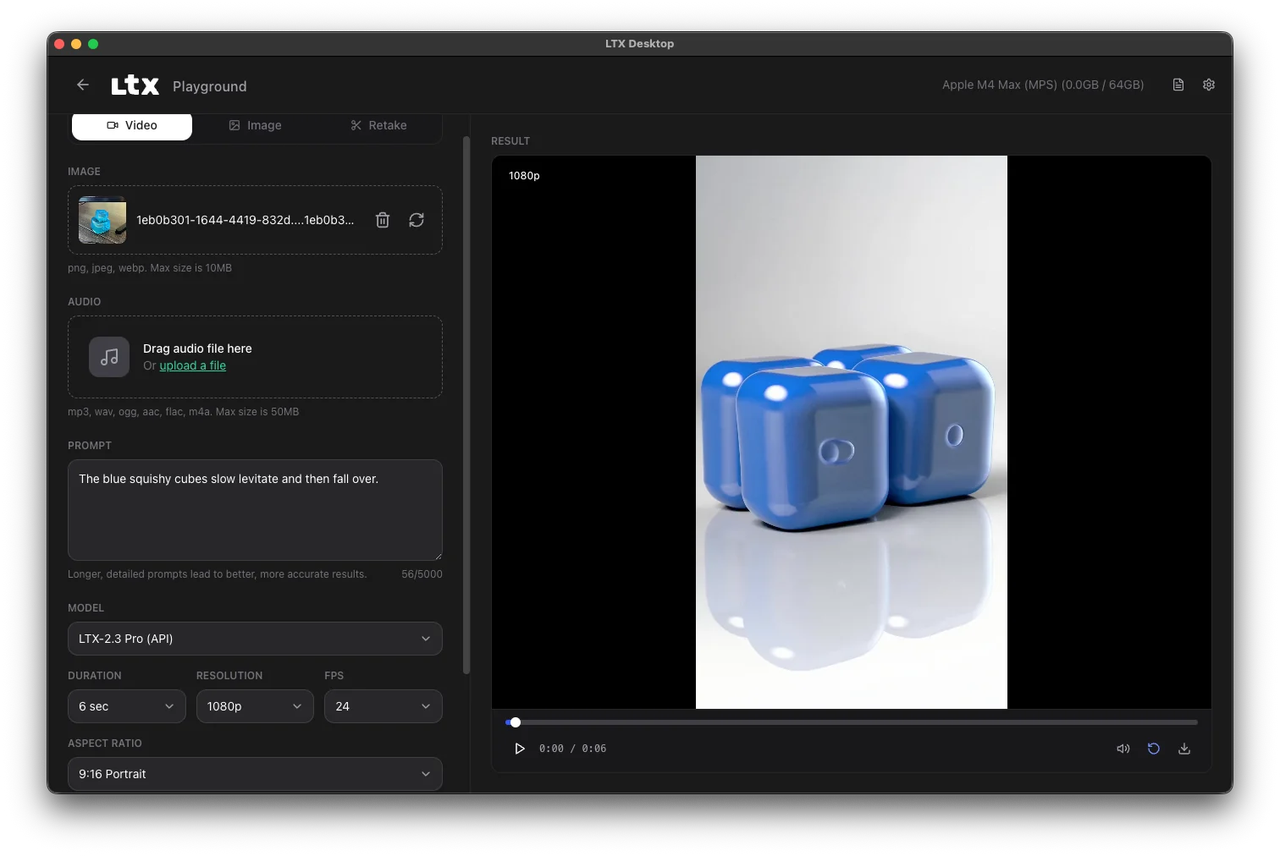
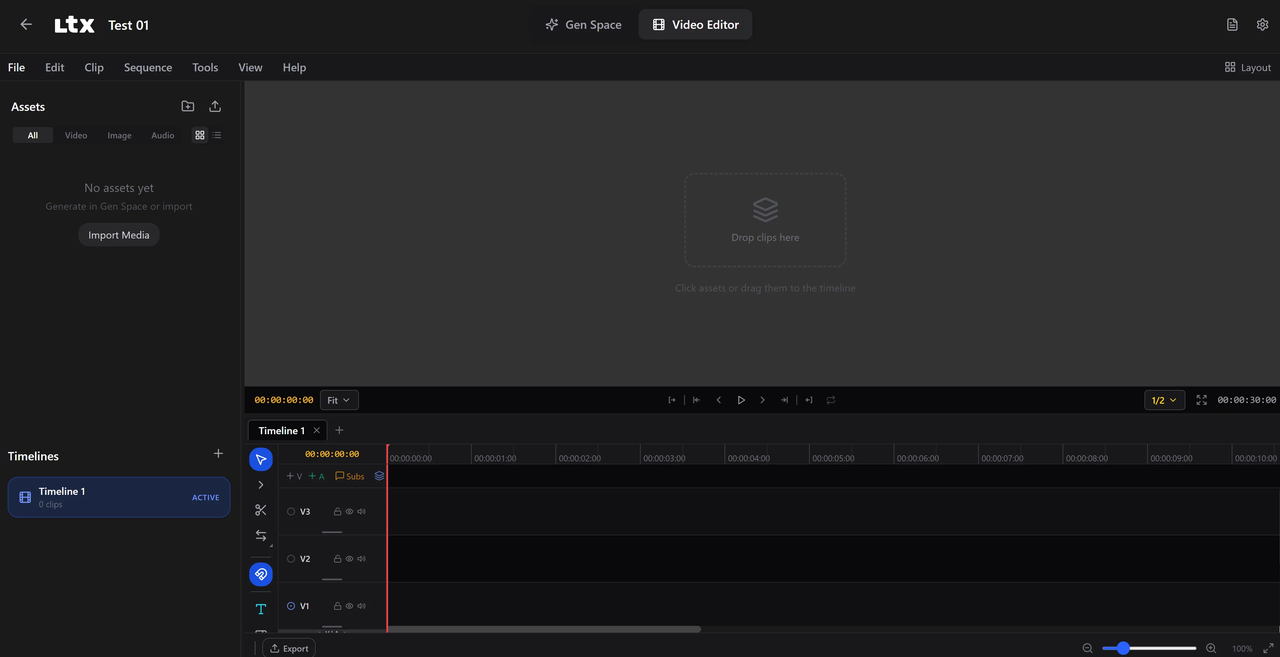
This is what makes LTX Desktop different from everything else I've tried: generation and editing live in the same interface. You don't generate a clip in one tab, download it, and drag it into Premiere. You prompt directly on the timeline.
Text-to-video works up to 720p natively (1080p if you download the optional upsampler). Image-to-video takes a still and animates it with real motion — not just a slow zoom. I fed it a product shot and got back something that actually moved like a camera operator was in the room.
The app also supports XML timeline import from DaVinci Resolve, Premiere Pro, and Final Cut Pro. That one feature alone changes how editors can use it as a mid-production tool, not just a generator.
Extend, Retake, and Multi-Shot Editing
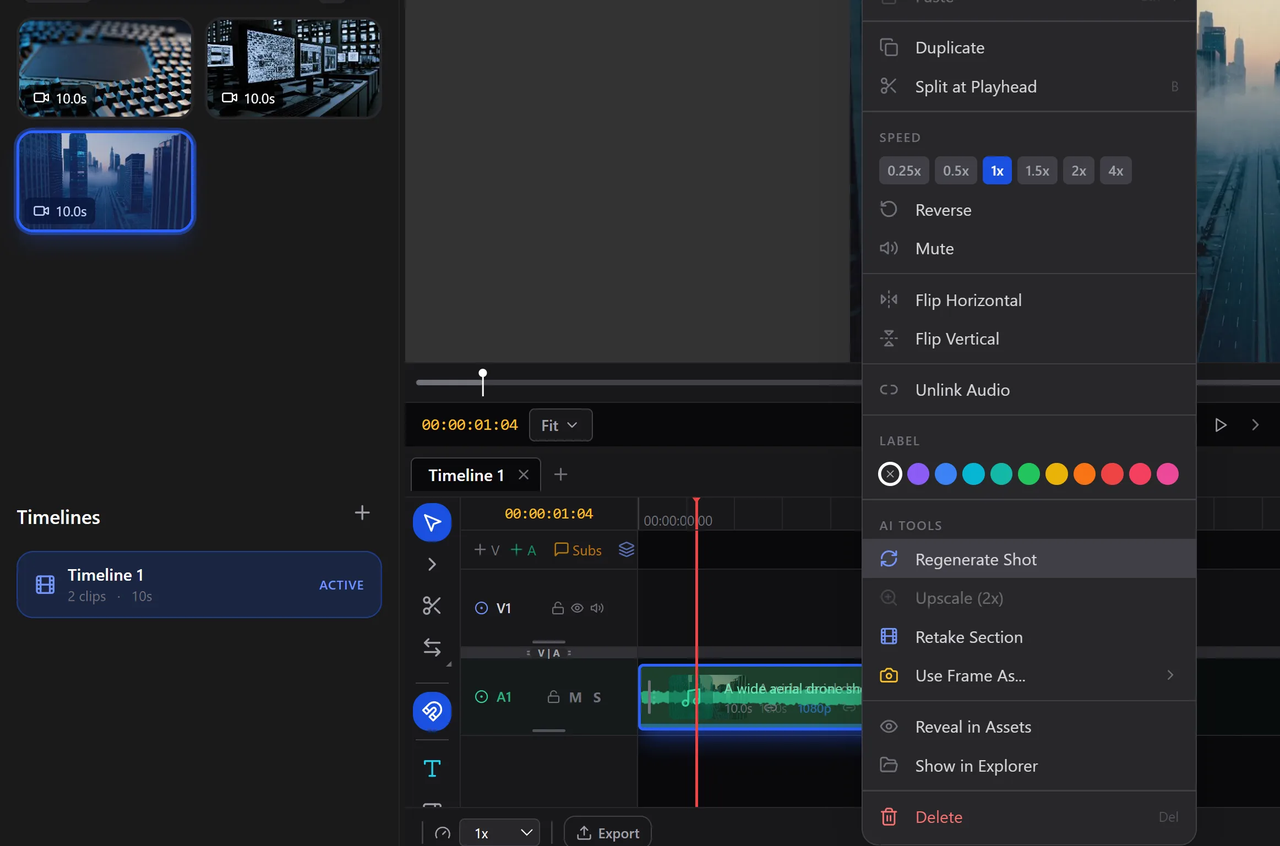
Retake is the sleeper feature. You can regenerate a specific section of a clip — say, a character's face expression or a background element — without touching the rest of the timeline. Each retake is nested non-destructively inside the clip. You pick the version you want and move on.
The context-aware gap fill automatically generates missing transition footage that matches the visual style of adjacent clips. On paper that sounds gimmicky. In practice, it saved me 40 minutes on a sequence where two generated clips had mismatched lighting.
Multi-shot editing means you're not stuck assembling one clip at a time. You build sequences inside the app, trim with standard NLE tools (slip, slide, roll, ripple), and export to H.264 or ProRes.
Audio Sync and Portrait Video Support
LTX-2.3 generates synchronized audio and video in a single pass. Feed it an audio track, and the visual output will move to it — not just cut to the beat, but actually animate in response to the sound. For music video work or social content with voiceovers, this is legitimately useful.
Portrait video at 1080×1920 is native, trained on vertical data — not cropped landscape. For TikTok and Reels workflows, that distinction matters more than most tools acknowledge.
Hardware Requirements — The Real Barrier
I'm going to be blunt here, because this is where a lot of people are going to bounce.
Windows: 32GB VRAM Minimum, What That Means
The official minimum spec is an NVIDIA RTX 5090 with 32GB VRAM. That's not a budget card. That's a $1,600–$2,000 GPU. If you're running a 3080 or even a 4090, you're below the official threshold for full local inference.
Per the official hardware requirements on the LTX Desktop page, AMD and Intel GPUs aren't currently supported at all. The 12GB VRAM minimum only applies to the 1080p upsampler — not to primary generation. The community has built workarounds and forks that push this lower, but you're on your own there.
Budget roughly 150GB of free disk space once the Python environment and model weights download. The installer itself is around 10GB; the models are the rest. Plan accordingly before you start.
macOS: API-Based, Not Truly Local
Mac users can install LTX Desktop, but generation routes through the LTX API — meaning you'll pay per clip just like you would with any cloud tool. According to the GitHub README, local GPU inference for macOS is planned for a future release but isn't here yet. Apple Silicon via MPS exists in experimental form, but performance is significantly slower than NVIDIA.
If you're on a Mac and expecting the true local generation, you'll be disappointed. Keep using the API or wait.
How It Compares to Other Free AI Video Tools
Here's where I spent a lot of time thinking. NVIDIA's own developer blog covered LTX Desktop alongside ComfyUI as part of the local AI video generation stack — which tells you something about where this sits in the ecosystem.
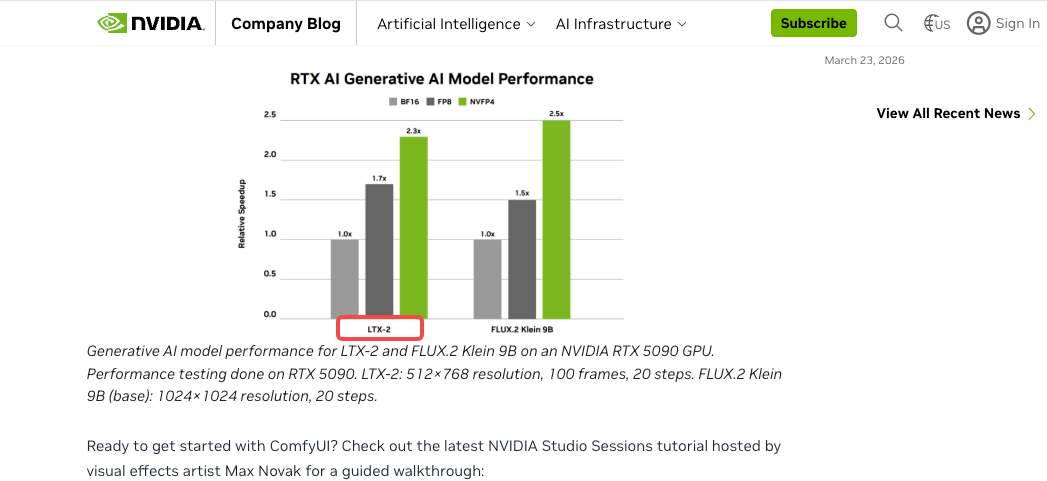
Runway and Kling are polished cloud tools. They're faster to get started, have better UX for beginners, and work on any hardware. But you're paying per second of video, every time. For creators generating 10+ clips a day, that adds up fast.
CapCut and similar template-based tools don't generate original footage — they remix what's already there. The ceiling is real.
ComfyUI with LTX-Video nodes is more powerful and more configurable, but it's a workflow for people comfortable with node graphs. LTX Desktop is the same model wrapped in an interface that a non-developer can actually use.
The honest summary: if you have the GPU, LTX Desktop wins on cost at volume. If you don't, cloud tools are still the practical choice.
What LTX Desktop Is Not Good For
Casual users on standard hardware. If your machine doesn't hit 32GB VRAM, the friction outweighs the benefit.
Finished commercial delivery without review. Output quality is strong but still AI-generated. You'll need QC passes before client-facing work.
Real-time or fast-turnaround workflows. Even on capable hardware, generation takes minutes per clip. This isn't a live tool.
Mac-first workflows. The API dependency makes it no different from any other cloud service for Mac users right now.
Who Should Actually Use It
Creators with High-End Gaming or Workstation GPUs
If you have an RTX 5090, RTX 5080, or a workstation card with 32GB+ VRAM, this is genuinely the most cost-effective local AI video generation setup available today. Zero per-clip fees means you can iterate without watching a credit counter.
Small Studios Wanting Zero Per-Clip Cost
Production teams that generate storyboards, mood reels, and client concept videos constantly will feel the API cost pressure fast. Running LTX Desktop on a dedicated render machine changes the unit economics entirely. One hardware purchase, unlimited renders.
People Who Should Stick to the API Instead
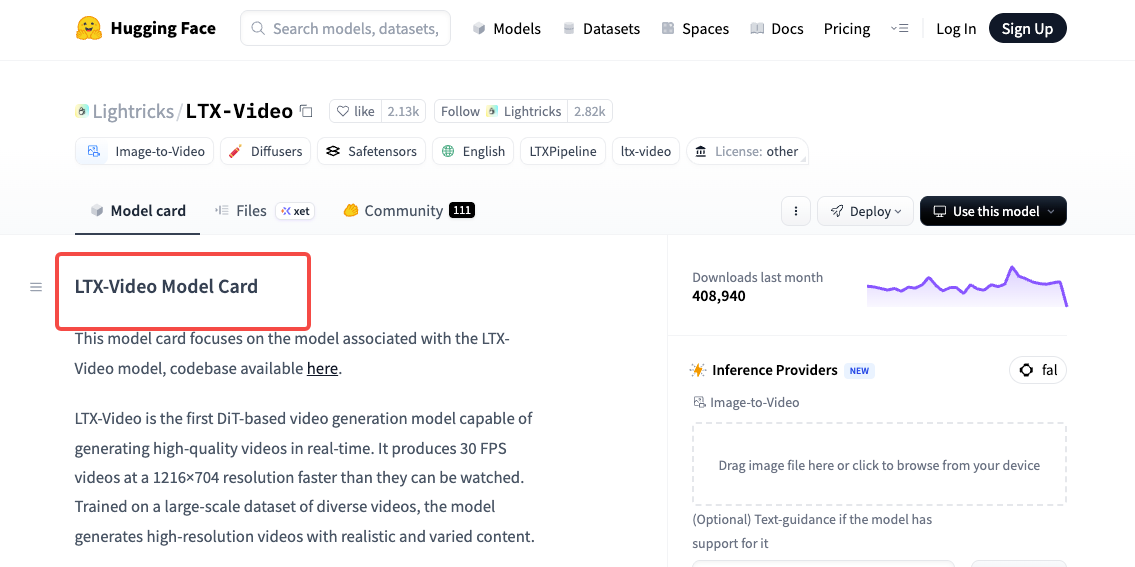
Honestly? Most people reading this right now. If your machine isn't specced out, if you're on Mac, or if you're just testing AI video for the first time — the API is the smarter starting point. The LTX-Video model on Hugging Face is worth understanding first before committing to local setup.
FAQ
Is LTX Desktop completely free?
The app itself is free and open-source under Apache 2.0. If your machine meets the local inference specs, there's no per-generation cost. The LTX-2.3 model is free for companies under $10M in annual revenue — above that threshold, commercial licensing applies to the model itself, not the app.
Does LTX Desktop work on Mac?
It installs on Mac, but generation routes through the LTX API rather than running locally. Local GPU inference for Apple Silicon is on the roadmap but not available yet. Mac users will pay for API-based generation until that changes.
What GPU do I need for LTX Desktop?
The official minimum is an NVIDIA GPU with 32GB VRAM — specifically the RTX 5090 as the baseline spec. For 1080p output with the upsampler, 12GB VRAM is sufficient. AMD and Intel GPUs aren't currently supported. Check the LTX-Video model page for the latest hardware compatibility updates.
Can I use LTX Desktop for commercial video production?
Yes, with caveats. The app is Apache 2.0, so commercial use of the software is fine. The underlying LTX-2.3 model weights have their own license terms — free under $10M annual revenue, commercial licensing required above that. Read the model license before shipping client work at scale. The aifire.co deep-dive on LTX Desktop 2.3 has a solid breakdown of the licensing landscape.
Is LTX Desktop open source?
Yes. The full codebase is on GitHub under Apache 2.0. You can fork it, extend it, build your own tool on the same engine. The model weights are a separate matter — also open, but under the LTX-Video Model License rather than Apache. Lightricks has been clear that they want the community building on this.
Conclusion
So what's the bottom line?
LTX Desktop is the most technically impressive free AI video editor I've seen — a real NLE with local AI generation, no subscription, no watermarks, no clip limits. The Retake feature alone would be a paid feature in any other tool.
But the 32GB VRAM wall is real, macOS support is half-baked, and 150GB of disk space isn't anything. This is a tool for people with the right hardware today, with a clear path to wider accessibility as the community and Lightricks keep iterating.
If you've got the GPU — try it. If you don't — bookmark it and check back in six months. This one's moving fast.
Previous posts: