

NemoClaw or OpenClaw: Which to Use Now?
Hey, I'm Dora. Someone asked me yesterday: "Should I wait for NemoClaw or just start with OpenClaw?" And I realized the question itself reveals the confusion. One exists and works today. The other might launch next week but won't be usable for months. This isn't a "which is better" question — it's a "do I need something now or can I afford to wait" question.
Here's the honest breakdown.
The One-Line Answer
If you need something now
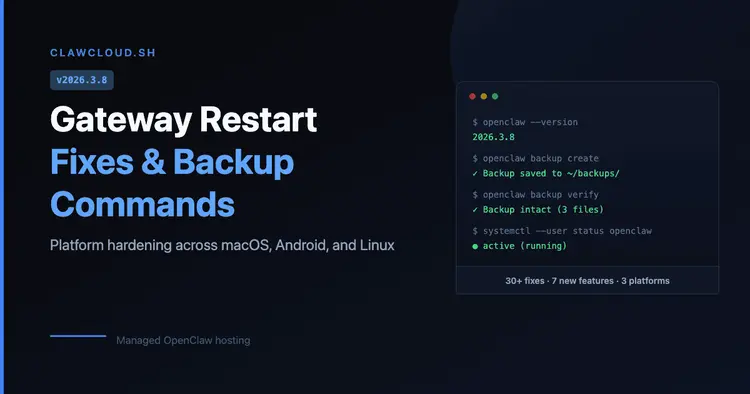
Use OpenClaw (or one of its forks like NanoClaw). It's live, actively developed, and has 280,000+ GitHub stars with a massive community. Version 2026.3.8 shipped two days ago (March 8th) with backup commands, gateway reliability fixes, and platform hardening. It works on macOS, Windows, Linux, iOS, and Android. You can install it in under 10 minutes.
If you can wait
Wait for NemoClaw if you're an enterprise team with specific security or compliance requirements. But understand "wait" means 6-12 months minimum before it's production-ready for most use cases. The expected announcement at GTC 2026 on March 16th is just that — an announcement, not a finished product.
What OpenClaw Does Well Right Now
Usability and community
OpenClaw 2026.3.8 released on March 8th, 2026 includes features that actually matter for daily use:
openclaw backup createopenclaw backup verifyThe community momentum is real. Over 200 bug fixes in version 2026.3.7 alone. Active development with daily commits. A Discord with thousands of developers troubleshooting edge cases and sharing configs. When you hit a problem, you can find someone who's already solved it.
Installation is straightforward:
npm install -g openclaw@latestopenclaw onboardWorkflow fit
For video creators, OpenClaw handles the boring automation tasks that eat up hours:
File sorting and metadata tagging
Integration with chat platforms (WhatsApp, Telegram, Slack, Discord, iMessage)
Basic transcription via third-party APIs
Workflow chaining (trigger actions based on conditions)
Example: I set up OpenClaw to watch a Dropbox folder, detect new video uploads, send files to Whisper API for transcription, and post results to Slack. This type of pipeline is becoming common as creators experiment with AI-assisted video creation workflows. Total setup time: 2 hours. It's been running for three weeks without issues.
Key limitations
OpenClaw has documented security issues. CVE-2026-25253 (plaintext credential storage), no skill sandboxing, admin-level system access by design.
If you're handling client NDAs, unreleased content, or regulated data (GDPR, HIPAA, SOC 2), OpenClaw's security model is a dealbreaker. You're responsible for auditing every plugin you install, and most creators don't have time for that.
Better alternatives for security-conscious users: NanoClaw (container-isolated), PicoClaw (lightweight), or managed services like ClawCloud that handle the security layer for you.
What NemoClaw Could Bring
Enterprise integration and security
NemoClaw's pitch is: enterprise-grade security, hardware-agnostic deployment, and built-in privacy controls. According to reports from March 9-10, 2026, NVIDIA has been offering early access to partners — Salesforce, Cisco, Google, Adobe, CrowdStrike — in exchange for code contributions.
The security model addresses what OpenClaw lacks:
Multi-layer safeguards (sandboxed execution, validated integrations)
Compliance-ready workflows (audit logs, role-based access, encrypted data handling)
No plaintext credential storage or unfettered system access
For video teams handling client work, embargoed material, or production-scale workflows (10+ people, high-volume content), those features matter. If your workflow requires SOC 2 compliance or client NDAs, you need enterprise-grade security — which OpenClaw doesn't offer.
Why people are watching it
NemoClaw represents NVIDIA's bet on owning the agent layer, not just the GPU layer. The fact that it's hardware-agnostic (works whether or not you use NVIDIA chips) signals they're prioritizing market reach over hardware lock-in.
If NVIDIA delivers — open source with real community access, not just "open source for approved enterprise partners" — then NemoClaw could reshape how teams automate workflows. But that's a big if, and it won't happen fast.
Decision Framework
Solo creator
Use OpenClaw (or NanoClaw) if:
You need automation today, not in six months
You're comfortable with Docker and terminal commands
Security risk is manageable (personal data, not client work)
You're okay auditing plugins before installing them
Skip both if:
You're not technical and don't want to learn Docker
You need "set it and forget it" reliability without maintenance
You'd rather pay for a managed service (like n8n Cloud or Zapier) than self-host
Small content team
Use OpenClaw if:
You have 1-5 people who share workflows
You're handling your own content, not client projects
One person on the team can manage setup and troubleshooting
Cost savings matter more than enterprise features
Wait for NemoClaw if:
You're handling client NDAs or regulated content
You need multi-user deployments with role-based access
Compliance requirements (GDPR, SOC 2) apply
You can afford to wait 6-12 months for production-ready tools
Enterprise decision-maker
Use OpenClaw forks (NanoClaw, managed hosting) if:
You need a proof-of-concept before committing to enterprise platforms
Your security team can validate and harden the setup
You're piloting agent workflows on non-sensitive data
Wait for NemoClaw if:
Security and compliance are non-negotiable
You need vendor support and SLAs
You're deploying across 10+ teams at scale
Budget exists for enterprise licenses and managed infrastructure
Risks of Choosing Too Early
OpenClaw tradeoffs
What you gain:
Immediate availability (install today, use today)
Active community support (Discord, GitHub issues, docs)
Proven workflows (thousands of users already running it in production)
What you risk:
Security vulnerabilities (CVE-2026-25253, malicious skills, plaintext credentials)
Maintenance burden (you're responsible for updates, backups, troubleshooting)
No vendor support (community-driven, not enterprise-backed)
NemoClaw uncertainty
What you gain (if NVIDIA delivers):
Enterprise security (validated integrations, compliance-ready workflows)
Hardware-agnostic deployment (no GPU lock-in)
Potential NVIDIA ecosystem integration (NeMo models, Triton inference, etc.)
What you risk:
6-12 month wait for production-ready tools
Unclear access model (open source for everyone, or gated behind partnerships?)
No guarantee it'll actually be better than OpenClaw for creator workflows
My take:
I'm using NanoClaw (security-hardened OpenClaw fork) for personal automation. It handles file sorting, transcription routing, and Slack notifications. It's not perfect — I spent 3 hours setting it up and another hour fixing channel conflicts — but it works.
I'm watching NemoClaw's GTC 2026 announcement on March 16th. If NVIDIA drops a public repo with clear docs and no partnership gatekeeping, I'll test it. But I'm not waiting for it. The workflows I need — file automation, metadata tagging, task chaining — already work with OpenClaw. Some creators are even taking this further by automatically turning structured content into short videos using AI pipelines. NemoClaw might make them more secure and easier to deploy at scale, but it won't invent them.
If you need automation today, build it with OpenClaw (or n8n, or LangChain). If you're handling client work or compliance-critical data, wait for enterprise tools or use managed services with proper security.